3
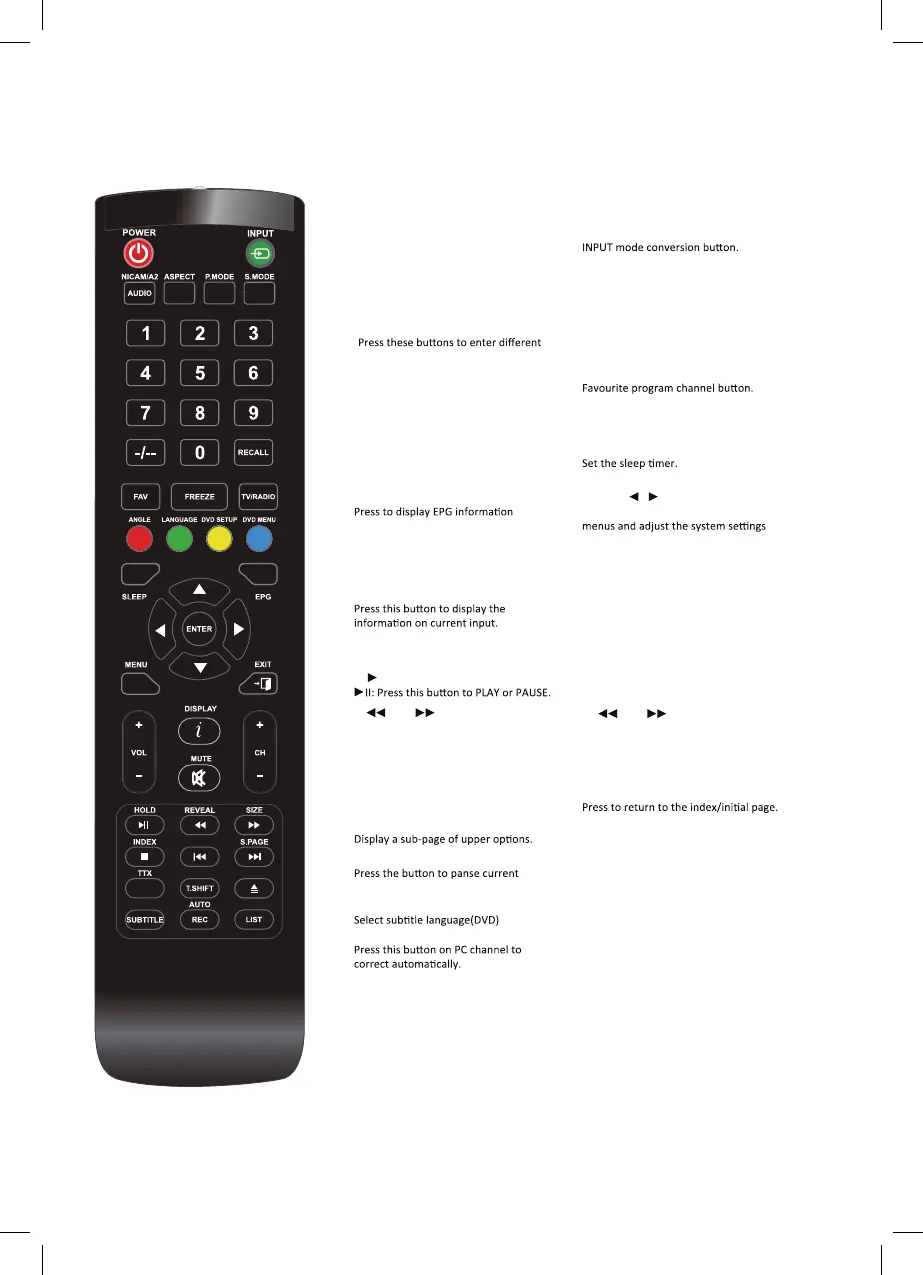
REMOTE CONTROL
【POWER】
Turns the TV on (standby)and off.
【
NICAM/A
】
TV Nicam/A2 select.
【
ASPECT
】
Select different size.
【
PMODE
】
Select the different picture mode directly.
【
SMODE
】
Select the different sound mode directly.
【
RECALL
】
Switch back and front between the current
and previous channels.
【
FAV
】
【
FREEZE
】
To freeze current picture.
【
TV/RADIO
】
Press to switch between DTV and radio programs.
【
DISPLAY
】 【
MUTE
】
Switches the sound on or off.
【
VOL+/VOL-
】
Adjust the volume.
【
CH+/CH-
】
Change the channel.
【
II】 【■ 】
Stop the disc.
【 】【 】
Play fast backward/forward.(MEDIA/DVD)
【
I 】【 I】
Play previous/next media file.(MEDIA/DVD)
【
HOLD
】
HOLD On or Off the current page display in
Teletext mode.
【
REVEAL
】
Reveal or Hide the hidden words.
【
SIZE】
Change the size of display in Teletext mode.
【INDEX】
【S.PAGE】 【TTX】
Press to turn the teletext On and Off.
【
T.SHIFT】
DTV program and start recording.
【
AUDIO】
Select Audio mode.
【
SUBTITLE】 【REC】
Press to record the program immediately.
【
AUTO】 【PVR】
PVR List.
【
MENU
】
Display the OSD menu(on screen display).
【
EXIT
】
Press EXIT to exit menu of sub menu.
【
EPG】
(Electronic Program Guide).
【▲ /▼ / /
/OK】
Allow you to navigate the on-screen
to your preference.
【
RED,GREEN,YELLOW,CYAN
】
Used to select the corresponding coloured
items on the screen during DTV mode.
【
SLEEP
】
【
NUMBER(0-9)
】
channels.
【
-/--
】
Press to change the channel bit.
【
INPUT
】
REPEAT
A-B



 To Next Page