EasyManua.ls Logo

Axis JS056WK - User Manual

Axis JS056WK
16 pages
Print Icon
To Next Page IconTo Next Page
Loading...
2
WARRANTY
YEAR
JS056WK
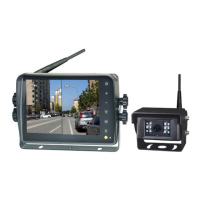
5.6” WIRELESS REVERSING SYSTEM
SPECIFICATIONS
MONITOR
- LCD: 143mm (5.6”) Digital Colour
- Resolution: 640 x 480
- Aspect Ratio: 4:3
- Image Orientation: Normal/Mirror/Flip/Mirror-Flip
- Display: Split/Single/Auto-Scan
- Inputs: 4 x Wireless
- Operating Freq: 2.4 ~ 2.4835 GHz
- Decomp Format: MPEG4
- Pairing to Camera/s: Auto when camera activated
- Time Delay: 120ms
- Transmitting Range: 120 Metres (approx)
- Signal System: PAL/NTSC Select
- Other: Touch Buttons/Auto Dim
- Loudspeaker: 1W/8 Ohm
- Operating Temp: -20~+60°C
- Power Consumption: 5W Max
- Power Supply: DC 10-32V
CAMERA
- Image Device: 1/3” PC3089 Sensor
- Viewing Angle: 120°
- Signal System: PAL
- Effective Pixels: 756 x 504
- Sensing Area: 4.80mm x 3.78mm
- Image Mode: Mirror/Normal Selectable
- Scanning System: 2:1 Interlace
- Sync System: Internal
- Horizontal Sync Frequency: 15.625 KHz
- Vertical Sync Frequency: 50 Hz
- Video Output: 1.0Vp-p, 75 Ohm
- S/N Radio: Better than 46.5dB
- White Balance: Auto
- Electronic Shutter: 1/50 (PAL) ~1/100,000 sec
- Operating Frequency: 2.4 ~ 2.4835 GHz
- Receiving Sensitivity: -89 dBm
- Line of Sight Range: 120 metres
- Compression Format: MPEG4
- Frame Rate: 25f/s
- Transmit Output Power: 17 dBm
- RF Bit Rate: 4Mbps
- Minimum Illumination: 0 Lux (12 IR LEDs)
- Night Vision Distance: 10m
- Audio: Yes
- Ingress Protection: IP69K
- Power Supply: DC 8-36V
- Optional Extra Camera: CC007W

Questions and Answers

  • J
    Jenna RiosAug 4, 2025
    What to do if my Axis Automobile Accessories show 'No signal'?
    • T
      Teresa HillAug 4, 2025
      If your Axis Automobile Accessories display shows 'No Signal', first ensure the camera is receiving power. If the power supply is ok, try pairing the monitor and the camera again.
  • J
    Jason MeyerAug 11, 2025
    Why do my Axis JS056WK Automobile Accessories have no picture and no sound?
    • J
      Joshua WatsonAug 11, 2025
      If your Axis Automobile Accessories unit has no picture and no sound, it could be due to an improperly connected power circuit or the use of an improper power supply. Also, ensure that the power switch is turned ON.
  • J
    Jennifer JonesAug 19, 2025
    How to fix no sound on Axis JS056WK Automobile Accessories?
    • K
      Kristie HayesAug 19, 2025
      If there is no sound from your Axis Automobile Accessories, check if the volume is turned off or set too low and adjust it accordingly.
  • R
    Raven WoodwardAug 27, 2025
    What to do if the picture on my Axis JS056WK Automobile Accessories is too dark?
    • B
      Bonnie SparksAug 27, 2025
      If the picture on your Axis Automobile Accessories is too dark, check whether the brightness and contrast settings are adjusted correctly.

Summary

Precautions

Storage and Keeping

Guidelines for storing the device to prevent damage and ensure longevity.

Operating Precautions

Safety and operational guidelines to follow while using the device.

Maintenance

Safety Symbols and Cautionary Notes

Explains the meaning of electrical shock, important instructions, and disposal symbols.

Features

Technical Specifications

Accessories

Parts Identification

Remote Control Operation

Installation and Basic Operation

Centre Mounting Bracket Installation

Steps to install the monitor using the centre mounting bracket.

U-support Bracket Installation

Steps to install the monitor using the U-support bracket, including wiring.

Display Modes and Audio Control

Automatic Reversing Display Switching

How the monitor switches displays automatically based on camera input.

Split View Volume Selection

How to select the audio output channel when the screen is split.

Menu Navigation and Settings

Troubleshooting

Warranty

Consumer Warranty

Details warranty terms for individual purchasers, including period and return procedures.

Commercial Warranty

Outlines warranty terms for products used in commercial applications, specifying a shorter duration.

Axis JS056WK Specifications

General IconGeneral
BrandAxis
ModelJS056WK
CategoryAutomobile Accessories
LanguageEnglish

Related product manuals