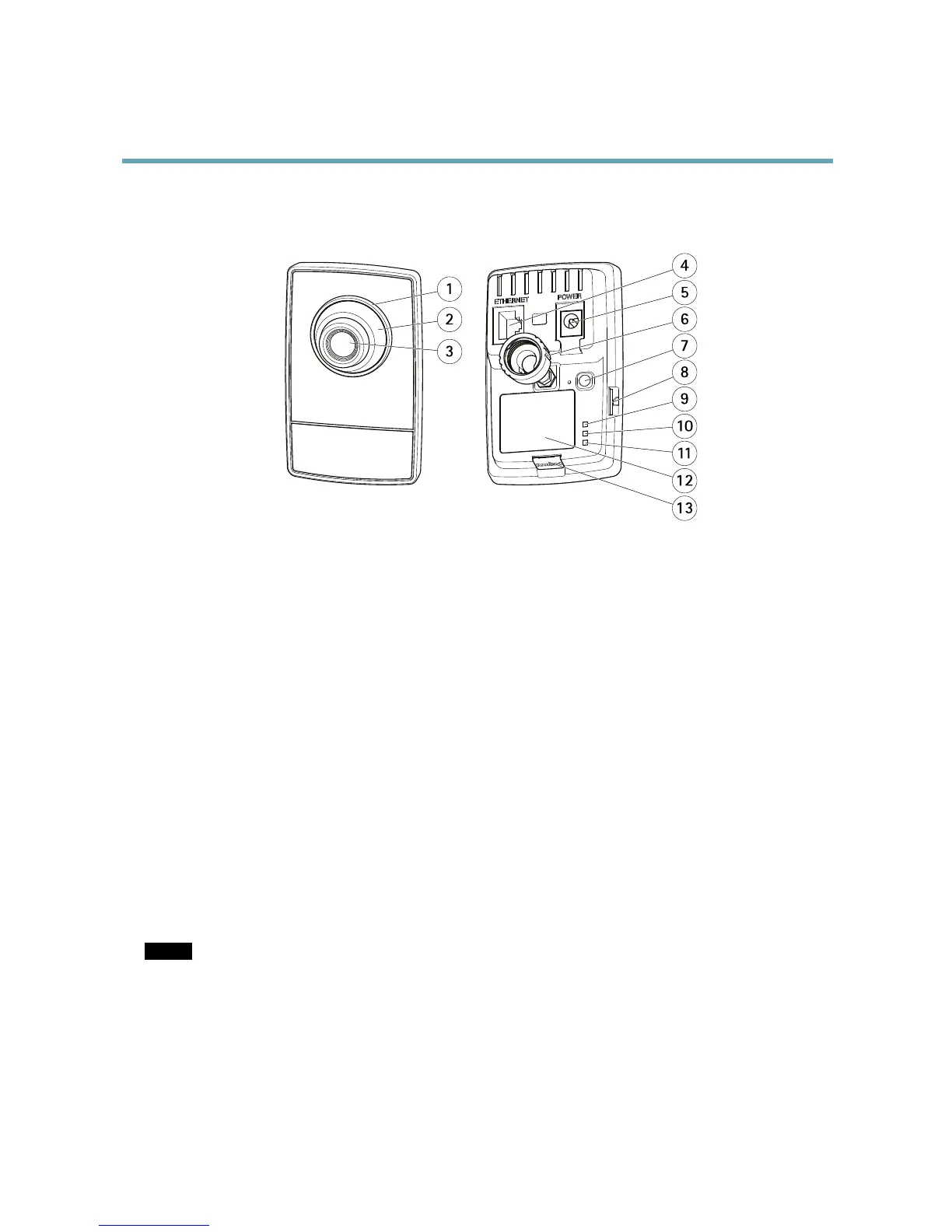
1.
StatusLEDindicator
2.
Focusring
3.
Lens
4.
Networkconnector(PoE)
5.
Powerconnector
6.
Lockring
7.
Controlbutton
8.
SDcardslot
9.
PowerLED
10.
NetworkLED
11.
WirelessindicatorLED(activatedonwirelessmodelsonly)
12.
Partnumber(P/N)&Serialnumber(S/N)
13.
HDMIconnector-VideooutcompatiblewithDVI
ConnectorsandButtons
Fortechnicalspecications,seepage52.
HDMIConnector
TheHDMIConnector
TM
isusedforconnectingtoavideodisplayormonitor.
NetworkConnector
RJ45Ethernetconnector.SupportsPoweroverEthernet(PoE).
NOTICE NOTICE
NOTICE
Theproductshallbeconnectedusingashieldednetworkcable(STP)oranopticalbercable.Allcablesconnectingthe
producttothenetworkshallbeintendedfortheirspecicuse.Makesurethatthenetworkdevicesareinstalledin
accordancewiththemanufacturer’sinstructions.Forinformationaboutregulatoryrequirements,seeElectromagnetic
Compatibility(EMC),onpage2.
SDCardSlot
AmicroSDcard(notincluded)canbeusedforlocalrecordingwithremovablestorage.Formoreinformation,seeTechnical
Specications,onpage52.
5



 To Next Page