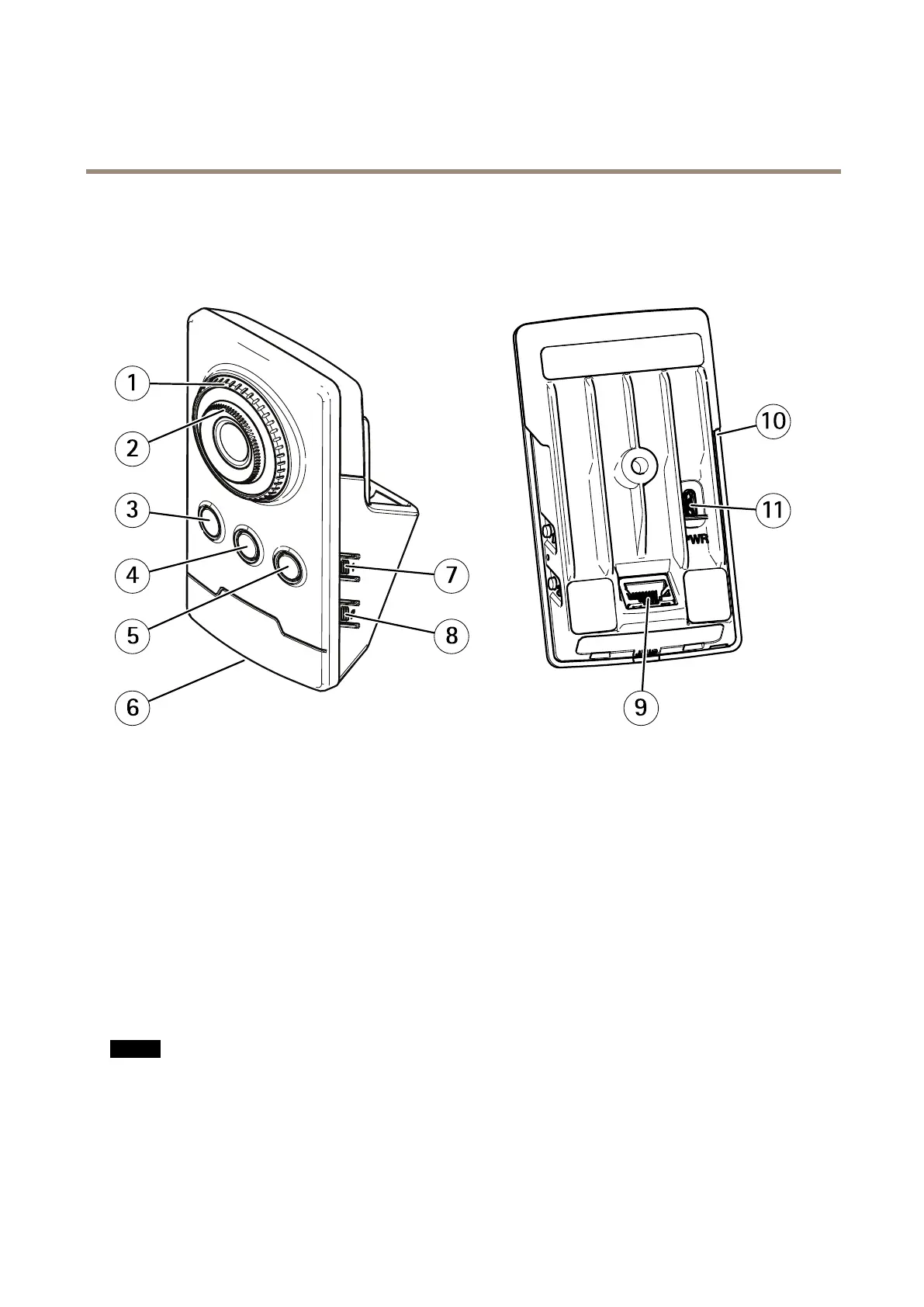
AXISM1065-LWNetworkCamera
Hardwareoverview
Hardwareoverview
Forspecicationsofthehardwarecomponents,seeTechnicalspecicationsonpage70.
1
Focuslockring
2
Focusring
3
IRLED
4
PIRsensor
5
Speaker
6
StatusLED
7
Controlbutton
8
WLANpairingbutton
9
Networkconnector
10
SDcardslot
11
Powerconnector
ConnectorsandButtons
Networkconnector
RJ45Ethernetconnector.
NO NO
NO
TICE TICE
TICE
Theproductshallbeconnectedusingashieldednetworkcable(STP).Allcablesconnectingtheproducttothenetworkshall
beintendedfortheirspecicuse.Makesurethatthenetworkdevicesareinstalledinaccordancewiththemanufacturer’s
instructions.Forinformationaboutregulatoryrequirements,seeElectromagneticcompatibility(EMC)onpage2.
Powerconnector
ThismicroUSBtypeBconnectorisforpoweronly.WerecommendusingAxismicroUSBpowersupply.
8



 To Next Page