AXISM11Series
Thedeviceinterface
Note
WerecommendyounottoturnonDefoginsceneswithlowcontrast,largelightlevelvariations,orwhentheautofocusis
slightlyoff.Thiscanaffecttheimagequality,forexample,byincreasingthecontrast.Furthermore,toomuchlightcan
negativelyimpacttheimagequalitywhendefogisactive.
Imagecorrection
Important
Werecommendyounottousemultipleimagecorrectionfeaturesatthesametime,sinceitcanleadtoperformanceissues.
Barreldistortioncorrection(BDC)
:Turnontogetastraighterimageifitsuffersfrombarreldistortion.Barreldistortion
isalenseffectthatmakestheimageappearcurvedandbentoutwards.Theconditionisseenmoreclearlywhentheimageis
zoomedout.
Crop:Usetheslidertoadjustthecorrectionlevel.Alowerlevelmeansthattheimagewidthiskeptattheexpenseofimage
heightandresolution.Ahigherlevelmeansthatimageheightandresolutionarekeptattheexpenseofimagewidth.
Removedistortion:Usetheslidertoadjustthecorrectionlevel.Puckermeansthattheimagewidthiskeptattheexpenseof
imageheightandresolution.Bloatmeansthatimageheightandresolutionarekeptattheexpenseofimagewidth.
Electronicimagestabilization(EIS):Turnontogetasmootherandsteadierimagewithlessblur.Werecommendyoutouse
EISinenvironmentswherethedeviceismountedinanexposedlocationandsubjecttovibrationsdueto,forexample,windor
passingtrafc.
Focallength:Usetheslidertoadjustthefocallength.Ahighervalueleadstohighermagnicationandanarrowerangleof
view,whilealowervalueleadstoalowermagnicationandawiderangleofview.
Stabilizermargin:Usetheslidertoadjustthesizeofthestabilizermargin,whichdeterminesthelevelofvibrationtostabilize.If
theproductismountedinanenvironmentwithalotofvibration,movetheslidertowardsMax.Asaresult,asmallerscene
iscaptured.Iftheenvironmenthaslessvibration,movetheslidertowardsMin.
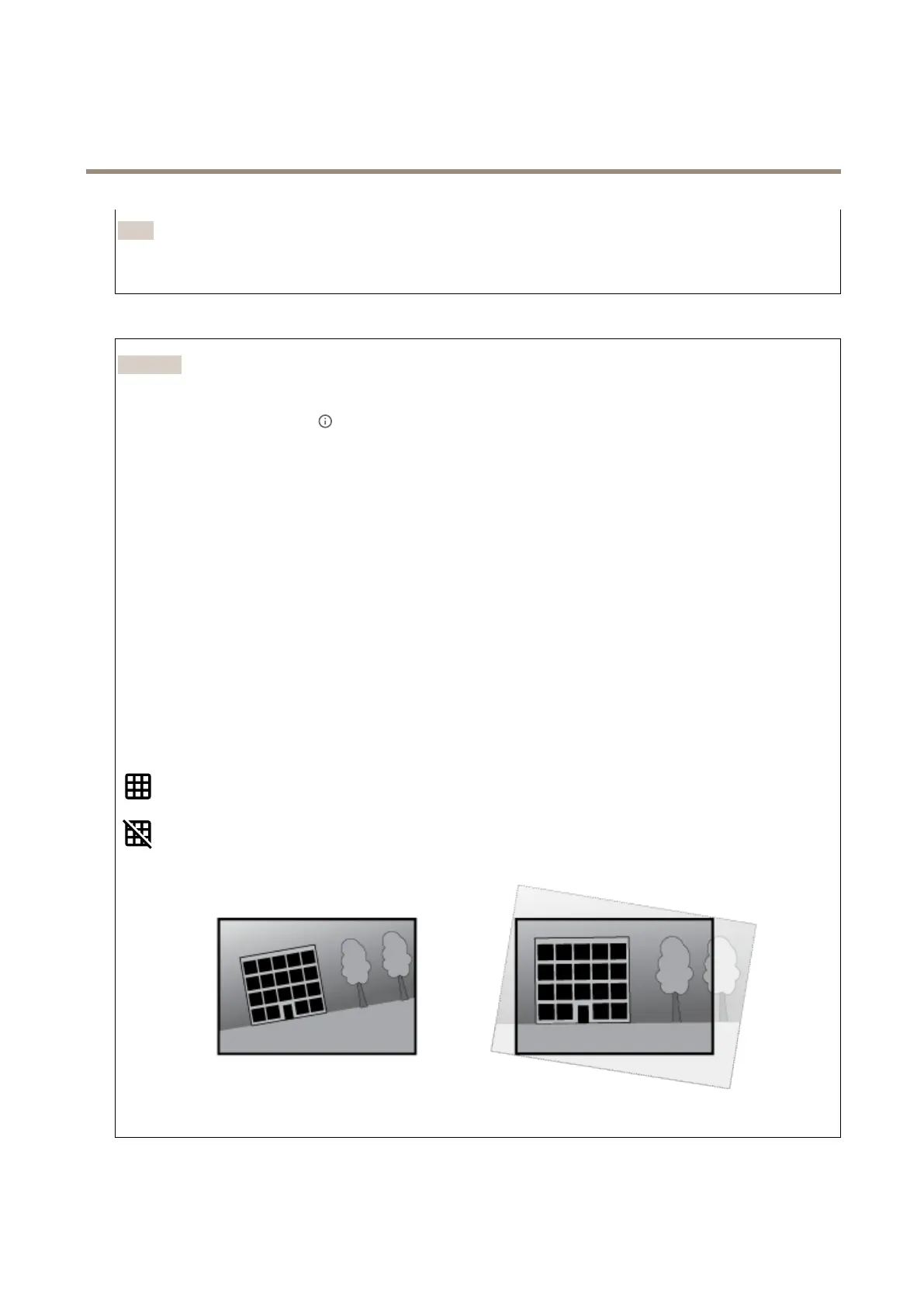
Straightenimage:Turnonandusetheslidertostraightentheimagehorizontallybyrotatingandcroppingitdigitally.The
functionalityisusefulwhenit’snotpossibletomountthecameraexactlylevel.Ideally,straightentheimageduringinstallation.
:Clicktoshowasupportinggridintheimage.
:Clicktohidethegrid.
Theimagebeforeandafterithasbeenstraightened.
20



 To Next Page