AXISP32Series
Setup
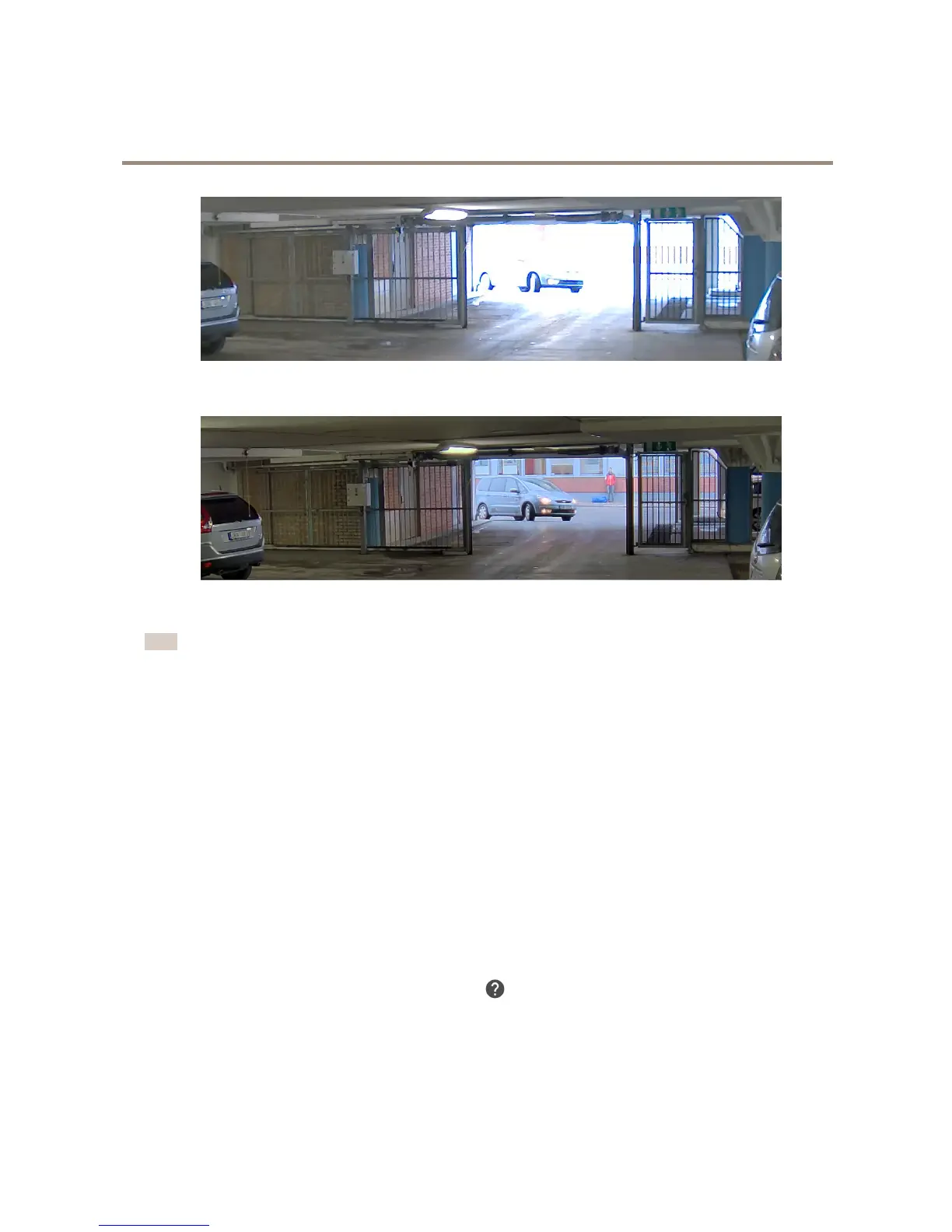
ImagewithoutWDR.
ImagewithWDR.
Note
IfyouuseWDR,youmayexperiencesomeWDRartifactsintheimage.
YoucanndoutmoreaboutWDRandhowtouseitatwww.axis.com
Howtoselectexposuremode
Thereareseveralexposuremodeoptionsinthecamerathatadjustsaperture,shutterspeed,andgaintoimproveimagequalityfor
specicsurveillancescenes.IntheImagetab,selectbetweenthefollowingoptions:
•Formostusecases,selectAutomaticexposure.
•Forenvironmentswithcertainarticiallighting,forexampleuorescentlighting,selectFlicker-free.
Selectthesamefrequencyasthepowerlinefrequency.
•Forenvironmentswithcertainarticiallightandbrightlight,forexampleoutdoorswithuorescentlightingatnightand
sunduringdaytime,selectFlicker-reduced.
Selectthesamefrequencyasthepowerlinefrequency.
•Tolockthecurrentexposuresettings,selectHoldcurrent.
Formoredetailedinstructions,gototheproduct’sbuilt-inhelp.
Howtochoosevideocompressionformat
Decidingwhichcompressionmethodtochoosedependsonyourviewingrequirements,andonthepropertiesofyournetwork.The
availableoptionsare:
6


 To Next Page