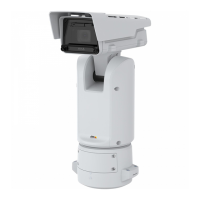
AXISQ1656BoxCameraSeries
Thewebinterface
•Widget:Linegraph:Showagraphchartthatdisplayshowameasuredvaluechangesovertime.
-Title:Enteratitleforthewidget.
-Overlaymodier:Selectanoverlaymodierasdatasource.IfyouhavecreatedMQTToverlays,theywillbe
locatedattheendofthelist.
-:Selectthepositionoftheoverlayintheimage.
-Size:Selectthesizeoftheoverlay.
-Visibleonallchannels:Turnofftoshowonlyonyourcurrentlyselectedchannel.Turnontoshowonall
activechannels.
-Updateinterval:Choosethetimebetweendataupdates.
-Transparency:Setthetransparencyoftheentireoverlay.
-Backgroundtransparency:Setthetransparencyonlyofthebackgroundoftheoverlay.
-Points:Turnontoaddapointtothegraphlinewhendataisupdated.
-Xaxis
-Label:Enterthetextlabelforthexaxis.
-Timewindow:Enterhowlongtimethedataisvisualized.
-Timeunit:Enteratimeunitforthexaxis.
-Yaxis
-Label:Enterthetextlabelfortheyaxis.
-Dynamicscale:Turnonforthescaletoautomaticallyadapttothedatavalues.Turnofftomanuallyenter
valuesforaxedscale.
-MinalarmthresholdandMaxalarmthreshold:Thesevalueswilladdhorizontalreferencelinestothegraph,
makingiteasiertoseewhenthedatavaluebecomestoohighortoolow.
•Widget:Meter
:Showabarchartthatdisplaysthemostrecentlymeasureddatavalue.
-Title:Enteratitleforthewidget.
-Overlaymodier:Selectanoverlaymodierasdatasource.IfyouhavecreatedMQTToverlays,theywillbe
locatedattheendofthelist.
-
:Selectthepositionoftheoverlayintheimage.
-Size:Selectthesizeoftheoverlay.
-Visibleonallchannels:Turnofftoshowonlyonyourcurrentlyselectedchannel.Turnontoshowonall
activechannels.
-Updateinterval:Choosethetimebetweendataupdates.
-Transparency:Setthetransparencyoftheentireoverlay.
-Backgroundtransparency:Setthetransparencyonlyofthebackgroundoftheoverlay.
-Points:Turnontoaddapointtothegraphlinewhendataisupdated.
-Yaxis
-Label:Enterthetextlabelfortheyaxis.
-Dynamicscale:Turnonforthescaletoautomaticallyadapttothedatavalues.Turnofftomanuallyenter
valuesforaxedscale.
-MinalarmthresholdandMaxalarmthreshold:Thesevalueswilladdhorizontalreferencelinestothebar
chart,makingiteasiertoseewhenthedatavaluebecomestoohighortoolow.
Viewareas
:Clicktocreateaviewarea.
Clicktheviewareatoaccesssettings.
Name:Enteranamefortheviewarea.Themaximumlengthis64characters.
Aspectratio:Selectdesiredaspectratio.Theresolutionadjustsautomatically.
PTZ:Turnontousepan,tilt,andzoomfunctionalityintheviewarea.
30



 To Next Page
 Loading...