AXISQ1715BlockCamera
Thewebinterface
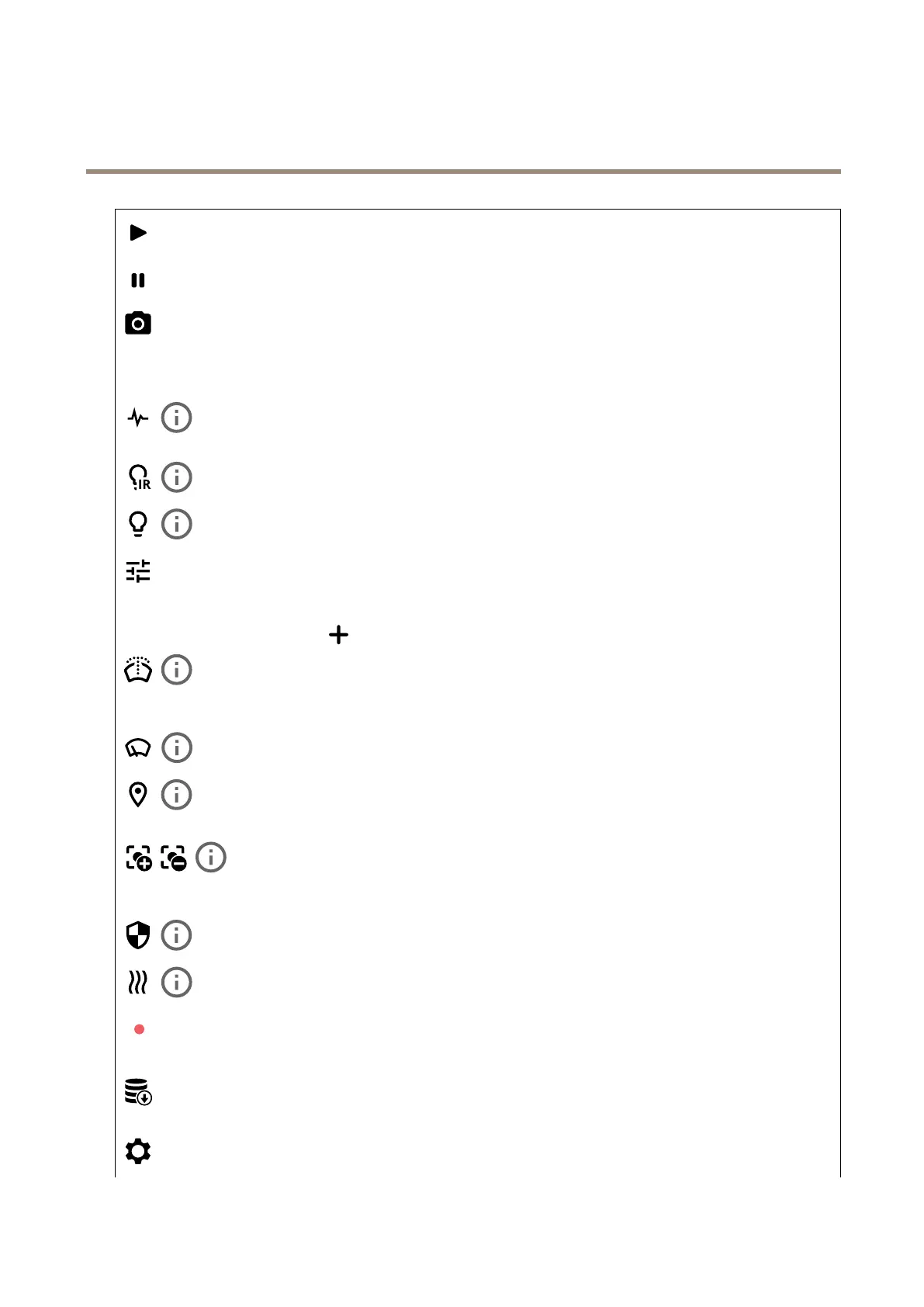
Clicktoplaythelivevideostream.
Clicktofreezethelivevideostream.
Clicktotakeasnapshotofthelivevideostream.Theleissavedinthe‘Downloads’folderonyourcomputer.Theimage
lenameis[snapshot_YYYY_MM_DD_HH_MM_SS.jpg].Thesizeofthesnapshotdependsonthecompressionthatthespecic
web-browserenginewherethesnapshotisreceivedapplies,therefore,thesnapshotsizemayvaryfromtheactualcompression
settingthatisconguredinthedevice.
ClicktoshowI/Ooutputports.Usetheswitchtoopenorclosethecircuitofaport,forexample,totestexternal
devices.
ClicktomanuallyturnonorturnofftheIRillumination.
Clicktomanuallyturnonorturnoffthewhitelight.
Clicktoaccessonscreencontrols:
•Predenedcontrols:Turnontousetheavailableonscreencontrols.
•Customcontrols:Click
Addcustomcontroltoaddanonscreencontrol.
Startsthewasher.Whenthesequencestarts,thecameramovestotheconguredpositiontoreceivethewash
spray.Whenthewholewashsequenceiscompleted,thecamerareturnstoitspreviousposition.Thisiconisonlyvisiblewhenthe
washerisconnectedandcongured.
Startsthewiper.
Clickandselectapresetpositiontogotothatpresetpositionintheliveview.Or,clickSetuptogotothepreset
positionpage.
Addsorremovesafocusrecallarea.Whenyouaddafocusrecallarea,thecamerasavesthefocussettingsat
thatspecicpan/tiltrange.Whenyouhavesetafocusrecallareaandthecameraentersthatareaintheliveview,thecamera
recallsthepreviouslysavedfocus.It’senoughtocoverhalfoftheareaforthecameratorecallthefocus.
Clicktoselectaguardtour,thenclickStarttoplaytheguardtour.Or,clickSetuptogototheguardtourspage.
Clicktomanuallyturnontheheaterforaselectedperiodoftime.
Clicktostartacontinuousrecordingofthelivevideostream.Clickagaintostoptherecording.Ifarecordingisongoing,it
willresumeautomaticallyafterareboot.
Clicktoshowthestoragethatisconguredforthedevice.Tocongurethestorage,youneedtobeloggedinasan
administrator.
Clicktoaccessmoresettings:
21



 To Next Page