EasyManua.ls Logo

Axis Q6045-E - Page 44

Axis Q6045-E
67 pages
Print Icon
To Next Page IconTo Next Page
To Previous Page IconTo Previous Page
Loading...
AXISQ6045-EMkIIPTZDomeNetworkCamera
Events
ConnecttheCable
CAUTION
Modicationscouldhaveanegativeeffectontheelectromagneticcompatibility(EMC)ofthewholesystem.Takeappropriate
precautionsandmakesuretoproperlyconnecttheshieldinbothends.
1.Stripthecable.
2.Separatethewires.
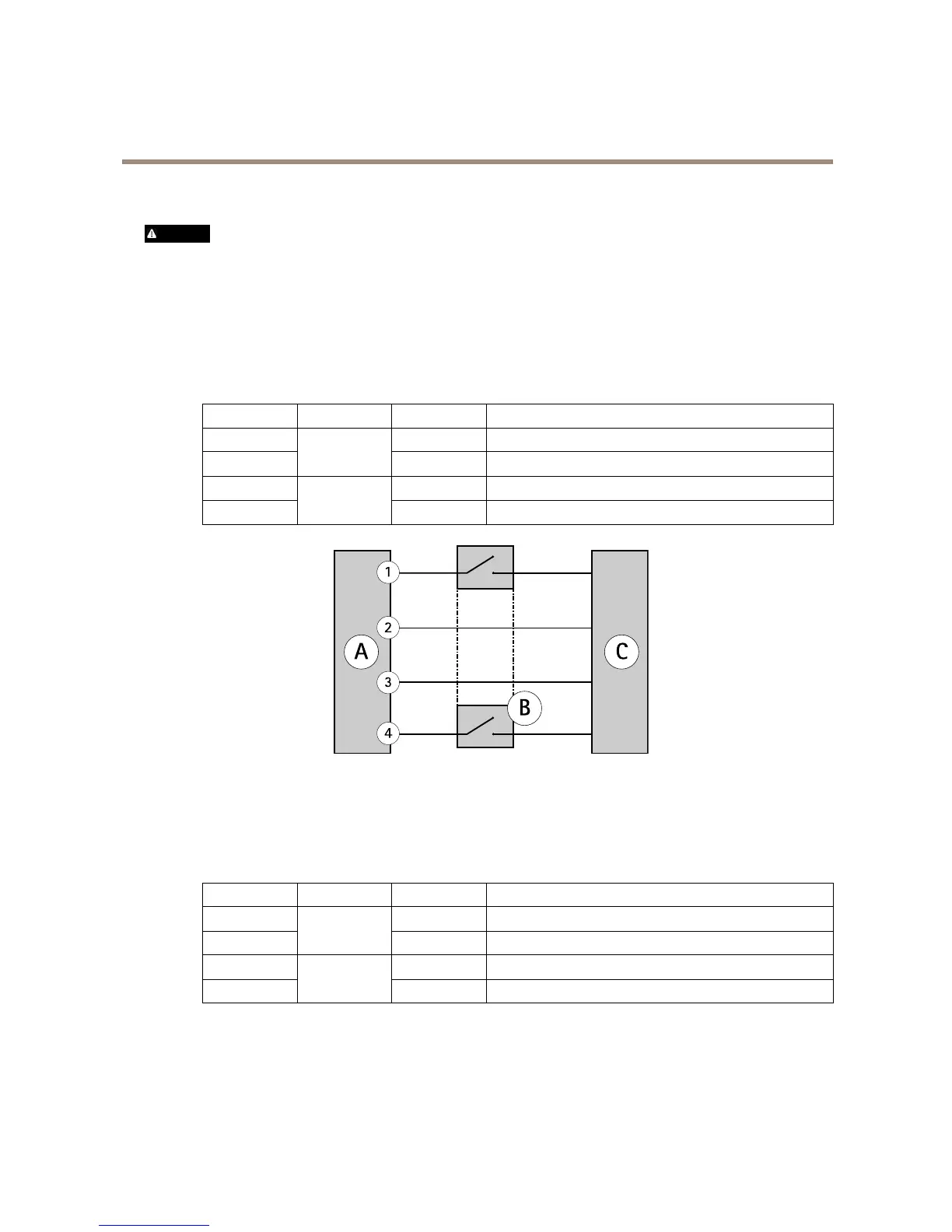
3.Cutthealarmdevicewires(seetablebelow)andconnectthemtothealarmdevice.
-Connectthefollowingwirestothemidspanthroughanalarmdevicethatcanopenandclosethecircuit:
PinPairWire
Color
4
2
Blue
5
1
1
White/blue
71
White/brown
8
4
2
Brown
B
1
2
3
4
A C
AMidspan
B
Alarmdevicewithaphysicalswitch(notincluded)
CCamera
4.Mountthenetworkconnectorandconnectthecablebetweenthecameraandthemidspan.
-Connectthefollowingwiresdirectlytothemidspan:
PinPairWire
Color
11
White/green
2
3
2
Green
3
1
White/orange
6
2
2
Orange
Formoreinformation,seethecamera’sInstallationGuide.
44

Related product manuals