Need help?
Do you have a question about the Axis Q6075-E and is the answer not in the manual?
Covers finding the device, browser compatibility, login procedures, and initial password setup.
Guidelines for creating and maintaining strong, secure passwords for the device.
Explanation of the main elements and controls visible on the device's web interface.
Adjusting focus, night mode, noise reduction, and WDR for optimal image quality.
Managing pixel resolution, privacy masks, overlays, and text displays in video streams.
Configuring PTZ movements, guard tours, video recording, and network storage.
Setting up rules for motion detection, impact detection, and tampering alerts.
Covers cleaning recommendations and managing video stream bitrate for bandwidth control.
Explains capture modes, privacy masks, overlays, and PTZ functionalities like guard tours.
Details on streaming, storage, video compression, and the AXIS Camera Application Platform.
Information on autotracking for object detection and security features like TPM.
Procedures for factory resets, checking and upgrading device firmware.
Resolving IP conflicts, browser access, remote connectivity, and network problems.
Addressing video streaming quality, performance factors, and seeking further support.
Identifies physical parts and explains LED status meanings.
Details the SD card slot, buttons, and network connector for device interaction.
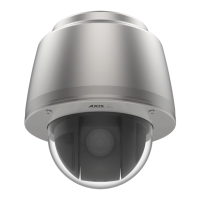
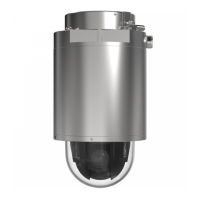
The AXIS Q60-E Series, including the AXIS Q6074-E and AXIS Q6075-E PTZ Network Cameras, and the D201-S XPT Q6075 Explosion-protected Camera, is a range of advanced surveillance devices designed for robust monitoring. These cameras offer a comprehensive set of features for image adjustment, camera view control, video recording, and event-triggered actions, making them suitable for various security applications.
The AXIS Q60-E Series cameras are primarily designed for network-based video surveillance, offering pan, tilt, and zoom (PTZ) capabilities for dynamic area coverage. They capture video streams and can store them locally on an SD card or on network storage. The cameras support various video compression formats, including Motion JPEG, H.264, and H.265, allowing users to balance image quality with bandwidth and storage requirements.
A key function is the ability to adjust the image for optimal clarity in different lighting conditions. This includes features like focus recall areas, which save focus settings for specific pan/tilt ranges, ensuring quick and accurate focus when the camera returns to a previously monitored area. This is particularly useful in scenarios with frequent manual operation or continuously changing focus settings, and in low-light conditions where autofocus might be challenged. The cameras also feature a night mode that utilizes both visible and near-infrared light to deliver brighter and more detailed black-and-white images in low-light environments. To combat noise in such conditions, users can adjust the blur-noise trade-off, shutter speed, max gain, and aperture. Wide Dynamic Range (WDR) functionality is available to handle scenes with strong backlighting, making both dark and bright areas of an image visible.
The PTZ functionality allows for flexible camera view adjustment, including the ability to limit pan, tilt, and zoom movements to exclude sensitive areas from surveillance. Guard tours can be created to display video streams from different preset positions in a predetermined or random order for configurable periods, ensuring comprehensive coverage of a monitored area without constant manual intervention.
The cameras are equipped with advanced event management capabilities, allowing users to set up rules that trigger specific actions based on various conditions. These conditions can include motion detection, shock detection, or tampering (such as spray painting the lens). Triggered actions can range from starting video recordings to sending email notifications or directing the camera to a preset position.
Users can access and manage the device through a web browser, with support for Chrome, Firefox, Edge, and Safari. The live view page provides an intuitive interface for monitoring and controlling the camera.
For image optimization, the pixel counter feature helps verify that a defined part of the image contains enough pixels for specific recognition tasks, such as reading license plates. Privacy masks can be created to hide sensitive parts of the image from being recorded or viewed, appearing as solid color blocks or mosaic patterns. Overlays, including text and images, can be superimposed on the video stream to provide additional information, such as timestamps or custom messages like "Motion detected" when an event occurs. The pan or tilt position can also be displayed as a text overlay.
Video recording can be initiated manually from the live view or automatically through event-triggered rules. Recordings can be stored on network storage or an SD card. The device offers various bitrate control options—Variable Bitrate (VBR), Maximum Bitrate (MBR), and Average Bitrate (ABR)—to manage bandwidth consumption and storage needs while maintaining desired image quality.
The AXIS Camera Application Platform (ACAP) allows for the integration of third-party analytics and other applications, expanding the camera's functionality. Autotracking is a notable feature that enables the camera to automatically zoom in on and track moving objects, such as vehicles or people, making it ideal for monitoring open areas with unusual movement. Users can manually select objects to track or define trigger areas for automatic tracking.
Security is enhanced by the presence of a Trusted Platform Module (TPM), which provides cryptographic features to protect information from unauthorized access, ensuring data integrity and confidentiality.
The device manual provides clear instructions for initial setup, including finding the device on the network, accessing it, and setting a root password. It emphasizes the importance of verifying the firmware's authenticity to ensure the device has its original Axis firmware and to prevent security attacks.
Firmware management is a key maintenance aspect, with Axis offering both active track and long-term support (LTS) tracks. Users can check the current firmware version and upgrade it through the web interface. The upgrade process is designed to save preconfigured and customized settings, provided the features are available in the new firmware. Troubleshooting sections address common issues such as firmware upgrade failures, IP address conflicts, and problems with accessing the device or streaming video.
Physical maintenance includes cleaning recommendations for the device. Users are advised to use mild, solvent-free soap or detergent, compressed air for dust removal, and a soft cloth for wiping. Important warnings are given against using harsh detergents or cleaning in direct sunlight or at elevated temperatures to prevent stains.
The device also includes a control button and a power button, which are used for resetting the product to factory default settings. This is a crucial maintenance feature for resolving persistent issues or reconfiguring the device from scratch. The SD card slot is designed for easy insertion and removal with fingers, with warnings against using sharp tools or excessive force, and against removing the card while the product is running to prevent data loss.
Overall, the AXIS Q60-E Series offers a robust and feature-rich surveillance solution with extensive customization options, intelligent monitoring capabilities, and user-friendly maintenance procedures.
 General
| Type | IP security camera |
|---|---|
| PTZ control | Yes |
| Certification | 55032 A, EN 55035, EN 61000-3-2, EN 61000-3-3, EN 61000-6-1, EN 61000-6-2, EN 55024, FCC 15 B A, ICES-003 A, VCCI A, RCM AS/NZS CISPR 32 A, KCC KN32 A, KN35 IEC/EN/UL 60950-1 EN 50121-4, IEC 62236-4, IEC/EN/UL 60950-22, IEC/EN/UL 62368–1 IEC/EN 60529 IP66/IP67, NEMA TS 2 (Subsection 2.2.7-2.2.9), IEC 62262 IK10, ISO 4892-2, EN 50121-4, IEC 62236-4, IEC 60068-2-1, IEC 60068-2-2, IEC 60068-2-6, IEC 60068-2-14, IEC 60068-2-27, IEC 60068-2-60, IEC 60068-2-78, NEMA 250 Type 4X NIST SP500-267 EN 60950-1, GS, UL, cUL, CE, FCC, VCCI, CB, KCC, UL-AR |
| Languages support | CHI (SIMPL), CHI (TR), DEU, ENG, ESP, FRE, ITA, JPN, KOR, POR, RUS |
| Number of languages | 11 |
| Placement supported | Outdoor |
| Connectivity technology | Wired |
| Sensor type | CMOS |
| Number of sensors | 1 |
| Optical sensor size | 1/2.8 \ |
| Digital zoom | 12 x |
| Optical zoom | 40 x |
| Focal length range | 4.25 - 170 mm |
| Maximum aperture number | 4.95 |
| Minimum aperture number | 1.6 |
| Pan range | 0 - 360 ° |
| Pan speed | 450 °/sec |
| Tilt angle range | 0 - 220 ° |
| Camera shutter speed | 1/11000 - 1/3 s |
| Minimum illumination | 0.03 lx |
| Bit rate control | Variable Bit Rate (VBR) |
| Total megapixels | - MP |
| Maximum resolution | 1920 x 1080 pixels |
| Video compression formats | AVC, H.264, H.265, HEVC, M-JPEG, MPEG4 |
| Wi-Fi | No |
| Networking standards | IEEE 802.1x |
| Ethernet interface type | Fast Ethernet |
| Supported network protocols | IPv4, IPv6 USGv6, HTTP, HTTPSa , SSL/TLSa , QoS Layer 3 DiffServ, FTP, SFTP, CIFS/SMB, SMTP, Bonjour, UPnP® , SNMP v1/v2c/v3 (MIB-II), DNS, DynDNS, NTP, RTSP, RTP, SRTP, TCP, UDP, IGMP, RTCP, ICMP, DHCP, ARP, SOCKS, SSH, NTCIP, LLDP |
| Security algorithms | EAP-TLS |
| IK code | IK10 |
| Form factor | Dome |
| Mounting type | Ceiling |
| Product color | White |
| Housing material | Aluminum |
| International Protection (IP) code | IP67 |
| Flash memory | 512 MB |
| Internal memory | 1024 MB |
| Compatible memory cards | SD, SDHC, SDXC |
| Storage temperature (T-T) | -40 - 65 °C |
| Operating temperature (T-T) | -20 - 50 °C |
| Operating relative humidity (H-H) | 10 - 100 % |
| AC input voltage | 100 - 240 V |
| Power source type | AC |
| Power consumption (max) | 66.1 W |
| Power consumption (typical) | 14 W |
| Harmonized System (HS) code | 85258900 |
 Weight and Dimensions
| Height | 269 mm |
|---|---|
| Weight | 3750 g |
| Diameter | 232 mm |


 To Next Page