Need help?
Do you have a question about the Axis Q6074-E and is the answer not in the manual?
Locate and assign IP addresses to Axis devices on the network.
Steps to open a browser and log in to the Axis device using its IP address.
Instructions for creating a strong password for the root account to secure the device.
Recommendations for creating and managing secure passwords for device protection.
Explanation of the main elements and controls visible on the device's web interface.
Guide to modifying image parameters for optimal viewing conditions.
Setting up specific pan/tilt areas to recall saved focus settings automatically.
Configuring the camera to shift to night mode for better low-light performance.
Settings to minimize noise in images captured in low-light environments.
Using Wide Dynamic Range (WDR) to balance dark and bright areas in challenging lighting.
Optimizing settings like pixel resolution, shutter speed, and gain for clear license plates.
Creating masked areas in the video stream to hide sensitive or private information.
Adding custom images or text onto the video stream for information display.
Displaying the camera's current pan and tilt position as an overlay on the video.
Adjusting pan, tilt, and zoom settings for optimal camera positioning.
Restricting the camera's pan, tilt, and zoom range to protect specific areas.
Setting up automated camera movements between predefined preset positions.
Optimizing video stream settings like H.264 and Zipstream to conserve network and storage resources.
Configuring the device to store recordings on a network storage location.
Steps for starting, stopping, and viewing video recordings.
Creating event-driven rules to trigger actions based on conditions like motion detection.
Configuring the camera to record video automatically when motion is detected.
Setting up rules to move the camera to a preset position upon detecting motion.
Automating zoom to specific areas (like license plates) when an object enters a trigger zone.
Configuring the camera to record video when shock or impact is detected.
Setting up alerts for tampering events like lens spray or obstruction.
Guidelines for safely cleaning the camera exterior.
Managing bandwidth consumption by adjusting video stream bitrate.
Understanding and configuring Average Bitrate for optimized storage and quality.
Explanation of different capture modes and their impact on frame rate and WDR.
Detailed explanation of how privacy masks function within the video stream.
Information on adding text or images as overlays to the video stream.
Overview of Pan, Tilt, Zoom functionalities and guard tour operations.
How video streams are managed and stored, including format options.
Comparison of Motion JPEG, H.264, and H.265 compression for video streaming.
Introduction to the AXIS Camera Application Platform for third-party software.
Using the autotracking feature to automatically follow moving objects.
Explanation of security features, including the Trusted Platform Module (TPM).
Procedures for restoring the device to its original factory settings.
Information on firmware tracks and how to check the current version.
Step-by-step guide to safely upgrade the device firmware.
Common technical problems and their resolutions.
Troubleshooting issues related to device IP address assignment and conflicts.
Solutions for problems encountered when accessing the device via a web browser.
Diagnosing and resolving issues related to video streaming.
Factors affecting system performance, bandwidth, and frame rate.
Resources for further assistance and contacting Axis support.
Visual identification of the camera's physical components and connectors.
Meaning of the different status LED indications on the device.
Information regarding the SD card slot and usage recommendations.
Details about the device's physical buttons and network connector.
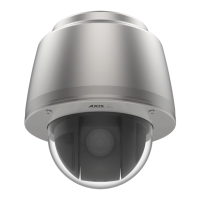
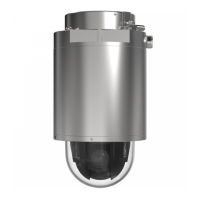
The AXIS Q60-E Series, including the AXIS Q6074-E and AXIS Q6075-E PTZ Network Cameras, is a sophisticated surveillance device designed for comprehensive monitoring and recording. This camera offers a range of features for image adjustment, video streaming, storage, and event-triggered actions, making it suitable for various security applications.
The AXIS Q60-E Series camera functions primarily as a Pan, Tilt, and Zoom (PTZ) network camera, capable of capturing high-quality video streams. It supports multiple video compression formats, including Motion JPEG, H.264 (MPEG-4 Part 10/AVC), and H.265 (MPEG-H Part 2/HEVC), allowing users to balance image quality with bandwidth and storage efficiency. The camera is equipped with a TPM (Trusted Platform Module) for enhanced cryptographic security, protecting sensitive information from unauthorized access. It also supports AXIS Camera Application Platform (ACAP), an open platform for third-party analytics and applications, expanding its functionality beyond basic surveillance.
The camera offers extensive usage features to optimize surveillance and monitoring. Users can easily find the device on the network using AXIS IP Utility or AXIS Device Manager and access its web interface through various browsers like Chrome, Firefox, Edge, and Safari. A secure password for the root account is crucial for initial setup, with recommendations for strong, regularly changed passwords to protect data.
Image adjustment features are robust, allowing users to fine-tune the camera's view. Focus recall areas can be created to save specific focus settings at different pan/tilt ranges, which is particularly useful in scenarios with frequent manual operation, changing focus settings, or low-light conditions. The camera supports a night mode, automatically shifting to black-and-white images using both visible and near-infrared light as ambient light diminishes, providing brighter and more detailed images in low-light conditions. Users can adjust the threshold for this shift and reduce noise by modifying shutter speed and gain settings. Wide Dynamic Range (WDR) functionality helps handle scenes with strong backlighting, making both dark and bright areas visible.
For specialized applications, the camera can be configured to improve license plate recognition by adjusting pixel resolution, shutter speed, gain, and zoom. Privacy masks can be created to hide specific parts of the image from being monitored, appearing as solid color blocks or mosaic patterns in all video streams and snapshots. Overlays, such as text or images, can be superimposed on the video stream to provide additional information like timestamps or custom messages, and can even be triggered by events like motion detection. The camera can also display pan or tilt positions as text overlays.
PTZ functionalities are central to the camera's operation. Users can limit pan, tilt, and zoom movements to exclude certain areas from surveillance, such as private residences near a monitored parking lot. Guard tours can be set up to display video streams from different preset positions in a predetermined or random order, with configurable pause lengths between each tour. The gatekeeper functionality allows the camera to automatically zoom in on a specific area, like a license plate at a gate entrance, and then return to a home position once the event has passed.
Video recording and storage are flexible. Users can set up network storage or use an installed SD card for recordings. Bandwidth and storage can be optimized through bitrate control, offering options like Variable Bitrate (VBR) for constant image quality with varying bandwidth, or Maximum Bitrate (MBR) to cap bandwidth consumption, potentially affecting image quality or frame rate. Average Bitrate (ABR) adjusts bitrate over time to meet specified targets based on available storage and retention time.
The camera's event management system allows for the creation of rules to trigger actions based on various conditions. For example, the camera can be configured to record video when motion is detected, directing it to a preset position. It can also detect tampering through shock detection, triggering recordings or other actions if vibrations or impacts occur. Furthermore, the camera can send email notifications if the lens is spray-painted, covered, or severely out of focus, using the "Trigger on dark images" feature.
Maintaining the AXIS Q60-E Series camera is straightforward. For general cleaning, mild, solvent-free soap or detergent can be used with a soft cloth, avoiding harsh chemicals like gasoline or benzene. Compressed air can remove dust or loose dirt. It's important to avoid cleaning in direct sunlight or at elevated temperatures to prevent stains.
Troubleshooting options are available through the web interface and physical buttons. The device can be reset to factory default settings by pressing and holding the control and power buttons, which is useful for resolving configuration issues or regaining control after a security attack. Firmware management is supported, with options for active or long-term support (LTS) tracks, allowing users to choose between the latest features or a stable platform with bug fixes and security updates. Firmware upgrades are performed through the web interface, with settings preserved if the features are available in the new firmware. The camera also provides indicators for network connection and operational status via LED lights. The SD card slot is designed for easy access, with warnings against using sharp tools or removing the card while the product is running to prevent damage or data loss.
 General
| Digital zoom | 12 x |
|---|---|
| Optical zoom | 30 x |
| Zoom capability | Yes |
| Number of lenses | 1 |
| Focal length range | 4.25 - 127.5 mm |
| Maximum aperture number | 4.2 |
| Minimum aperture number | 1.6 |
| Bit rate control | Variable Bit Rate (VBR) |
| Total megapixels | - MP |
| Maximum resolution | 1280 x 720 pixels |
| Supported video modes | 720p |
| Image quality adjustment | Brightness, Colour depth, Sharpness |
| Video compression formats | AVC, H.264, H.265, HEVC, M-JPEG, MPEG4 |
| Supported graphics resolutions | 320 x 180, 1280 x 720 (HD 720) |
| Type | IP security camera |
| Certification | EN 55032 Class A, EN 55035, EN 61000-3-2, EN 61000-3-3, EN 61000-6-1, EN 61000-6-2, EN 55024, FCC Part 15 Subpart B Class A, ICES-003 Class A, VCCI Class A, RCM AS/NZS CISPR 32 Class A, KCC KN32 Class A, KN35, IEC/EN/UL 60950-1, EN 50121-4, IEC 62236-4, IEC/EN/UL 60950-22, IEC/EN/UL 62368–1, IEC/EN 60529 IP66/IP67, NEMA TS 2 (Subsection 2.2.7-2.2.9), IEC 62262 IK10, ISO 4892-2, EN 50121-4, IEC 62236-4, IEC 60068-2-1, IEC 60068-2-2, IEC 60068-2-6, IEC 60068-2-14, IEC 60068-2-27, IEC 60068-2-60, IEC 60068-2-78, NEMA 250 Type 4X, NIST SP500-267, EN 60950-1, GS, UL, cUL, CE, FCC, VCCI, CB, KCC, UL-AR |
| Languages support | CHI (SIMPL), CHI (TR), DEU, ENG, ESP, FRE, ITA, JPN, KOR, POR, RUS |
| Number of languages | 11 |
| Placement supported | Indoor & outdoor |
| Connectivity technology | Wired |
| Sensor type | CMOS |
| Optical sensor size | 1/2.8 \ |
| Pan range | 0 - 360 ° |
| Pan speed | 450 °/sec |
| Tilt angle range | 0 - 220 ° |
| Camera shutter speed | 1/11000 - 1/3 s |
| Minimum illumination | 0.002 lx |
| Bluetooth | - |
| Streaming method | Multicast |
| Networking standards | IEEE 802.1x, IEEE 802.3at |
| Ethernet interface type | Fast Ethernet |
| Supported network protocols | IPv4, IPv6 USGv6, HTTP, HTTPS, SSL/TLS, QoS Layer 3 DiffServ, FTP, SFTP, CIFS/SMB, SMTP, Bonjour, UPnP , SNMP v1/v2c/v3 (MIB-II), DNS, DynDNS, NTP, RTSP, RTP, SRTP, TCP, UDP, IGMP, RTCP, ICMP, DHCP, ARP, SOCKS, SSH, NTCIP, LLDP |
| IK code | IK10 |
| Form factor | Dome |
| Mounting type | Ceiling/wall |
| Product color | Black, White |
| Housing material | Aluminum |
| International Protection (IP) code | IP66, IP67 |
| Alert notification type | |
| Intelligent Video Surveillance (IVS) system features | Missing object, Tripwire |
| Flash memory | 512 MB |
| Internal memory | 1024 MB |
| Compatible memory cards | SD, SDHC, SDXC |
| AC input voltage | 100-240 V |
| Power source type | AC, PoE |
| Power consumption (max) | 51 W |
| Power consumption (typical) | 14 W |
| Storage temperature (T-T) | -40 - 65 °C |
| Operating relative humidity (H-H) | 10 - 100 % |
| Harmonized System (HS) code | 85258900 |
 Weight and Dimensions
| Width | 232 mm |
|---|---|
| Height | 269 mm |
| Weight | 3750 g |


 To Next Page