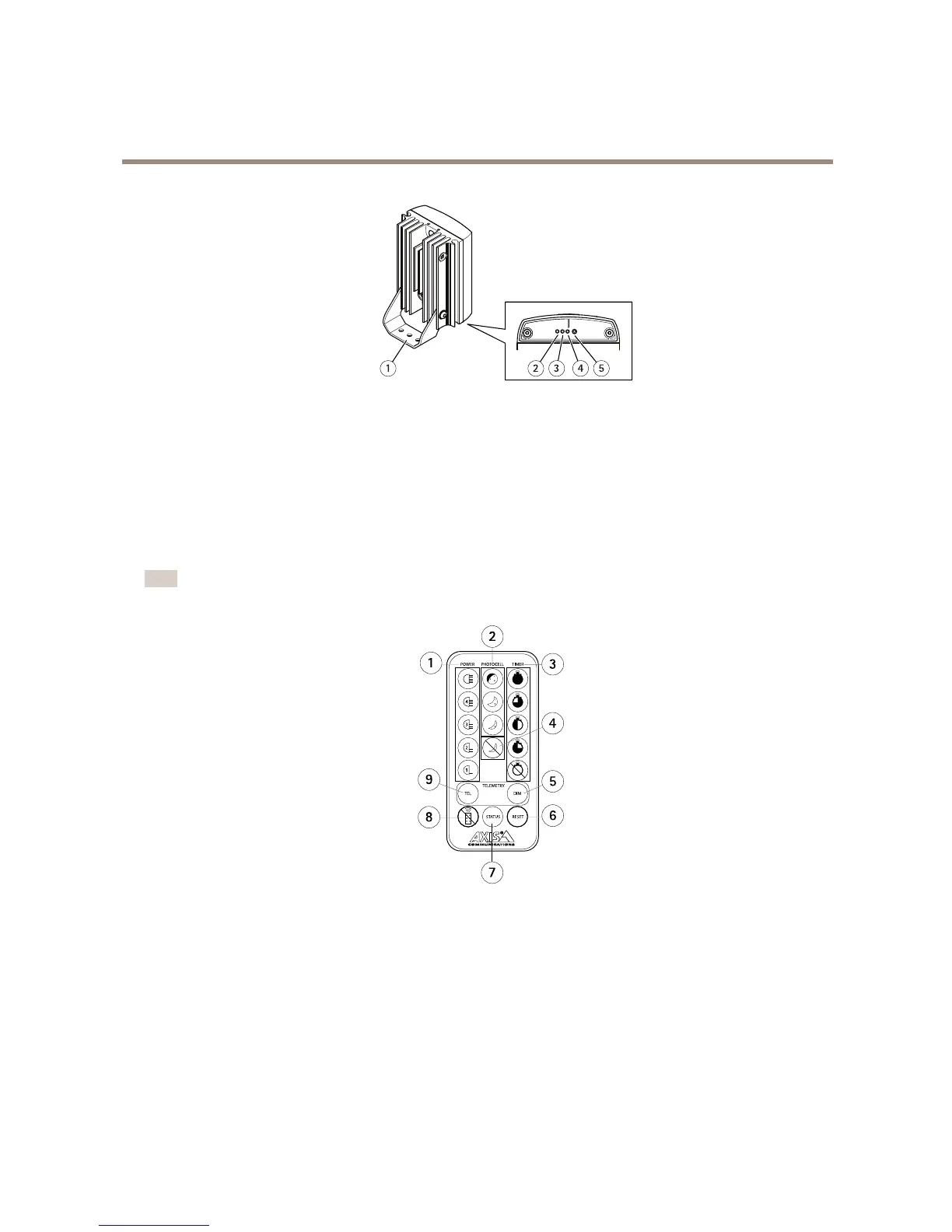
AXIST90DIlluminatorSeries
Productoverview
1
Mountingbracket(pre-mounted)
2
Controlbutton(left)
3
LeftHandSideLED(LHS)
4
RightHandSideLED(RHS)
5
Controlbutton(right)
Thebaseplatemustberemovedinordertoaccessthetwocontrolbuttons.
Remotecontrol
Note
Theremotecontrolisanoptionalaccessory.
1
Powerlevelbuttons
2
Photocellsensitivitybuttons
3
Timerbuttons
4
Photocelldisablebutton
5
Telemetrydimmingbutton
6
Resetbutton
7
StatusbuttonforLEDandPIN
8
Disableremotecontrolsetupbutton
9
Telemetryinputbutton
Howtocongurethewires(onlyforAC/DCversions)
Connectthepowerwires(redandblack)toapowersourceequipment.Formoreinformation,seetheInstallationGuide.
6



 To Next Page