EasyManua.ls Logo

Axminster Hobby Series - User Manual

Axminster Hobby Series
28 pages
Print Icon
To Next Page IconTo Next Page
Loading...
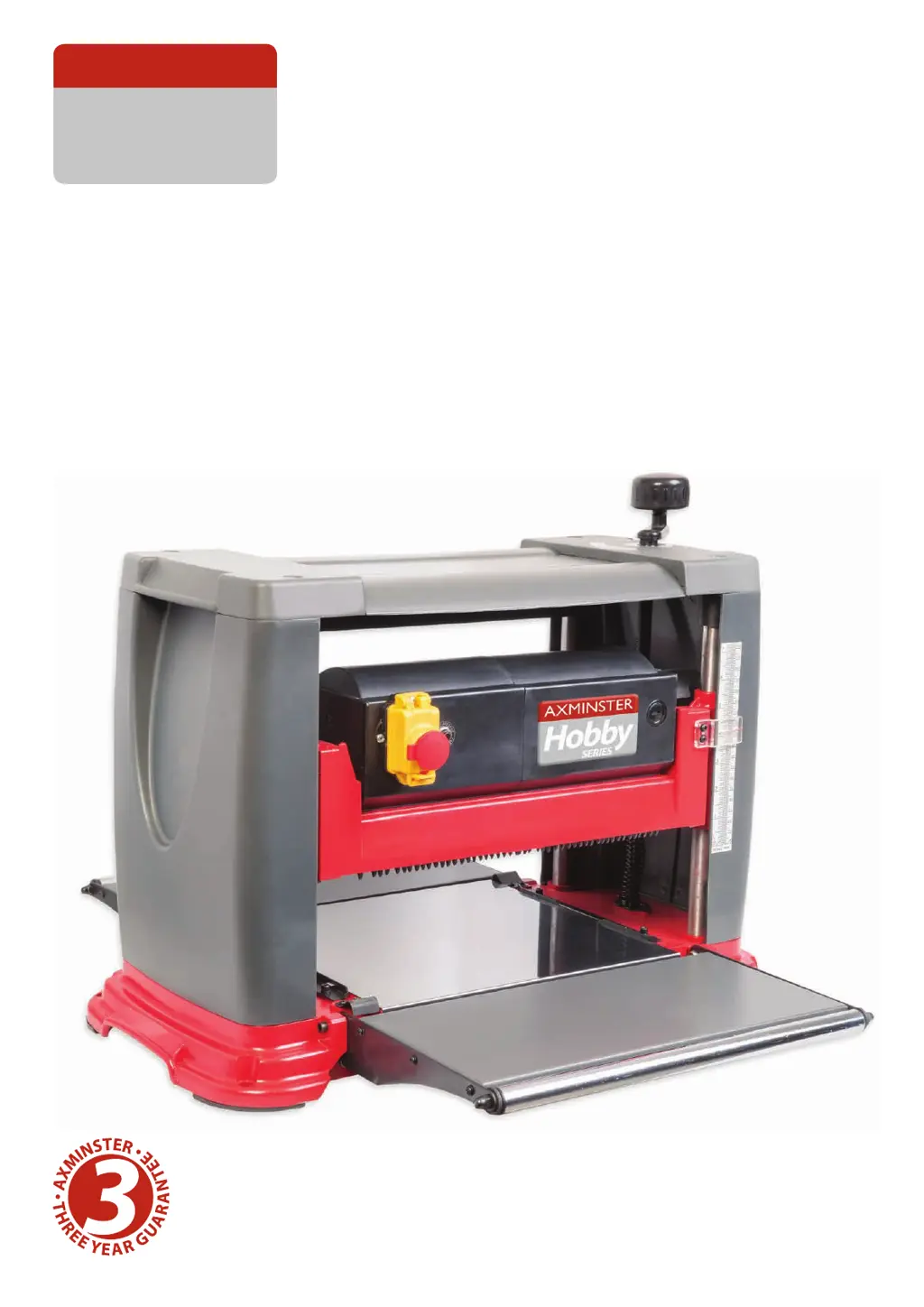
MB1931(TP2000)
Benchtop Thicknesser
Code 104279
AT&M: 23/04/2018
BOOK REF : 104860
Original Instructions
AXMINSTER
SERIES
Hobby

Other manuals for Axminster Hobby Series

Questions and Answers

  • P
    Patrick HarrellAug 16, 2025
    What to do if my Axminster Power Tool will not start or restart?
    • P
      peternelsonAug 16, 2025
      If your Axminster Power Tool won't start or restart, there could be several reasons. First, ensure the tool is properly plugged into a functioning power source. If it is, the motor may have failed, or there might be a loose wire. A qualified electrician should check the motor in these cases. Also, the overload reset may have failed; allow the machine to cool down before attempting to restart it. Finally, the motor starter itself might have failed, which also requires inspection by a qualified electrician.
  • J
    Janet KramerAug 18, 2025
    Why is my Axminster Power Tool circuit tripping and causing the motor to stop?
    • A
      Amy SchmittAug 19, 2025
      A circuit tripping and causing the motor to stop in your Axminster Power Tool can be due to several reasons. The extension cord might be too long or too thin; try using a shorter or thicker cord. Dull blades can also cause this issue, so sharpen or replace them. Lastly, low voltage running could be the culprit, so check the voltage supply.
  • K
    Kathy YangAug 22, 2025
    How to fix torn grain when using my Axminster Power Tool?
    • N
      nrussellAug 22, 2025
      Torn grain when using your Axminster Power Tool can occur for a few reasons. First, the cut may be too heavy, so review the proper depth of cut. Second, the blades might be cutting against the grain; feed the workpiece with the grain or turn it around. Finally, dull blades can also cause this, so try sharpening them.
  • P
    Patricia WilliamsAug 25, 2025
    Why is the grain rough or raised after using my Axminster Power Tool?
    • B
      Brandy ThomasAug 26, 2025
      Rough or raised grain after using your Axminster Power Tool can be attributed to several factors. Dull blades are a common cause, so sharpening them is a good first step. Also, the cut may be too heavy, so review the proper depth of cut. High moisture content in the wood can also lead to this issue, so ensure the wood is dry. Lastly, damaged cutter head bearings can be the cause and require replacement.
  • B
    browncraigAug 28, 2025
    What to do if my Axminster Power Tool has poor feeding of timber?
    • L
      Leslie SmithAug 28, 2025
      If your Axminster Power Tool has poor feeding of timber, consider these potential causes: 1. The planer table may be dirty. Clean off any pitch and residue, and lubricate the table. 2. The feed roller might be damaged and require replacement. 3. The sprocket could be damaged, also requiring replacement. 4. The gear box might have malfunctions and should be checked.
  • J
    Jonathan MunozAug 31, 2025
    How to correct an uneven depth of cut from side to side with my Axminster Power Tool?
    • B
      Brian TurnerAug 31, 2025
      An uneven depth of cut from side to side with your Axminster Power Tool can be due to: 1. Non-uniform blade projection: Adjust the blade projection to ensure it is uniform. 2. The cutter head not being level to the planer bed: Level the cutter head to the table.
  • W
    William BakerSep 3, 2025
    Why is the grain fussy when using my Axminster Power Tool?
    • N
      nguyenstephenSep 3, 2025
      If the grain is fussy when using your Axminster Power Tool, it could be due to planing wood with high moisture content; make sure to dry the wood. Also, dull blades can cause this issue, so sharpen the blades.
  • F
    fgriffinSep 6, 2025
    What causes the chain to jump on my Axminster Power Tool?
    • P
      Paul JenkinsSep 6, 2025
      If the chain is jumping on your Axminster Power Tool, it may be caused by: 1. Misaligned sprockets: Align the sprockets. 2. Worn sprockets: Replace the sprockets.
  • L
    lbellSep 9, 2025
    What to do if the board thickness doesn't match the depth of cut scale on my Axminster Power Tool?
    • E
      Ethan JimenezSep 9, 2025
      If the board thickness doesn't match the depth of cut scale on your Axminster Power Tool, the depth of cut scale is likely incorrect. Adjust the depth of cut scale to match.
  • G
    Grace ClaySep 12, 2025
    What to do if the workpiece is jammed in my Axminster Power Tool?
    • S
      susanburnsSep 12, 2025
      If the workpiece is jammed in your Axminster Power Tool, it is likely due to an inadequate blade setting height. Set the blade to the correct height.

Summary

General Instructions for 230 V Machines

Specific Instructions for Thicknessing Machines

Machine Specification

Assembly Procedures

Illustration & Parts Description

Controls and Key Components

Identifies controls, cutter block, feed rollers, and thicknessing scale.

Setup & Adjustment Guide

Levelling Extension Tables

Steps to adjust extension tables for proper alignment.

Setting Cutter Head to Thicknessing Bed

How to align the cutter head with the thicknessing bed using a gauge block.

Operating Instructions

Depth of Cut Scale Adjustment

How to calibrate the depth of cut scale for accurate settings.

Changing the Blades

Maintenance Procedures

Troubleshooting Guide

Wiring Diagram

Axminster Hobby Series Specifications

General IconGeneral
BrandAxminster
ModelHobby Series
CategoryLathe
LanguageEnglish

Related product manuals