
EasyManua.ls Logo

Axxera AC216BI - User Manual

Axxera AC216BI
28 pages
Print Icon
To Next Page IconTo Next Page
Loading...
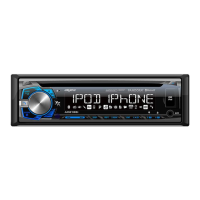
INSTALLATION/OWNER'S MANUAL
AM/FM/CD Receiver with Detachable Face
AC216Bi
Front and Rear Inputs
Front Input

Questions and Answers

  • E
    Evan GordonAug 14, 2025
    Why Axxera Car Stereo System has power but no sound?
    • M
      matthew31Aug 14, 2025
      If your Axxera Car Stereo System has power but you're not getting any sound, it could be due to a couple of things: First, check the speaker wires to ensure they are properly connected at the speakers. Second, make sure that none of the speaker wires are touching each other or the chassis ground. If they are, insulate all bare speaker wires to prevent contact.
  • M
    Mr. Alexander Hoffman MDAug 17, 2025
    What to do if my Axxera Car Stereo System blows fuses?
    • F
      frankthomasAug 17, 2025
      If your Axxera Car Stereo System keeps blowing fuses, there are a few potential causes. Check if the yellow or red wire is touching the chassis ground, looking for any pinched wires. Also, verify that the speaker wires are not touching the chassis ground, again checking for pinched wires. Finally, ensure that you are using a fuse with the correct rating for your unit.
  • M
    megan43Aug 20, 2025
    How to fix Axxera Car Stereo System that will not turn on?
    • Z
      Zachary HolmesAug 20, 2025
      If your Axxera Car Stereo System isn't turning on, there are a few things you can check: * First, make sure the yellow wire is properly connected and has the correct voltage (11~16VDC). * Second, verify that the black wire is securely connected to ground. * Lastly, inspect the fuse and replace it if it's blown.
  • A
    Alexis HernandezAug 25, 2025
    What to do if my Axxera AC216BI displays ERROR 2?
    • K
      Kelly RiddleAug 25, 2025
      If your Axxera Car Stereo System displays 'ERROR 2', it means there may be a disc read error or the disc might be inserted upside down. Try pressing the eject button or the RESET button to resolve this issue.
  • W
    William McdowellAug 27, 2025
    Why does my Axxera AC216BI Car Stereo System say 'PROTECT'?
    • H
      Heidi LopezAug 27, 2025
      If your Axxera Car Stereo System displays 'PROTECT', it indicates that the WMA file you're trying to play is copy-protected by DRM (Digital Rights Management). To fix this, create a disc using WMA files that are not copy-protected.
  • I
    Isabel OchoaAug 30, 2025
    What causes excessive skipping in Axxera AC216BI Car Stereo System?
    • J
      jacob62Aug 30, 2025
      Excessive skipping in your Axxera Car Stereo System can be caused by a couple of things. First, check that the unit is mounted correctly and the backstrap is secure. Second, inspect the media (CD, CD-R, or CD-RW) for any physical defects like scratches.
  • E
    Emily FowlerSep 3, 2025
    What does 'NO FILE' mean on my Axxera AC216BI?
    • S
      Stephanie JohnstonSep 3, 2025
      If your Axxera Car Stereo System displays 'NO FILE', it means that the selected file is not available in direct or alphanumeric search modes. Try repeating the search using valid parameters.
  • S
    Shawn PhillipsSep 6, 2025
    Why Axxera Car Stereo System will not accept a disc?
    • J
      Juan GarrettSep 6, 2025
      If your Axxera Car Stereo System won't accept a disc, it could be due to a couple of reasons. First, the CD mechanism position might be out of alignment; try pressing and holding the EJECT button for 3 seconds to reset it. Second, check if the CD transit screws are still in place on top of the unit and remove them.
  • Z
    zperezSep 9, 2025
    What does 'NO SUPPORT' mean on Axxera AC216BI display?
    • M
      Matthew SaundersSep 9, 2025
      If your Axxera Car Stereo System displays 'NO SUPPORT', it indicates that either an invalid ID3 tag version is present (only versions 1.0 to 2.4 are supported) or an ID3 tag character is not supported (only ASCII characters are supported).

Summary

Installation and Preparation

Installation Preparation Steps

Steps before and during unit installation, including safety and setup.

Wiring Diagram

Control Locations Overview

General Operation

Power, Mode, and Display Settings

Controls the unit's power state, mode selection, and display settings.

Faceplate and Clock Settings

Procedures for removing the faceplate and setting the clock.

Audio Input, Volume, and Mute

Using auxiliary input, adjusting volume, and muting audio.

Setup Menu Functions

Tuner and Audio Settings

Auto store, tuning, beep confirmation, volume settings.

Display and Bluetooth Settings

Scrolling, demo mode, Bluetooth, and auto-answer configuration.

Audio Adjustments

Tone and Balance Controls

Adjusts bass, middle, treble, balance, and fader.

EQ, Loudness, and Subwoofer

Controls equalization, loudness, and subwoofer output.

Source Volume Level

Adjusts audio level for the current source.

AM;FM Tuner Operation

Tuning and Band Selection

Seek tuning, manual tuning, and band switching.

Station Presets and Storage

Storing, recalling, and auto-storing radio stations.

CD Player Operation

Basic CD Playback

Inserting, ejecting, track selection, pause/resume.

Playback Modes (Intro, Repeat, Random)

Controls for intro scan, repeat, and random playback.

CD-R;CD-RW Compatibility

Information on compatible and incompatible CD media.

MP3;WMA CD Playback

Disc Reading and Information Display

How the unit reads discs and shows track info.

Character Support

Details character limits for MP3/WMA file information.

MP3;WMA File and Folder Navigation

Folder;File Search

Navigates through folders to find specific MP3/WMA files.

Repeat, Random, and Intro Options

Controls repeat, random, and intro functions for folders/tracks.

MP3;WMA Compatibility and Formats

Supported Media and Files

Lists compatible discs, files, and recording standards.

Playback Order and Limits

Explains playback sequence and file/folder limits.

MP3;WMA File Specifications

Sampling Rates and Bit Rates

Supported sampling frequencies and bit rates for MP3/WMA.

Tag Display and Recommended Settings

ID3 tag support and burning guidelines for MP3/WMA.

USB Operation

Connecting and Basic Playback

Connecting USB devices and starting music playback.

Playback Controls (Track, FF;Rev, Pause)

Controls for track selection, fast forward, reverse, and pause.

Repeat, Random, and Intro Modes

Controls for repeat, random, and intro playback from USB.

USB File and Folder Navigation

Folder Access and File Search

Navigates folders and searches for files on USB.

Displaying Information

Toggles through MP3 display options for USB files.

USB Device Specifications

Character Support and Media Types

Character limits and compatible/incompatible file types.

Playback Capacity and Compatibility

File/folder limits and USB device requirements.

USB File Format Details

Additional Information and Rates

ESP, sampling rates, bit rates for USB files.

MP3 Tag Display

Supported ID3 tag versions for USB files.

iPod Operation

Connecting and Basic Control

Connect iPod and control playback, track selection.

Playback Modes (Repeat, Random, Intro)

Controls for repeat, random, and intro playback from iPod.

iPod Search and Navigation

Character Support

Details character limits for iPod file information.

Library Search Functions

Navigates iPod library by playlist, artist, album, song.

Bluetooth Operation

Pairing and Connecting Devices

Steps for pairing and connecting Bluetooth devices.

Device Management

Connecting paired devices and disconnecting.

Bluetooth Phone Functions

Call Management

Making, receiving, ending phone calls via Bluetooth.

Recent Calls and Redial

Accessing recent calls and redialing last number.

Bluetooth Streaming Audio Control

Streaming Audio Operation

Controlling music playback from Bluetooth device via AVRCP.

Music Control Commands

Skip tracks, play/pause music streaming.

Pandora Operation

Pandora Setup and Requirements

Prerequisites and connection for Pandora service.

Pandora Music Control

Station selection, shuffle, skip, thumbs up/down.

Specifications

Component Specifications

Details CD, FM, AM tuner specs.

General and Power Specifications

Speaker impedance, output, dimensions, CEA-2006 power.

Troubleshooting

Common Problems and Solutions

Addresses power, sound, fuse, skipping, and disc issues.

Display Error Codes and Messages

Explains specific error messages and their fixes.

Warranty Information

Warranty Coverage and Service

Details warranty terms, what's covered, and service procedures.

FCC Compliance

Compliance and Interference Notes

FCC rules, warnings, and interference handling.

Axxera AC216BI Specifications

General IconGeneral
BrandAxxera
ModelAC216BI
CategoryCar Stereo System
LanguageEnglish
