EasyManua.ls Logo

Azden WLX-PRO - User Manual

Azden WLX-PRO
2 pages
Print Icon
To Next Page IconTo Next Page
Loading...
WLX-PRO WIRELESS MICROPHONE SYSTEM INSTRUCTION MANUAL
Thank you for purchasing the AZDEN WLX-PRO WIRELESS MICROPHONE SYSTEM.
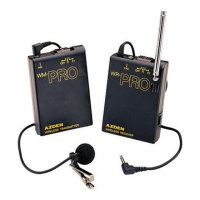
The WLX-PRO consists of the WM-PRO transmitter, WR-PRO receiver, and EX-503 clip-on electret
microphone. Read this instruction manual carefully for correct use and retain it for future reference.
The WLX-PRO operates in the low-interference VHF band and has 2 switchable frequencies :
(F1) 187.550 and (F2) 187.900. You should select the quieter frequency for use.
WR-PRO RECEIVER SET-UP :
(1) LOADING THE BATTERY :(see diagram)
Insert one (1) 9 volt battery into the Receiver, BEING CAREFUL NOT TO FORCE THE BATTERY
COMPARTMENT CLOSED.If it doesn’t close easily, take the battery out and turn it around.
(2) POWER/FREQUENCY SELECTOR SWITCH :
This slide switch is used to turn the system on and off to select a frequency. When not using the WLX-PRO,
make sure that the switch is turned to OFF.
(3) SIGNAL INDICATOR :
This LED has two functions : When you first turn the Power/Frequency Selector Switch of the Receiver on, and
if the Transmitter is not on, the LED will go on and off, indicating that the battery is good. If the Transmitter is
turned on and the Receiver is turned on, and they are on the same frequency, the Signal Indicator LED will
remain on. If the LED is not functioning properly, check your batteries.
(4) SHOE MOUNT :
The Receiver comes with an attached shoe mount for mounting to a video camera. You can also attach the
Receiver with the enclosed Velcro. The shoe mount can be easily removed from the Receiver by unscrewing the
philips head screw in the center of the shoe mount.
(5) OUTPUT PLUG :
Connect the plug from the Receiver into the camera’s “Ext. mic jack”.
(6) TELESCOPIC ANTENNA :
Fully extend the antenna for the best reception.
(7) EARPHONE JACK :
Plug the supplied earphone into the jack to monitor the sound you are recording. Or, you can plug the earphone
into the camera’s earphone jack if it has one.
LOADING BATTERY:
Open the battery compartment lid by sliding it down and raising the lid. Insert a 9 volt battery, into the battery
compartment with the correct polarity. Directions are on the inside left of the battery compartment.
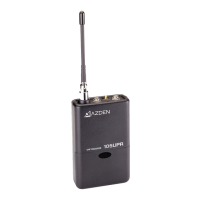
WM-PRO TRANSMITTER  WR-PRO RECEIVER

Other manuals for Azden WLX-PRO

Question and Answer IconNeed help?

Do you have a question about the Azden WLX-PRO and is the answer not in the manual?

Summary

WR-PRO Receiver Setup

Receiver Battery Loading

Instructions for inserting a 9-volt battery into the receiver, ensuring correct polarity.

Power and Frequency Selector

How to turn the system on/off and select frequencies using the slide switch.

Signal Indicator LED Explained

Functions of the LED for battery status and signal confirmation.

Receiver Shoe Mount

Mounting the receiver to a camera using the shoe mount or enclosed Velcro.

Output Plug Connection

Connecting the receiver's output plug to the camera's external microphone jack.

Telescopic Antenna Use

Guidance on extending the antenna for optimal signal reception.

Earphone Jack Monitoring

How to connect an earphone into the jack to monitor recorded sound.

WM-PRO Transmitter Setup

Transmitter Battery Loading

Instructions for inserting a 9-volt battery into the transmitter, ensuring correct polarity.

Microphone Connection and Antenna

Connecting the EX-503 microphone; its cord functions as the transmitter's antenna.

Transmitter Power and Frequency Switch

How to turn the transmitter on/off and select frequencies for optimal reception.

Transmitter Mounting

Methods for attaching the transmitter using the belt clip or placing it in a pocket.

Azden WLX-PRO Specifications

General IconGeneral
TypeWireless Microphone System
TransmitterBodypack
ModulationFM
Dynamic Range100 dB
MicrophoneLavalier
ReceiverDiversity
Audio OutputXLR and 1/4"
Power SupplyAA batteries

Related product manuals