3.2 MODIFYING THE CONNECTION FOR FIRST USE
Your router has an auto connection feature that automatically detects
active connections on its Ethernet WAN and DSL port. Different presets
would be shown on the Selected Profile Preset for each selected Service
provider.
Before proceeding, it is important to take note of the following:
ADSL Subscribers are advised to consult their respective Internet
Service Providers for the details of their internet connection access.
Take note that it is important to ensure that you have followed the
setup on Section 2 for ADSL subscribers.
Fibre Subscribers, however, need not to configure their Internet
Connection method since these are already pre-configured in ONT
devices and are loaded in your router once connected except for
TM Unifi subscribers.
•
•
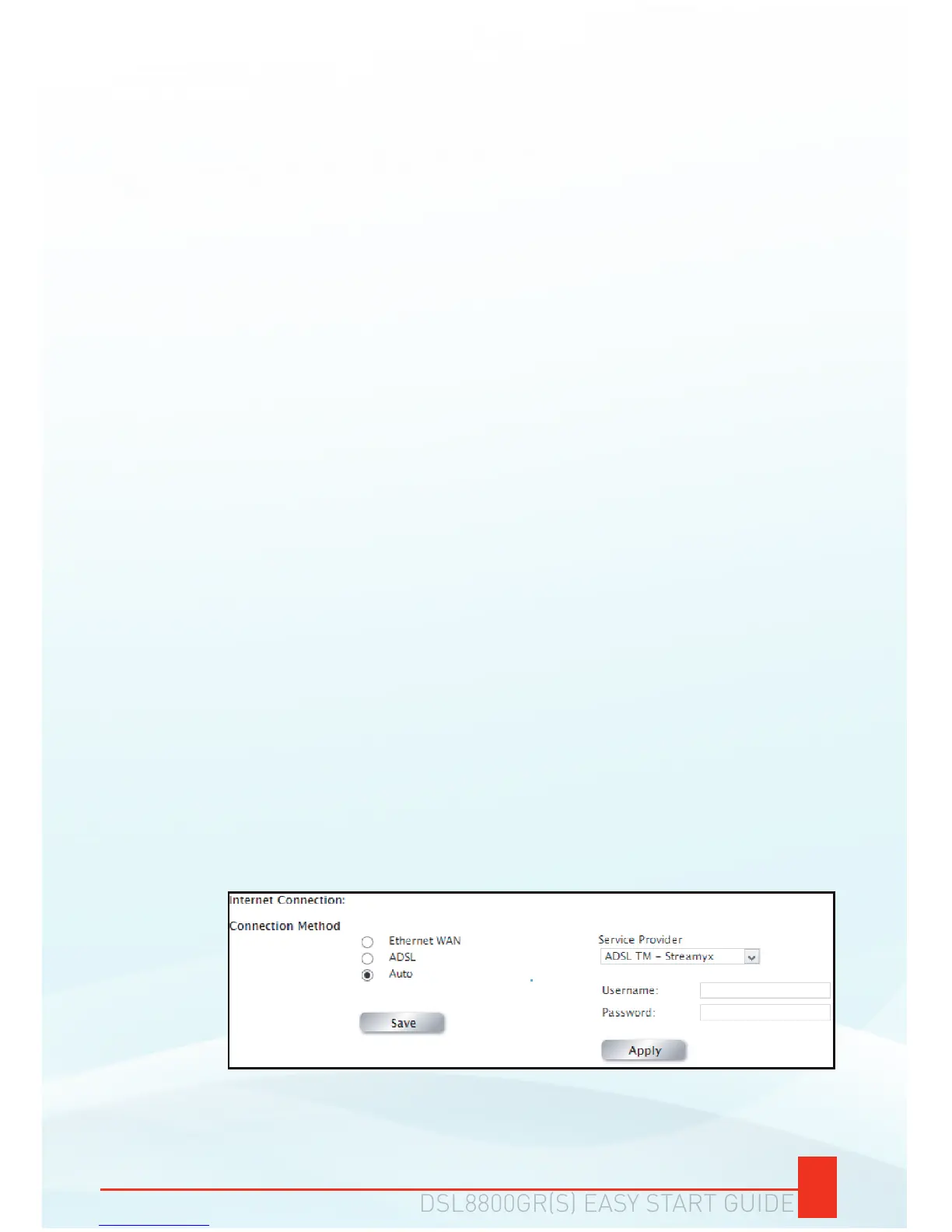
On the Web User Interface, click Quick Internet Setup.
The DSL8800GR(S) has an AUTO-DETECT feature that
automatically detects if the connection is ADSL or FIBRE.
If prompted to input a Username and Password, input correctly
the Username and Password given to you by your Internet
Service provider and press the Connect button.
a.
b.
c.
To modify the Connection for first use:
NOTE: You may change the Connection Method, however, It is
strongly advised that the Connection method is left to AUTO.


 To Next Page