VRK01 US
EN
INSTALLATION
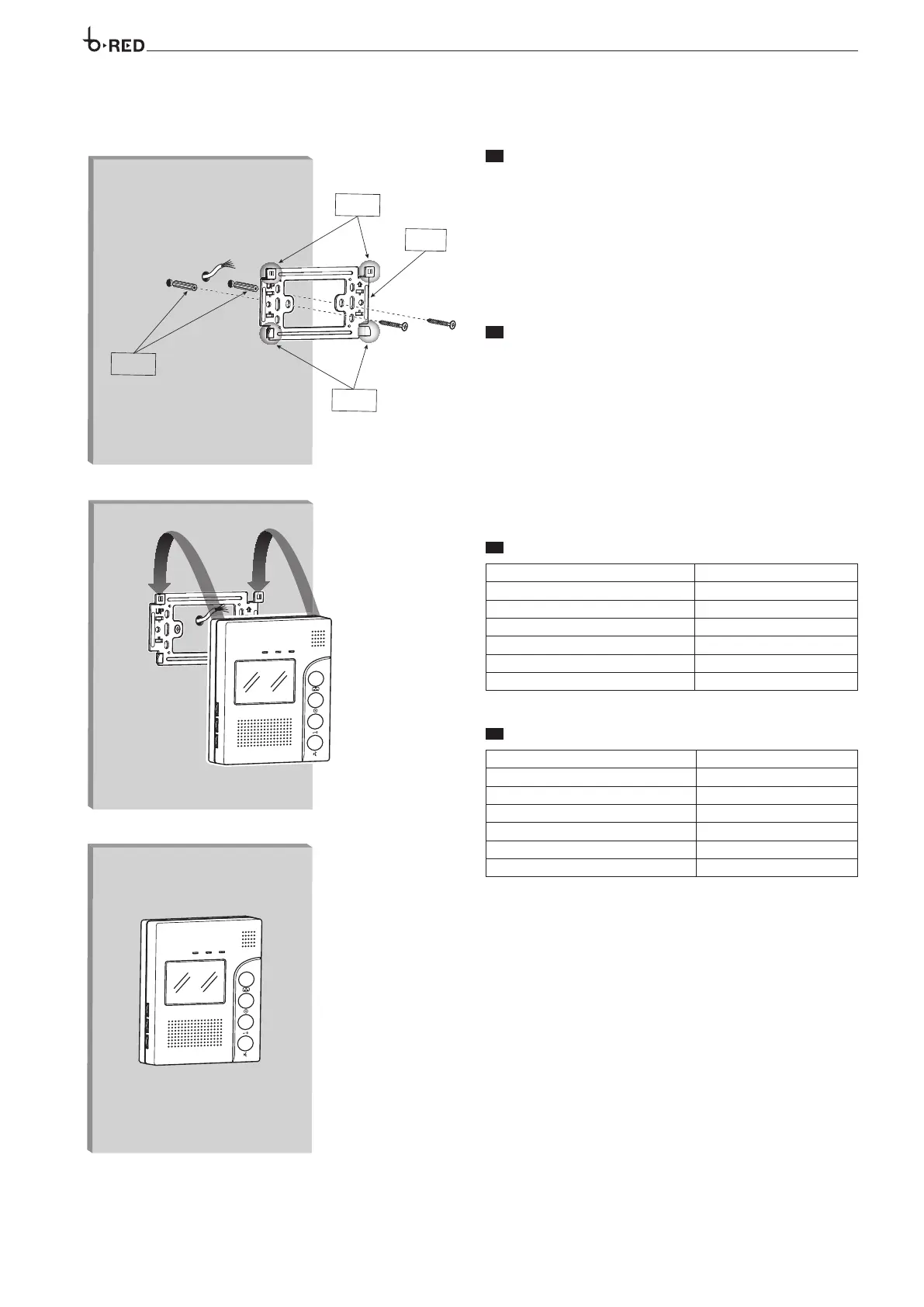
Consider the unit must be fitted at a suitable height in relation to the user.
Position the location where the unit has to be mounted. Use the bracket to
mark the location point accurately.
Drill the holes and use the screw anchors to fill them. Fasten the metallic
support to the wall using the provided screws and observing the UP indica-
tion (figure 1).
According to the wiring diagram, perform the wiring connections.
Mount the unit to the bracket (figure 2).
ES
INSTALACIÓN
Considerar que la unidad debe ser instalada a una altura adecuada en
relación con el usuario.
Seleccione el lugar donde la unidad tiene que ser montada. Utilice el sopor-
te de pared para marcar el punto de ubicación con exactitud.
Taladre los agujeros y utilice los taquetes para llenarlos. Fijar el soporte de
pared utilizando los tornillos suministrados como se observa a continuación
(figura 1).
De acuerdo con el diagrama de cableado, realizar las conexiones del ca-
bleado.
Monte la unidad receptor de video en el soporte de pared (figura 2).
4
ANCHORS
ANCLAS
BRACKET
SOPORTE
HOOKS
GANCHOS
HOOKS
GANCHOS
EN
TECHNICAL FEATURES
Voltage 14.5 VDC
Absorption 400 mA (50 mA stand-by)
Audio mode Duplex
Talking time 2 min
Dimensions 128x180x24 mm
Operating temperature -10 °C +55 °C
Monitor 3.5’’ TFT
ES
CARACTERÍSTICAS TÉCNICAS
Alimentación 14.5 VDC
Consumo 400 mA (50 mA stand-by)
Modo de Audio Duplex
Tiempo de hablar 2 min
Dimensiones 128x180x24 mm
Temperatura de funcionamiento -10 °C +55 °C
Monitor 3.5’’ TFT
ANCHORS
ANCLAS
BRACKET
SOPORTE
HOOKS
GANCHOS
HOOKS
GANCHOS
ANCHORS
ANCLAS
BRACKET
SOPORTE
HOOKS
GANCHOS
HOOKS
GANCHOS



 To Next Page