The B'Twin Count 14+ is a bicycle computer designed to track and analyze cycling performance. It utilizes ANT+ technology for wireless data transmission, ensuring interference-free communication with various sensors.
Function Description:
The Count 14+ computer records and displays a range of cycling data, including current speed, average speed, maximum speed, distance covered (session and total bike distance), pedaling cadence (average and maximum RPM), and heart rate (current, average, and maximum BPM, as well as percentage of maximum heart rate). It also calculates theoretical kilocalories burned during a ride.
The device features a backlit screen for visibility in various lighting conditions. It includes a speed comparer that indicates whether the current speed is faster or slower than the average ride speed. Target zones can be set for cadence and heart rate, with an optional alarm bell to alert the user when they are outside these zones.
The computer has an internal memory that stores ride data, allowing for analysis directly on the device or by transferring the data to a PC using Geonaute Software. The software enables more detailed analysis and charting of performance.
Important Technical Specifications:
- Connectivity: ANT+ wireless technology for sensor communication.
- Sensors: Compatible with speed/cadence sensors and optional heart-rate monitors.
- Memory: Stores ride data. The memory duration depends on the sampling interval chosen (6 hours for 2-second intervals, 15 hours for 5-second intervals, 30 hours for 10-second intervals).
- Display: Backlit screen.
- Power: Battery-powered (battery replacement is a maintenance feature).
- Language Support: English, French, Spanish, and Italian for menus.
- Bicycle Profiles: Supports up to 3 different bicycle profiles, each with its own speed/cadence sensor and customizable settings.
- Wheel Size Configuration: Predefined tyre sizes are available, or a custom circumference can be entered in millimeters.
Usage Features:
- Initial Setup: Requires initial configuration of units (European or imperial), user profile (gender, age, weight, height), date and time, and bicycle settings (name, wheel size).
- Navigation: Uses three buttons (B1, B2, and S) for menu navigation, selection, and confirmation. B1 and B2 are used to switch between menus or modify values, while S is used to enter a menu or confirm a selection. Holding B1 or B2 down allows for faster adjustment of values.
- Starting a Session: From the main menu, select "START" to begin a ride. The screen displays remaining memory time before switching to the ride display.
- During a Session:
- Modes: The computer operates in various modes: speed/distance, cadence, heart rate (optional), time, and double display (current cadence and heart rate, or partial distance).
- Mode Switching: Press B1 to switch between modes.
- Function Display: Press B2 to view different functions within each mode.
- Sensor Detection: Before each ride, the computer searches for enabled sensors. Users must ensure sensors are active (e.g., by turning wheels or crank for speed/cadence, wearing the heart rate strap). If a sensor is missing, the computer displays "SENSOR MISSING" and offers options to retry, continue without sensor data, or add a new sensor.
- Alarm Bell: If enabled, the alarm bell beeps when cadence or heart rate falls outside the target zones. It emits a long bip and displays "RETURN TO CADENCE" or "RETURN HR" when values return to the target zone. The alarm can be enabled/disabled during a ride by pressing B1 and B2 simultaneously for 2 seconds.
- Stopping a Session: Press S for 2 seconds to quit a session. Users can choose to save the ride report or quit without saving.
- After a Session:
- Report Menu: Access the "REPORT" menu to view recorded ride data or transfer it to a PC.
- Viewing Reports: Reports are sorted by session date and time. Details include distance, time, average/max speed, average/max cadence, time/percentage in cadence target, average/max heart rate, time/percentage in heart rate target, and calories burned.
- Deleting Reports: Reports can be deleted from memory to free up space.
- Sampling Rate: The interval at which data samples are taken can be adjusted (2, 5, or 10 seconds), affecting chart accuracy and memory capacity.
- Option Menu: Used to adjust computer functions and settings, including:
- Cadence Settings: Activate/deactivate target zones, set minimum/maximum limits, and enable/disable the alarm bell.
- HR (Heart Rate) Settings: Select units (BPM or %MAX HR), choose automatic or manual MAX HR calculation, set MAX HR, activate/deactivate target zones, set minimum/maximum limits, and enable/disable the alarm bell.
- Time Settings: Set time, date, and display type (12-hr or 24-hr).
- User Profile: Adjust gender, age, weight, and height.
- Bike Settings: Change settings for existing bikes or add new ones (up to 3). This includes setting wheel size and naming the bike.
- Light: Toggle the backlit screen ON/OFF. The light consumes more energy when activated.
- Units: Choose between European (km, kg, cm) or imperial (mi, lbs, inches) units.
- Sensors: Pair new optional sensors (heart rate monitor or speed/cadence sensor) or switch existing sensors ON/OFF.
- Language: Select the menu language.
- Data Transfer to PC: Connect the computer to a PC via a supplied cable. "PC" appears on the screen. Use Geonaute Software to import and analyze ride data.
Maintenance Features:
- Battery Replacement: The computer indicates when the battery is low, requiring replacement.
- Sensor Pairing: New sensors need to be paired with the computer once during initial setup.
- Cleaning: While not explicitly detailed, general electronic device cleaning practices would apply.

 Need help?
 General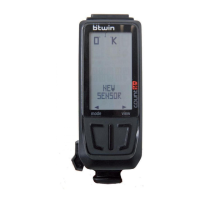

 To Next Page