8
EN
B2
B2
B2
B1
B1
B1
S
- 2nd method:
STARTING A SESSION
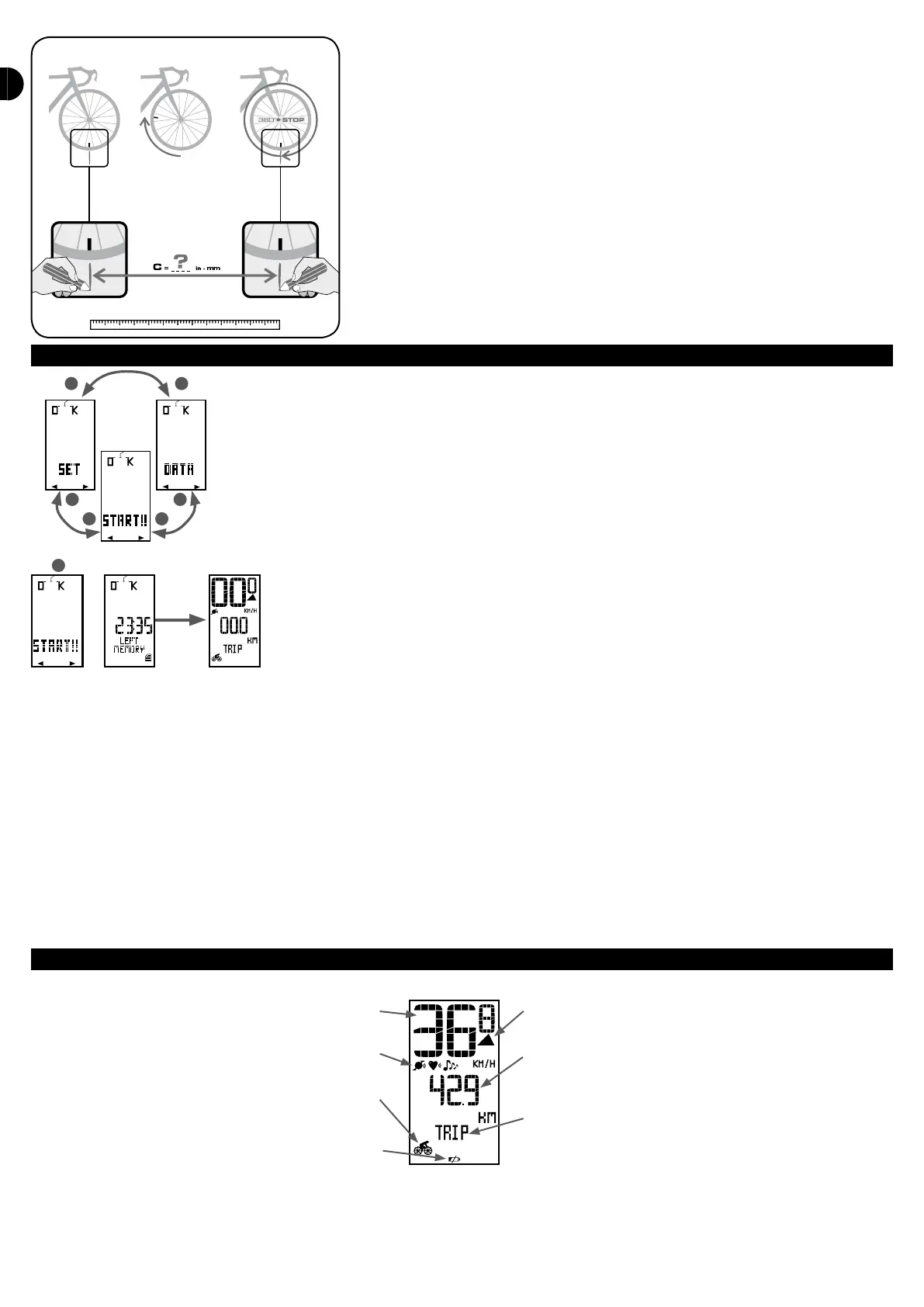
In the main menu, press on B1 or B2 to choose the DEPARTURE menu.
Press on S to start a session. For 2 seconds, the screen displays the remaining memory time in which to save the values
recorded during the ride (displayed in hh:mm). The screen then automatically switches to the display you will see
throughout the ride.
Comments:
- If there is not sucient memory time to save your entire ride, you may quit the session (press for 2 sec on S) and delete rides from the memory in the REPORT menu.
- Before each ride, your computer searches for the sensors (speed/cadence and the optional heart rate strap if enabled). During this search the values ash on the screen.
- Warning: the computer only detects a sensor when it sends a signal. You must therefore turn the wheels or the crank to enable the speed-cadence sensor and you must
wear the heart rate strap.
- If the computer cannot detect one or more sensors, the screen will display «SENSOR MISSING» for 2 seconds. You may then choose from the following:
- Try again: try again to start the connection procedure again
- Continue : you can still benet from all the computer functions, except the values measured by the sensor.
- New sensor: to hook up a new sensor
The most common reasons for a missing sensor:
- The sensor is not sending out a signal. Turn the rear wheel or the crank for the speed-cadence sensor, or put the heart rate strap on.
- The sensor battery is low: it needs to be replaced. You can check whether the speed-cadence sensor battery is low by pressing on the sensor button: the green light on
the speed sensor no longer lights up.
- The computer and sensors are too far from each other. The sensors must be no more than 3 metres from the computer.
DURING YOUR RIDE
There are several display levels for when you are riding:
Current speed
Active sensor indicator
Mode indicator
Battery indicator
Speed comparer
Display of secondary function (value)
Display of secondary function (name)
The current speed is always displayed at the top of the screen, as is the speed comparer, that shows that you are going faster (upwards arrow) or slower (downwards
arrow) than the average ride speed.
On a second display level you may view a secondary function (value + name). All the functions are organised into 5 modes.


 To Next Page