10
EN
B2
B2
B2
B2
B1
B1
B1
B2
B1
S
S
TIME MODE
Indicated by the following pictogram:
This mode features the following functions:
- SESSION TIME: time elapsed since the beginning of the ride (this is only measured while in motion, not when stationary).
- TIME: time
DOUBLE DISPLAY MODE
Indicated by the following pictogram:
This mode is only available if you have enabled heart ratemode and when in motion (not when stationary)!
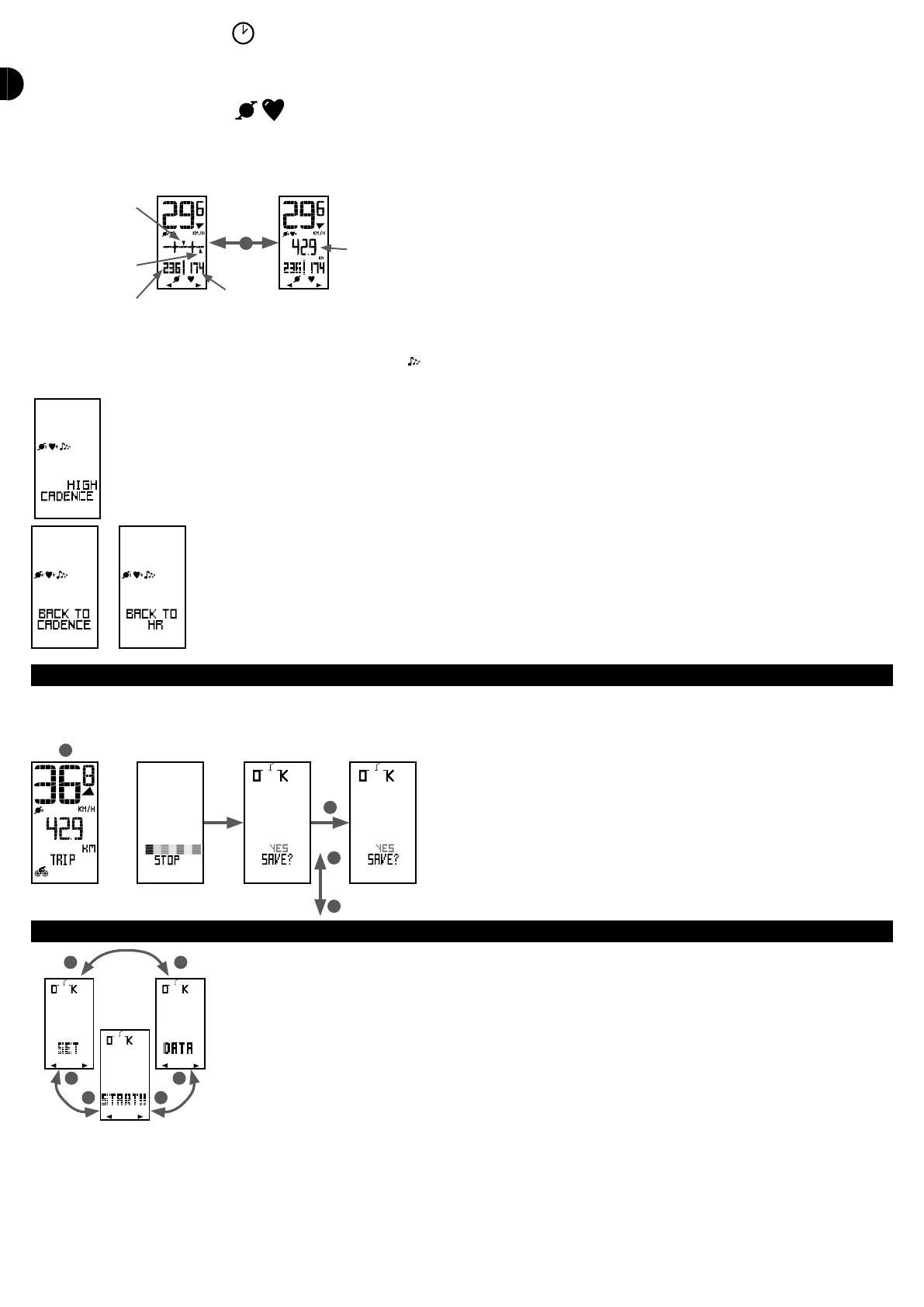
This is a specic mode which simultaneously displays the current cadence and heart rate.
A second reading oers a choice between a graphic view of cadence target and heart rate zones or a partial distance display (distance covered since the beginning of the
ride). Press on the button B2 to switch between these 2 views.
Current heart rate
compared to the
target programmed
Current cadence
compared to the
target programmed
Current cadence
Current heart
rate
Partial distance
ALARM BELL
If you have enabled the alarm bell in the OPTION menu (indicated by the pictogram), the computer will emit a 5-second beep three times to alert you to the fact that
you are outside the cadence or heart rate target zone.
The screen will also show whether your cadence or heart rate is too high or too low, for 4 seconds.
When your cadence or heart rate comes back to the target zone, the computer emits a long bip and the screen displays RETURN TO CADENCE or RETURN
HR.
If you want to enable or disable the alarm during your ride, press simultaneously on B1 and B2 for 2 seconds..
QUITTING YOUR SESSION
To quit your session, press on S for 2 seconds.
You may now save your ride report or quit without saving. Choose YES or NO by pressing on B1 or B2 and press on S to conrm.
This brings you back to the main menu where you may view your ride report in the REPORT menu.
2 sec.
NO
AFTER A SESSION
After your ride, you may view the report or transfer the data to your PC.
In the main menu, select the REPORT menu by pressing on B1 or B2 and press on S to conrm.
The REPORT menu features 5 sub-menus:
- VIEW REPORT: to view your ride reports
- DELETE REPORT: to delete reports
- SAMPLE: to set the interval between each sample and thus the memory time available
- QUIT: to quit the REPORT menu and return to main menu


 To Next Page