kmi
mm
total
mi/h
km/h
0 K
x x
reset
kmtotal
km/h
Please note : You may quit the REPORT menu at any time and return to the main menu by pressing on B1 and B2 simultaneously
for 2 seconds. This is a shortcut to avoid having to navigate through to QUIT to quit the menu.
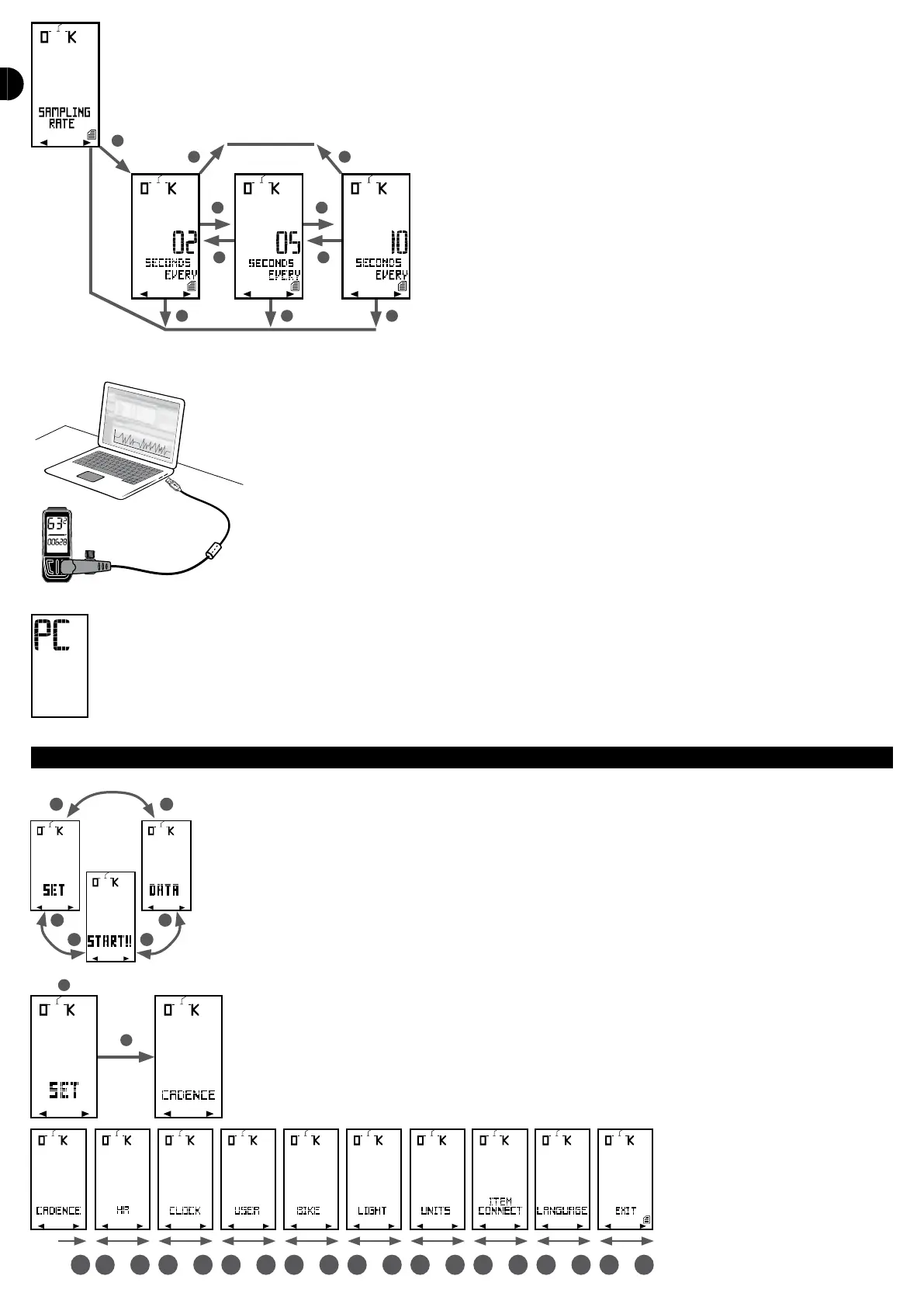
TRANSFERRING DATA TO THE PC
You can transfer your ride data on your COUNT14+ computer to your PC.
This is only possible if you have installedGeonaute Software on your PC. You may download this software free of charge on
www.geonaute.com.
Once the software has been installed, connect the computer with your PC using the cable supplied with the computer.
«PC» appears on the computer screen.
Execute the Geonaute Software programme, click on «import from the bicycle computer» and follow the instructions. More detailed instructions are
available on the www.geonaute.com website.
MENU OPTION
The third main menu of the COUNT 14+ computer is the OPTION menu, which is used to set your computer’s functions.
In the main menu, select the REPORT menu by pressing on B1 or B2 and press on S to conrm.
You are in the rst setting menu (CADENCE). To switch between adjustment menus, use B1 and B2. To enter a menu, press on S.


 To Next Page