Multi-Zone Gas Monitors
P/N: 3015-5074 Rev 11 25
SECTION 3. SETUP PROGRAMMING
3.1. Initial Power Up
When the MZ monitor is powered up, all front panel LEDs will illuminate and a splash screen will appear,
displaying the monitor’s firmware version level. Note that on CO
2
models, a “Clearing Purge Line”
message is displayed for approximately 2.5 minutes before warm up begins. After a moment, the Warm
Up screen will be displayed and the green MONITOR ON light will blink.
After a 15-minute warm up cycle, the MONITOR ON light will glow steadily and the Data Display screen
will be displayed. (See Appendix C for an overview map of the screens in the system.)
3.2. Data Display Screen
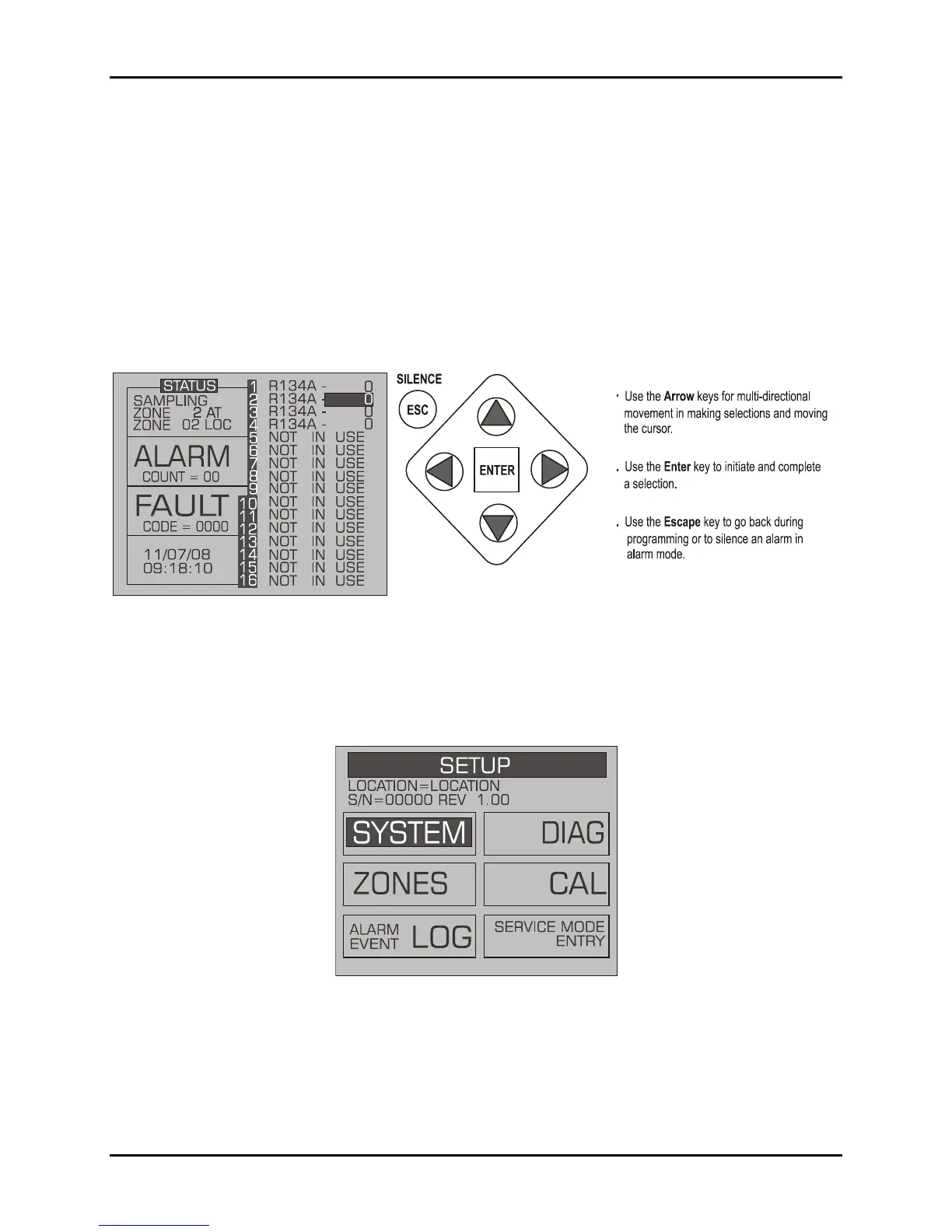
Figure 3-1. Data Display Screen and Front Panel Keypad
3.3. Navigating to the 1
st
Setup Screen
From the Data Display Screen, press the UP or DOW N arrow key. SETUP will be highlighted in the first
box. Press ENTER to select this option and display the Setup screen (see below).
Figure 3-2. System Setup Screen #1
3.4. Navigating to the 2
nd
Setup Screen
From System Setup Screen #1, select the SYSTEM option to go to System Setup Screen #2. Select the
ESC key to return to the Syste m Setup Screen #1.


 To Next Page