112
REFRIGERATORS
RMD10.5 AND RMD10.5X
S
WITCHING ON THE REFRIGERATOR
• Press on/off button for 2 seconds
- The refrigerator starts with the last
selected settings.
SWITCHING OFF THE REFRIGERATOR
• Press on/off button for 4 seconds
- A beep sounds and the refrigerator
switches off.
OPERATING THE REFRIGERATOR
CONTROL
• Repeatedly press mode button, until the
LED indicates the desired operating mode.
• Repeatedly press temperature selection
button, until the desired temperature level
is set.
SETTING THE COOLING CAPACITY
• Repeatedly press temperature selection
button until the desired temperature level
is selected.
NOTE
For ambient temperatures of +15 °C to +25
°C, select the average cooling capacity.
For further information on the operation of
the Dometic 10 series fridge please refer to the
appliance user manual
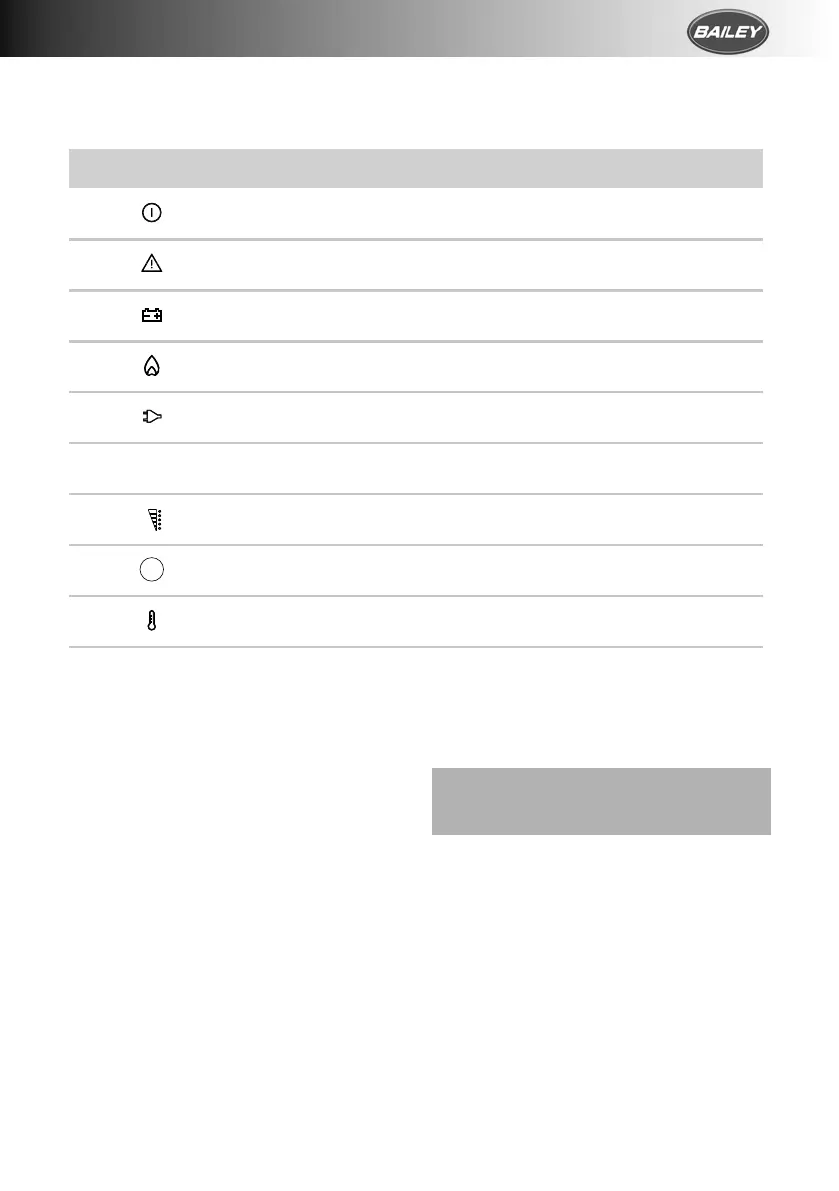
The LED display has the following operating and display elements.
Using the refrigerator RMD10
16
RMD10.5 and RMD10.5X
The LED display has the following operating and display elements (fig. 1 B,
page 3):
5 Using the refrigerator
I
Symbol Description
ON/OFF button
Fault indication
Operating with DC power
Operating with gas
Operating with AC power
Automatic mode
Temperature indication
Energy selection button
Temperature selection button
NOTE
• Before starting your new refrigerator for the first time, clean it inside
and outside with a damp cloth for hygienic reasons.
• When using the refrigerator for the first time, there may be a mild
odor which will disappear after a few hours. Air the living space well.
• Park the vehicle so that it is level, especially when starting up and fill-
ing the refrigerator before setting off on a journey.
• The cooling performance can be affected by:
– the ambient temperature (e.g. when the vehicle is exposed to
direct sunlight)
– the amount of food to be refrigerated
– how often you open the door
A
MODE
RMD10-O-WEST.book Seite 16 Sonntag, 27. Januar 2019 7:05 07



 To Next Page