PRODUCT OVERVIEW
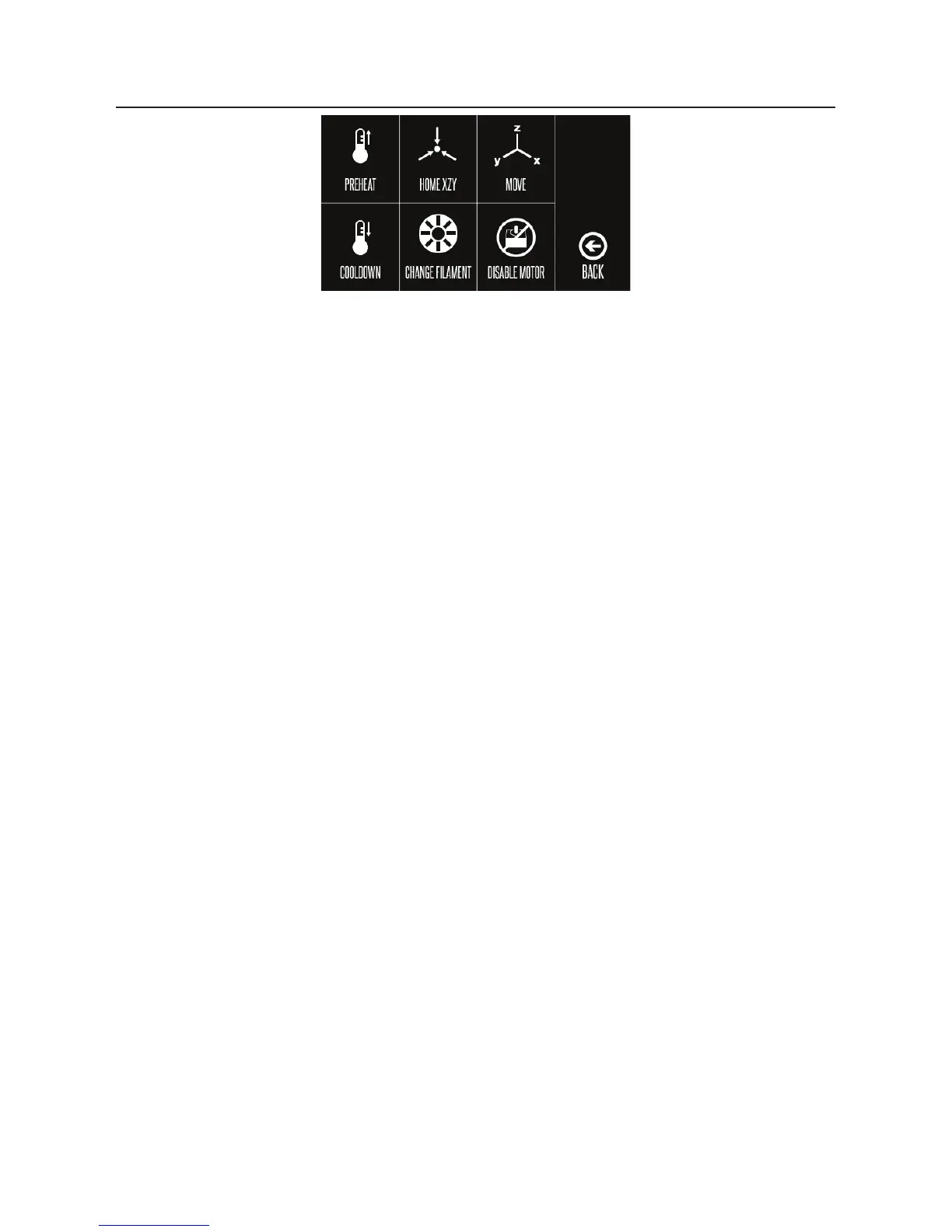
Quick Menu
• Preheat: Preheat Extruder and Heat Bed Temperature for PLA or ABS lament
• Home XZY: Automatically resets Extruder location to Home position
• Move:
• -X Axis+: Move the Extruder along the X-Axis manually
• -Z Axis+: Move the Extruder along the Z-Axis manually
• -Y Axis+: Move the Extruder along the Y-Axis manually
• Extruder Flow:
• In: Pulls lament into the Extruder
• Out: Ejects the lament out of the Extruder
• Disable Motor: Unlocks Print Bed to be movable manually
• Home X: Position the Extruder to the home position on the X-Axis
• Home Y: Position the Extruder to the home position on the Y-Axis
• Home Z: Position the Extruder to the home position on the Z-Axis
• Back: Return to Quick Menu
• Cool Down: Select to begin cooling down your Printer’s Print Bed and Extruder
• Change Filament:
• Add Filament: Select from Touch Screen the type of lament you will be inserting.
• Remove Filament: Select from Touch Screen the type of lament you will be removing.
Your Printer will begin to heat up the Extruder and Print Bed to the correct temperature
settings of selected lament type
• Raise Extruder: Automatically raise the Extruder from the Print Bed
• Preheat PLA: Select for printing with PLA Filament. Once selected, the Bed Temperature
and Extruder Temperature status will be displayed on touch screen
• Preheat ABS: Select for printing with ABS Filament. Once selected, the Bed Temperature
and Extruder Temperature status will be displayed on touch screen
• Back: Return to Change Filament Page
• Disable Motor: Unlocks Print Bed to be movable manually on x and y-axis only
• Back: Return to Main Menu


 To Next Page