Need help?
Do you have a question about the Baldwin Evolved and is the answer not in the manual?
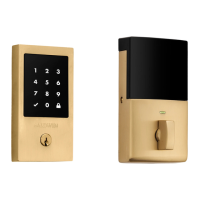
Touch the lock exterior on the metallic surface to lock and unlock.
Communicates door status and low battery alerts. Can be turned on/off by Switch #1.
Used to reset the lock, deleting all eKeys and fobs. Refer to 'System Reset' on page 7.
Used for enrolling phones and fobs into the system.
Controls the door lock status LED, can be turned off with Switch #1.
Enables locking the door by touching the exterior three times. See page 7.
Enables/disables beeping sounds during programming and operation.
Automatically re-locks the door 30 seconds after unlocking. See page 7.
Describes the process of locking the door using the touch surface and light string animations.
Details the process of unlocking the door via the touch surface and light string.
Allows locking the door from outside without a smartphone or fob by touching the lock three times.
Automatically re-locks the door 30 seconds after unlocking when enabled.
Describes various light string color patterns indicating lock status or errors.
Explains red light patterns signaling low batteries or jammed deadbolt.
Details status LED colors (green/amber) for door unlocked/locked states.
Activate the fob by pressing its button for the first time.
Press fob button to initiate pairing and then press the lock's Program button.
Hold fob close to back panel until it turns solid green to confirm enrollment.
Test the fob with standard key outside to ensure it locks and unlocks the door.
Helps prevent unlocking by unauthorized users when your device is inside.
View the lock's activity history through the Kevo app or web portal.
Configure custom notifications for lock events via the Kevo app.
Enables remote locking/unlocking and status checks when away from home.
 General
| Brand | Baldwin |
|---|---|
| Series | Evolved |
| Category | Locks |
| Power Source | Battery |
| Connectivity | Bluetooth |
| Keypad | Yes |
| Re-Key Technology | SmartKey |
| Lock Type | Deadbolt |
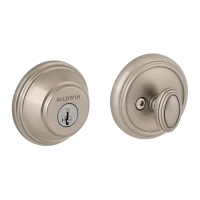
| Finish Options | Satin Nickel |
| Material | Brass |
| Keyway | Kwikset KW1 |
| ANSI Grade | Grade 1 |


 To Next Page