The battery pack is located inside the
interior assembly, and it holds four (4) AA
batteries. For best results, use new, non-
rechargeable Alkaline batteries only.
Dispose of the old batteries according
to local laws and regulations.
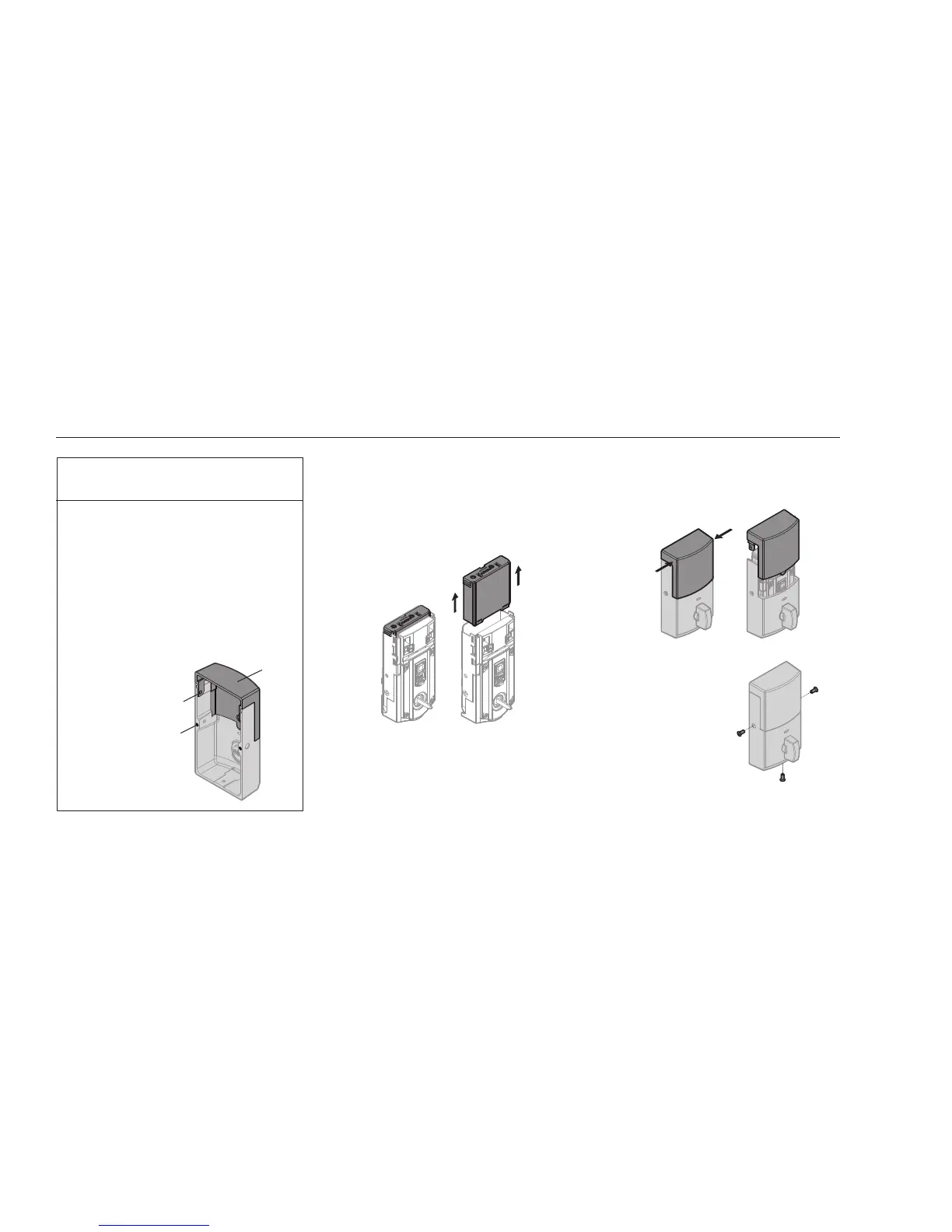
If the window on the interior cover is unlocked,
gently squeeze the top sides of the window and
pull up when you need to access the battery pack.
squeeze
If the window on the
interior cover is locked,
remove the three (3)
screws that secure the
interior cover to the interior
assembly when you need to
access the battery pack.
LOCK BATTERY REPLACEMENT
The interior cover features a window that
is unlocked by default so you may slide
it up for quick access to programming
buttons and the battery pack.
For added security, you may lock the window
to prevent access to the programming buttons.
Note: This will require the removal of the interior
cover to access the battery pack. To lock the
window, remove the two screws from the back of
the interior cover and install them in the window.
window
ACCESS TO BATTERY PACK
AND BACK PANEL
Remove screws.
Install screws in window.



 To Next Page