ENGLISH
9
FOB PAIRING
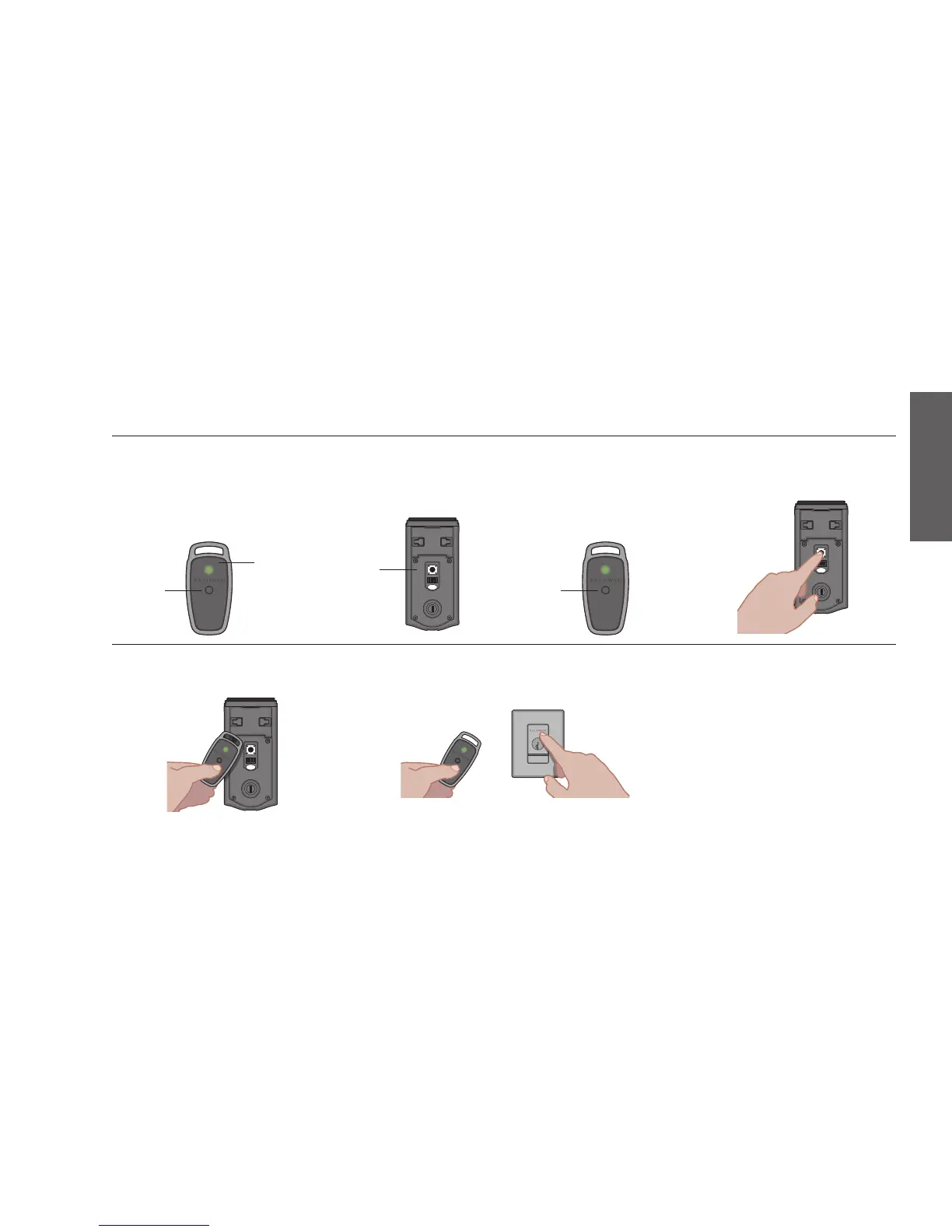
1. To activate the fob for the rst
time after unboxing, press and
release the fob’s button (do
not press and hold). The fob’s
internal LED will ash green.
2. Remove the interior cover
or window to gain access
to the back panel. See
page 10 for details.
3. Press and release the fob’s
button again to intiate pairing.
The LED will begin to blink green.
4. Press and hold the Program
button on the back panel
for two (2) seconds.
5. Hold the fob close against the back panel. The
fob’s LED will begin to blink faster. When it turns
solid green, the fob is successfully enrolled. If
A B
button button
LED
A B
back
panel
A B
the LED ashes
red, pairing is
unsuccessful.
6. Bring your fob and standard key outside and
close the door. Make sure there is a clear line of
sight between the fob and the lock. Test the fob
to make sure it locks and unlocks the door.
If you are unable to pair the fob, reboot
the lock and try steps 2-6 again.
To reboot, remove the battery pack,
wait a few seconds, then reinsert the
battery pack. See page 10 for battery
removal instructions. When the lock
reboots, the light string will ash amber.



 To Next Page