The Baldwin fob accessory
(8380) is a Bluetooth device
that provides the same
touch-to-open convenience
as a smartphone.
Up to eight fobs can be
enrolled in a single lock, and
a single fob can be enrolled
in up to 25 different locks.
Note: You may choose
to use only fobs, only
smartphones, or a
mix of both in your Baldwin system.
When using a fob to lock and unlock the
door, you may hold it in your hand, pocket,
bag or purse as long as there is a clear line
of sight between the lock and the fob.
For fob pairing instructions, see page 9.
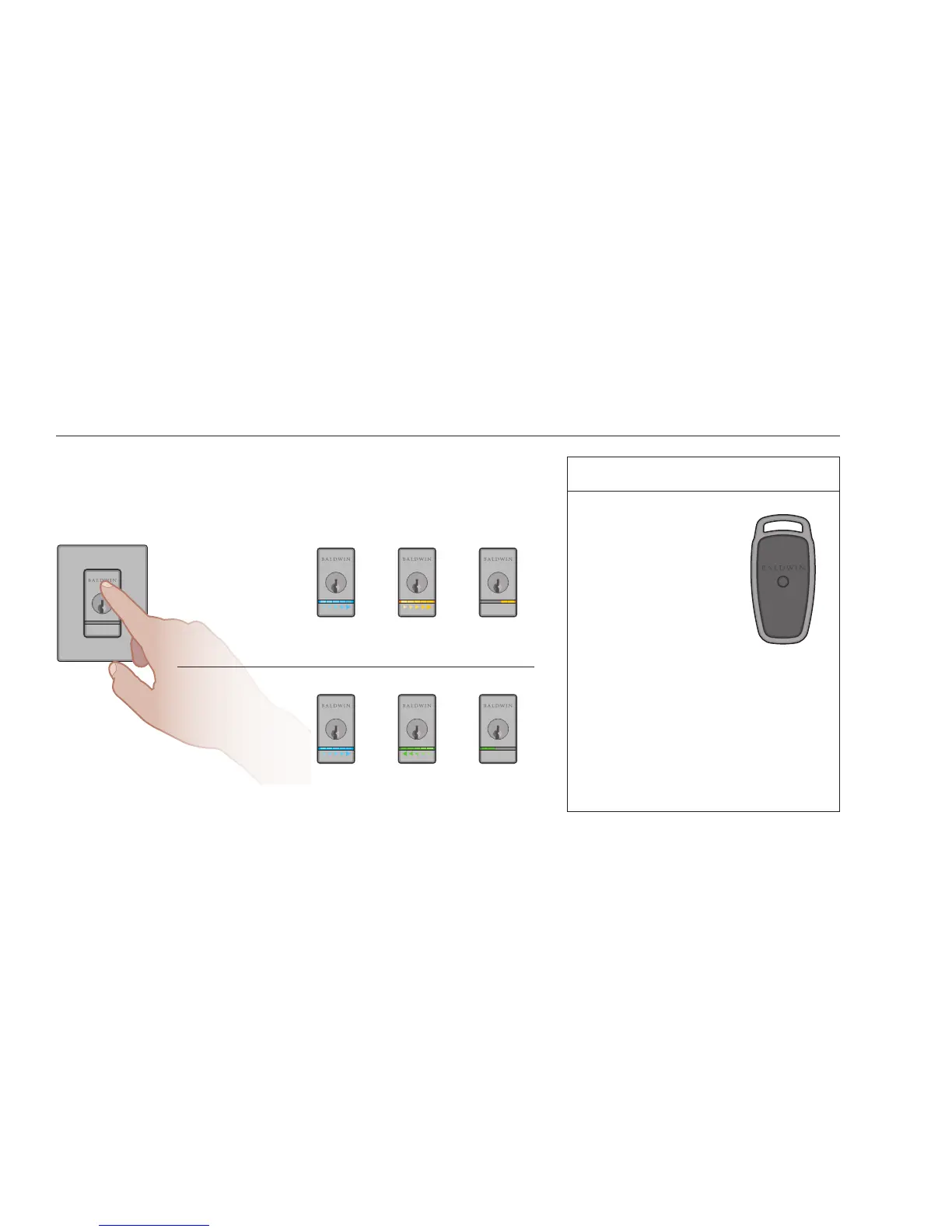
LOCKING THE DOOR
Touch the lock exterior
on the touch surface. The
light string will display
the following animations,
the lock will beep once,
and the door will lock.
UNLOCKING THE DOOR
Touch the lock exterior
on the touch surface. The
light string will display the
following animations, the
lock will beep twice, and
the door will unlock.
NORMAL USE
When using your phone to lock and unlock the door, make sure the phone is on,
Bluetooth is enabled, and the Kevo app is running in the background.
You may hold the phone in your hand, pocket, bag or purse as long as
there is a clear line of sight between the lock and the phone.
FOB ACCESSORY
blue sweep amber sweep,
moving towards
door edge
last 2 LEDs
remain on for
2 seconds
blue sweep green sweep,
moving away
from door edge
last 2 LEDs
remain on for
2 seconds



 To Next Page