CONTROL AND COMMAND EQUIPMENT LME...
OPERATION.
RED
YELLOW
GREEN
The reset button «EK...» is the main element to access all diagnostics fun-
ctions (activation and deactivation) and serves to unlock the command and
control device.
Both «LED» and «EK...» are positioned under the transparent button. Pressing this button, you reset the command and control equipment.
There are two diagnostics choices:
1. Visual indication directly on the reset button: operation and diagnostics of device status.
2. Diagnostics with interface: in this case the OCI400 connecting cable is necessary and it can be connected to a PC with ACS400 software, or
to gas analysers of different manufacturers.
VISUAL INDICATION.
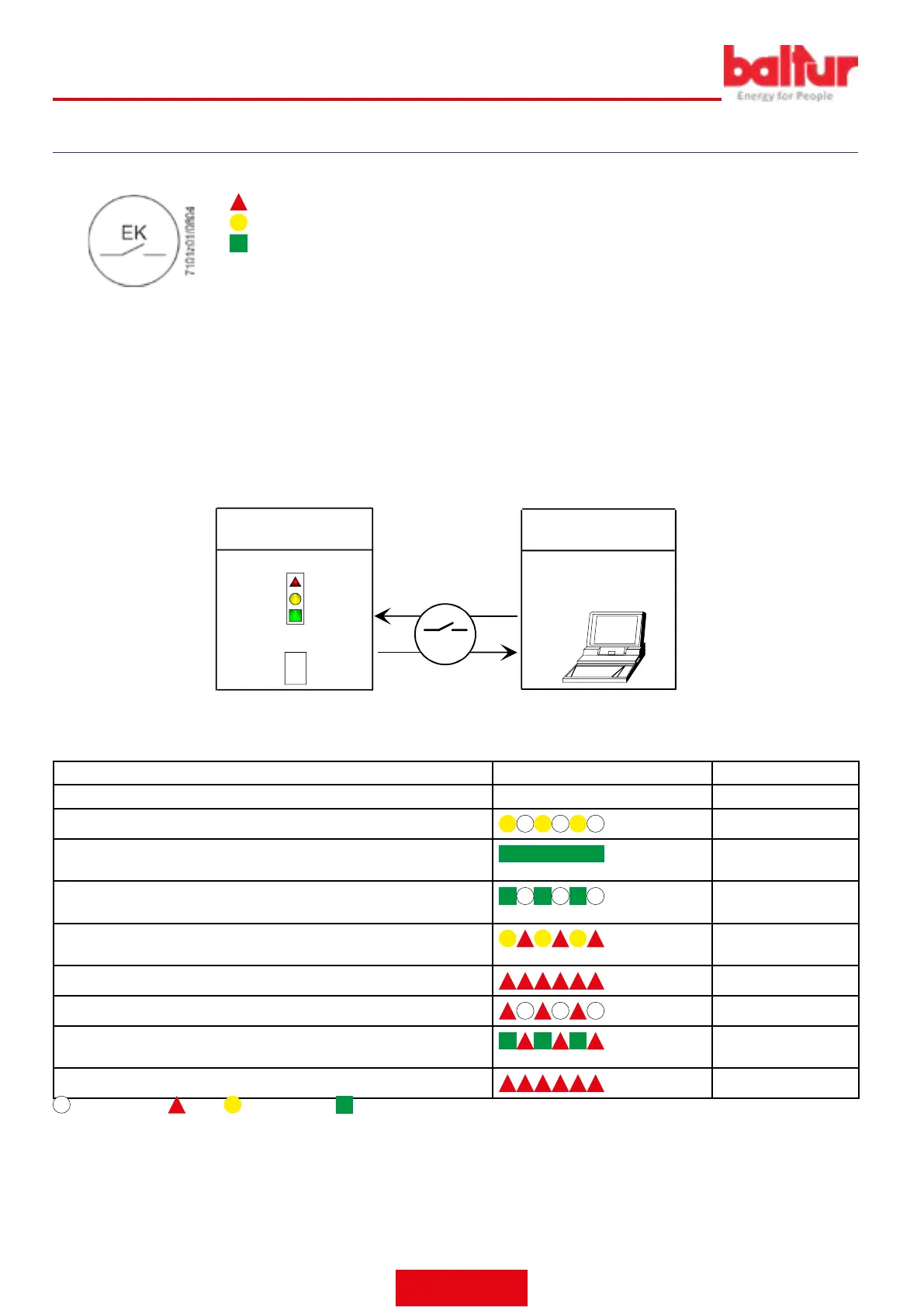
During operation, the command and control equipment phase is indicated on the reset button. The table lists all colour sequences and their
meaning. To activate the diagnostics function, hold the reset button down for at least 3 seconds. A quick red ashing indicates that the function
is active. Likewise, hold the reset button down for at least 3 seconds to deactivate the function (the switching will be indicated with a ashing
yellow light).
EK
xxxxxxxx
xxxxxxxx
xxxxxxxx
xxxxxxxx
xxxxxxxx
xxxxxxxx
> 3 s
Operating position
PC interface / diagnostic
analyser
Colour code table
Diagnostics
Operating position
COMMAND AND CONTROL DEVICE STATUS INDICATION.
Condition Colour sequence Colours
Waiting conditions TW, other intermediate conditions . . . . . . . . No light
Ignition phase
Intermittent yellow
Correct operation, current strength of ame detector above the minimum
allowed
Green
Incorrect operation, current strength of ame detector below the minimum
allowed value
Intermittent green
Decrease in power supply voltage
Alternating Yellow
and Red
Burner shut down condition
Red
Fault indication (see colour key)
Intermittent red
Extraneous light upon burner start-up
Alternating Green and
Red
Quick ashing for diagnostics
Quick ashing red
NO LIGHT. RED. YELLOW. GREEN.
ENGLISH
30 / 42
0006160079_202008




 To Next Page