EasyManua.ls Logo

B&D PanelMax - User Manual

B&D PanelMax
6 pages
Print Icon
To Next Page IconTo Next Page
Loading...
1.0 USER OPERATING CONTROLS
PanelMax
Sectional Door Openers
Quick Operation Guide
01
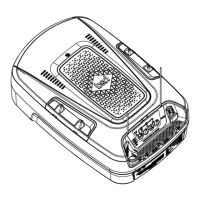
Button Function
01 Close
02 Close indicator
03 Stop / Set
04 Open
05 Open indicator
06 Mode
07 Status indicator
08 Remote status indicator
09 Adjustment indicator
02
03 04
05
06
07
0809

Questions and Answers

Summary

User Operating Controls

Button Functions and Indicators

Summary of button functions and indicator light meanings for the door opener controls.

Manual Door Operation

Disengaging the Opener

Steps and precautions for manually disengaging the garage door opener.

Engaging the Opener

Steps and precautions for manually engaging the garage door opener.

Coding a Remote Control

Coding a Remote Control

Procedure for programming a new remote control directly to the opener unit.

Remotely Coding a Remote Control

Procedure for programming a remote by duplicating an existing remote.

Changing a Battery

Battery Replacement Procedure

Step-by-step guide for changing the remote control battery and safety precautions.

Smart Phone Control

Smartphone Control Setup

Guide for connecting the opener to a smartphone via a smart hub and Wi-Fi network.

Troubleshooting

Troubleshooting Common Issues

Table of common issues with garage door openers and their corresponding remedies.

Caring for Your Opener

Preventative Servicing and Maintenance

Importance of regular servicing for opener performance and warranty.

B&D PanelMax Specifications

General IconGeneral
Drive TypeChain Drive
Courtesy LightYes
Operating Temperature-30°C to 70°C
Storage Temperature-20°C to 70°C
CompatibilityCompatible with most sectional garage doors

Related product manuals