Page 2 of 6
SELECTING THE PROPER CHANNEL FOR COMMUNICATION
There are two ways to select a channel on the YR,
direct entry using the keypad, and
Up/Dn arrow keys.
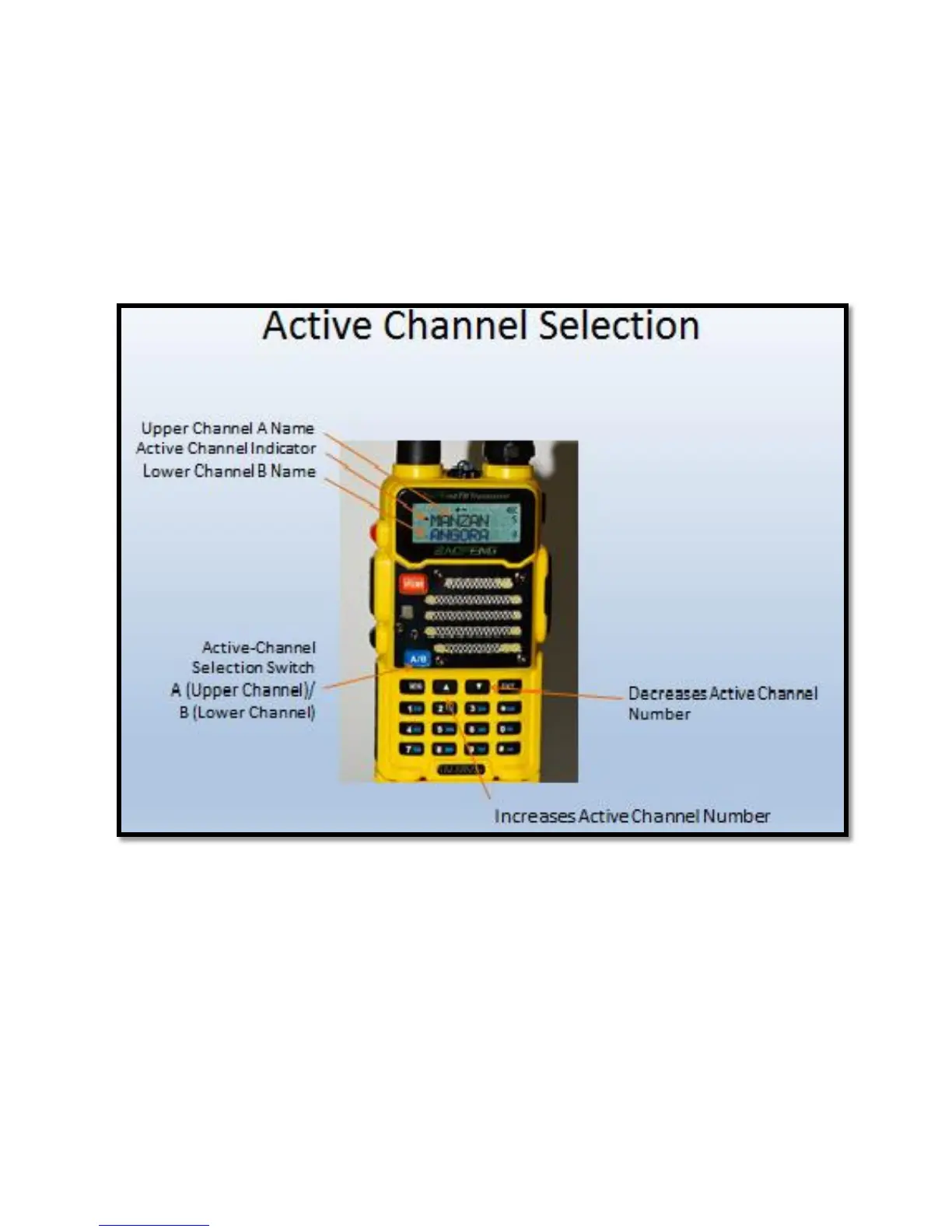
The YR is capable of displaying two channels, Channel A and Channel B as shown in Figure 2
below.
Figure 2
NOTE: The YR displays two channels, but it does not monitor both channels at the same time.
Refer to Figure 2 noting the “Active Channel Indicator” which consists of a small caret symbol
to the left of the active channel’s name. In Figure 2, it is to the left of the “M” in Manzanita.
Pressing the blue A/B button changes the active channel between either channel A or B. (Fig. 2)
The YR listens and talks only on the active channel.
Channel Selection using the keypad. The desired channel is selected by using the keypad to
enter a three-digit channel number, using prefix zeros if necessary. For example, the Manzanita



 To Next Page