EasyManua.ls Logo

Baofeng UV-9R - Page 8

Baofeng UV-9R
34 pages
Print Icon
To Next Page IconTo Next Page
To Previous Page IconTo Previous Page
Loading...
USER'S
MANUAL
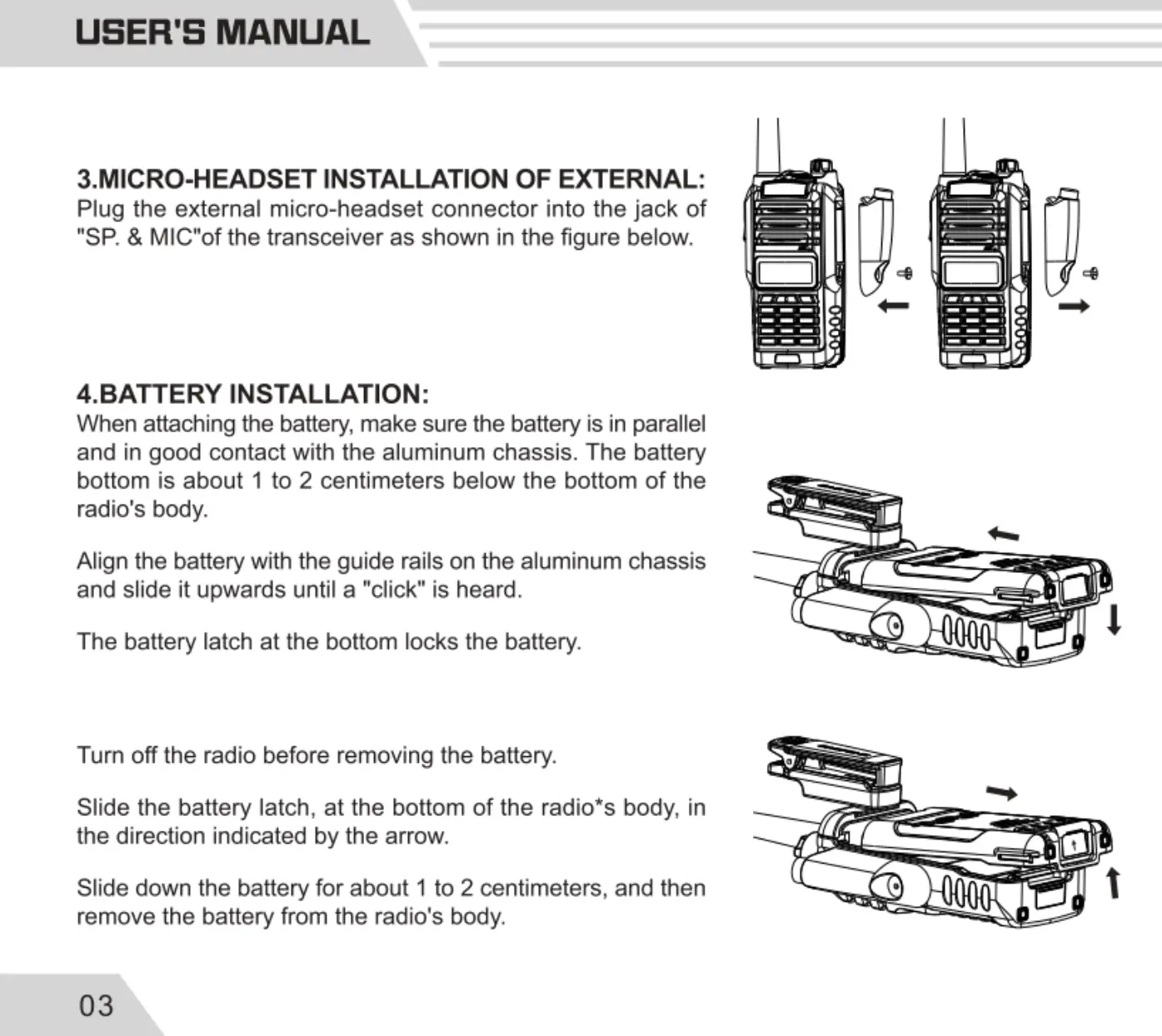
3.MICRO-HEADSET
INSTALLATION
OF
EXTERNAL:
Plug
the
external
micro-headset
connector
into
the
jack
of
"SP.
&
MIC"of
the
transceiver
as
shown
in
the
figure
below.
4.BATTERY
INSTALLATION:
When
attaching
the
battery,
make
sure
the
battery
is
in
parallel
and
in
good
contact
with
the
aluminum
chassis.
The
battery
bottom
is
about
1
to
2
centimeters
below
the
bottom
of
the
radio's
body.
Align
the
battery
with
the
guide
rails
on
the
aluminum
chassis
and
slide
it
upwards
until
a
"click"
is
heard
The
battery
latch
at
the
bottom
locks
the
battery.
Tum
off
the
radio
before
removing
the
battery.
Slide
the
battery
latch,
at
the
bottom
of
the
radio*s
body,
in
the
direction
indicated
by
the
arrow.
Slide
down
the
battery
for
about
1
to
2
centimeters,
and
then
remove
the
battery
from
the
radio's
body.
03
USER'S
MANUAL
BATTERY
CHARGING:
Use
only
the
charger
specified
by
the
manufacturer.
The
charger's
LED
indicates
the
charging
progress.
-
CHARGING
STATUS
LED
INDICATION
Standby
(no-load)
Red
LED
flashes,while
Green
LED
glows
Charging
Red
LED
solidly
glows
Fully
Charged
Green LED
solidly
glows
Error
Red
LED
flashes,while
Green
LED
glows
Please
follow
these
steps:
1.
Plug
the
power
cord
into
the
adapter.
2.
Plug
the
AC
connector
of
the
adapter
into
the
AC
outlet
socket,
3.
Plug
the
DC
connector
of
the
adapter
into
the
DC
socket
on
the
back
of
the
charger.
04

Related product manuals