EasyManua.ls Logo

Baofeng UV3R - Installation of Accessories

Baofeng UV3R
14 pages
Print Icon
To Next Page IconTo Next Page
To Previous Page IconTo Previous Page
Loading...
INSTALLATION
OF
ACCESSORIES
ANTENNA
INSTALLATION
The
supplied
antenna
provides
good
results
over
the
entire
frequency
range
of
the
transceiver.
However,
for
enhanced
based
station
medium-
wave
and
shortwave
reception,
you
may
wish
to
connect
an
external
antenna,
as
the
supplied
antenna
is
very
small
and
can
not
be
expected
to
provide
high
performance
at
these
frequencies.
To
install
the
supplied
antenna,
hold
the
bottom
end
of
the
antenna
and
screw
it
onto
the
mating
connector
on
the
transceiver
until
it
is
snug.
Do
not
over-tighten
by
use
of
extreme
force.
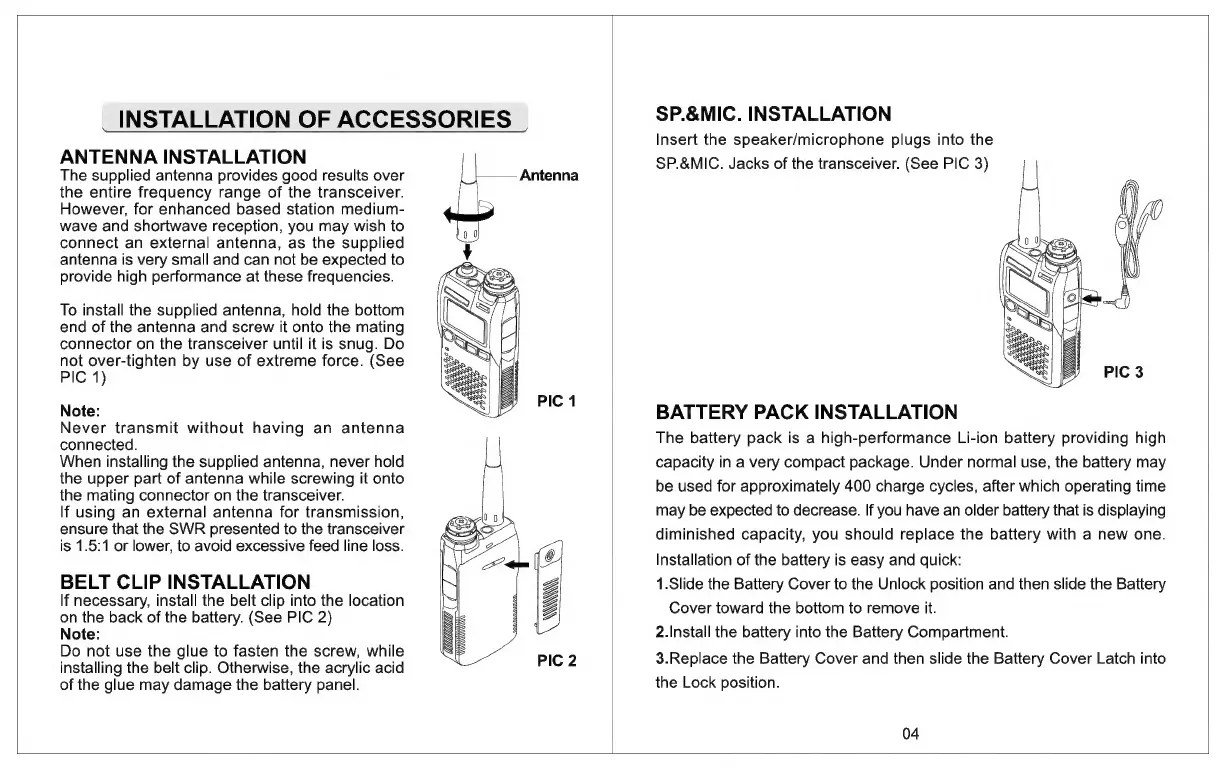
(See
PIC
1)
Note:
Never
transmit
without
having
an
antenna
connected.
When
installing
the
supplied
antenna,
never
hold
the
upper
part
of
antenna
while
screwing
it
onto
the
mating
connector
on
the
transceiver.
If
using
an
external
antenna
for
transmission,
ensure
that
the
SWR
presented
to
the
transceiver
is
1.5:1
or
lower,
to
avoid
excessive
feed
line
loss.
BELT
CLIP
INSTALLATION
If
necessary,
install
the
belt
clip
into
the
location
on
the
back
of
the
battery.
(See
PIC
2)
Note:
Do
not
use
the
glue
to
fasten
the
screw,
while
installing
the
belt
clip.
Otherwise,
the
acrylic
acid
of
the
glue
may
damage
the
battery
panel.
nM
Ly
Z
WCC)
PIC
1
SP.&MIC.
INSTALLATION
Insert
the
speaker/microphone
plugs
into
the
SP.&MIC.
Jacks
of
the
transceiver.
(See
PIC
3)
Cy
AW
BATTERY
PACK
INSTALLATION
The
battery
pack
is
a
high-performance
Li-ion
battery
providing
high
capacity
in
a
very
compact
package.
Under
normal
use,
the
battery
may
be
used
for
approximately
400
charge
cycles,
after
which
operating
time
may
be
expected
to
decrease.
If
you
have
an
older
battery
that
is
displaying
diminished
capacity,
you
should
replace
the
battery
with
a
new
one.
Installation
of
the
battery
is
easy
and
quick:
1.Slide
the
Battery
Cover
to
the
Unlock
position
and
then
slide
the
Battery
Cover
toward
the
bottom
to
remove
it.
2.Install
the
battery
into
the
Battery
Compartment.
3.Replace
the
Battery
Cover
and
then
slide
the
Battery
Cover
Latch
into
the
Lock
position.
04

Related product manuals