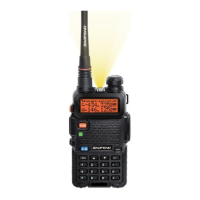
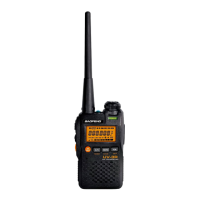
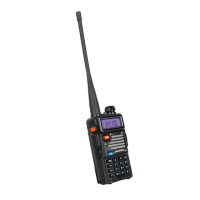
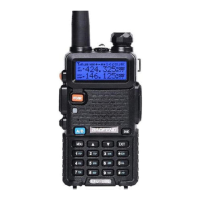
The Baofeng UV-5R is a dual-band handheld amateur radio designed for communication across various frequencies. It offers both Frequency Mode and Channel Mode, catering to different user needs. Frequency Mode is ideal for short-term use, such as quickly testing a frequency, while Channel Mode is intended for long-term storage of frequently used frequencies, including repeaters and simplex operations.
Function Description:
The primary function of the Baofeng UV-5R is two-way radio communication. It allows users to transmit and receive signals on different frequencies, making it suitable for amateur radio enthusiasts. The radio supports the use of repeaters, which are essential for extending communication range, by incorporating repeater offsets. It also features Continuous Tone-Coded Squelch System (CTCSS), which helps to filter out unwanted interference and allows for more selective communication within a group using a specific tone.
Usage Features:
The Baofeng UV-5R offers a range of features that enhance its usability:
-
Dual Modes (Frequency and Channel):
- Frequency Mode: This mode allows users to directly input and test frequencies. It's useful for quick checks or for exploring new frequencies. Settings made in Frequency Mode, such as repeater offsets and CTCSS tones, are independent of Channel Mode settings.
- Channel Mode: This mode is designed for storing and recalling pre-programmed frequencies and their associated settings. It's ideal for saving favorite repeaters or simplex frequencies for easy access. Each channel can store a complete set of parameters, including transmit and receive frequencies, repeater offsets, and CTCSS tones.
-
Listening to a Frequency:
- To listen, users first turn on the radio and adjust the volume using the top knob.
- Pressing the "VFO/MR" button toggles between Frequency Mode and Channel Mode. The radio provides voice prompts to indicate the current mode.
- Frequencies are entered using the number keys. The decimal point is automatically added, simplifying input (e.g., "152000" for 152.000 MHz).
- A "half step" can be added to the frequency by pressing the "UP" arrow key, allowing for fine-tuning (e.g., "147225 UP ARROW" for 147.2255 MHz).
-
Using Repeater Offsets:
- Repeaters utilize two distinct frequencies: one for listening and one for transmitting. The UV-5R allows users to set a repeater offset in Frequency Mode.
- Once set, the radio automatically shifts the frequency when transmitting to the repeater's input frequency and then reverts to the main listening frequency for replies.
- Standard repeater offsets are commonly used in amateur radio. For 2-meter frequencies, this offset is typically -600 KHz when below 147.00 MHz and +600 KHz when above 147.000 MHz. For example, a repeater on 146.980 MHz would have an input frequency of 146.380 MHz (600 KHz down).
-
Setting a Repeater Offset in Frequency Mode:
- First, ensure the top line of the display is selected by pressing "A/B".
- Enter the main listening frequency of the repeater (e.g., "146900" for 146.900 MHz).
- Press "MENU" to access the menu. The radio will announce "Menu."
- Enter "26" to select the "Offset Frequency" menu item.
- Press "MENU" again. The radio will say "Offset Frequency."
- Enter the Megahertz offset without decimals (e.g., "00600" for 600 KHz).
- Press "MENU" to save. The radio will confirm with "Confirm."
-
Setting the Offset Direction:
- The repeater offset can be positive, negative, or turned off. A positive offset means the transmit frequency is higher than the receive frequency, while a negative offset means it's lower.
- For simplex operation (direct communication without a repeater), the offset direction can be turned off, allowing the same frequency for both transmitting and receiving.
- To set the offset direction:
- Press "MENU" to access the menu.
- Enter the listening frequency.
- Enter "25" to select the "SFT-D" (Offset Shift Direction) menu item.
- Press "MENU" again.
- Use the "UP" or "DOWN" arrows to select the desired offset direction (positive, negative, or OFF).
- Press "MENU" to save. The radio will confirm with "Confirm."
-
Using CTCSS (Continuous Tone-Coded Squelch System):
- CTCSS is a low-frequency tone transmitted along with the voice signal. Repeaters often use CTCSS to reduce interference by ignoring transmissions that don't carry the correct tone.
- Transmit CTCSS: Setting a transmit CTCSS tone ensures that your transmissions carry the coded tone, allowing communication with repeaters that require it. This is the most common use of CTCSS.
- Receive CTCSS: Setting a receive CTCSS tone forces the radio to ignore incoming signals unless they carry the matching tone. This can be useful for listening to specific messages or groups.
- It's important to remember that Frequency Mode and Channel Mode handle CTCSS settings independently.
-
Setting Transmit CTCSS in Frequency Mode:
- Turn on the radio and adjust the volume.
- Press "VFO/MR" to ensure you are in Frequency Mode.
- Press "MENU" to access the menu.
- Enter "13" to select the "T-CTCS" (Transmit CTCSS) menu item. The radio will display "T-CTCS."
- Press "MENU" again. The radio will say "CCTSS."
- Enter the desired CTCSS tone without the decimal point (e.g., "1405" for 140.5 Hz).
- Press "MENU" to save. The radio will confirm with "Confirm," and the CTCSS tone will be sent with your transmissions.
-
Setting Receive CTCSS in Frequency Mode:
- Turn on the radio and adjust the volume.
- Press "VFO/MR" to ensure you are in Frequency Mode.
- Press "MENU" to access the menu.
- Enter "11" to select the "R-CTCS" (Receive CTCSS) menu item. The radio will display "R-CTCS."
- Press "MENU" again. The radio will say "CCTSS."
- Enter the desired CTCSS tone without the decimal point (e.g., "1405" for 140.5 Hz).
- Press "MENU" to save. The radio will confirm with "Confirm," and the radio will only receive transmissions with the matching tone.
-
Programming the UV-5R Using Channel Mode:
- Channel Mode is for long-term storage of frequencies and their settings. Each channel saves all associated settings, including CTCSS tones and repeater offsets.
- This allows for different repeater offsets or CTCSS tones on different channels.
- Once multiple channels are programmed, users can scan through them to find active channels.
-
Selecting an Existing Channel:
- Turn on the radio and adjust the volume.
- Press "VFO/MR" to switch to Channel Mode.
- Use the "UP" or "DOWN" arrows to cycle through the saved channels.
- Press the "TALK" button to transmit on the selected channel, using its saved CTCSS or offset settings.
-
Saving a New Channel:
- Saving a new channel requires starting in Frequency Mode. This is a crucial point that can confuse new users.
- Both the receiving and transmitting frequencies must be saved separately into the same channel. For example, for a repeater with a receiving frequency of 146.800 MHz and an offset of -0.600 KHz (resulting in a transmitting frequency of 146.200 MHz), both 146.800 and 146.200 must be saved into the channel.
- Steps to save a new channel:
- Press "VFO/MR" to select Frequency Mode.
- Press "A/B" to highlight the top line of the display.
- Enter the "Receive" frequency to save, without a decimal point.
- Press "MENU." The UV-5R menu appears.
- Press "27" to select the "Memory Channel" menu item.
- Press "MENU" again. The radio says "Memory Channel."
- Press "UP" or "DOWN" to scroll through available channels and choose an unused channel number.
- Press "MENU" again. The radio says "Receiving Memory," and the receive frequency is saved.
- Press "EXIT." The menu disappears, and you return to the Frequency view.
- Repeat steps 2-9 for the Transmit Frequency, ensuring you enter the transmitting frequency and choose the identical channel number.
- Tip for saving channels: You can save a different transmitting frequency on an existing memory channel. However, you cannot override an existing receiving frequency. To save a new receiving frequency in a channel, you must first delete the existing channel using Menu #28, and then save the desired frequency as a brand new channel.
Maintenance Features:
The manual does not explicitly detail maintenance features. However, as a handheld radio, general maintenance would likely involve keeping the device clean, protecting it from extreme temperatures and moisture, and ensuring the battery is charged and in good condition. The programming process itself, while a usage feature, could also be considered a form of "maintenance" in terms of keeping the radio updated with current frequencies and settings.


 To Next Page


 General