6
Adjustable Self Timer
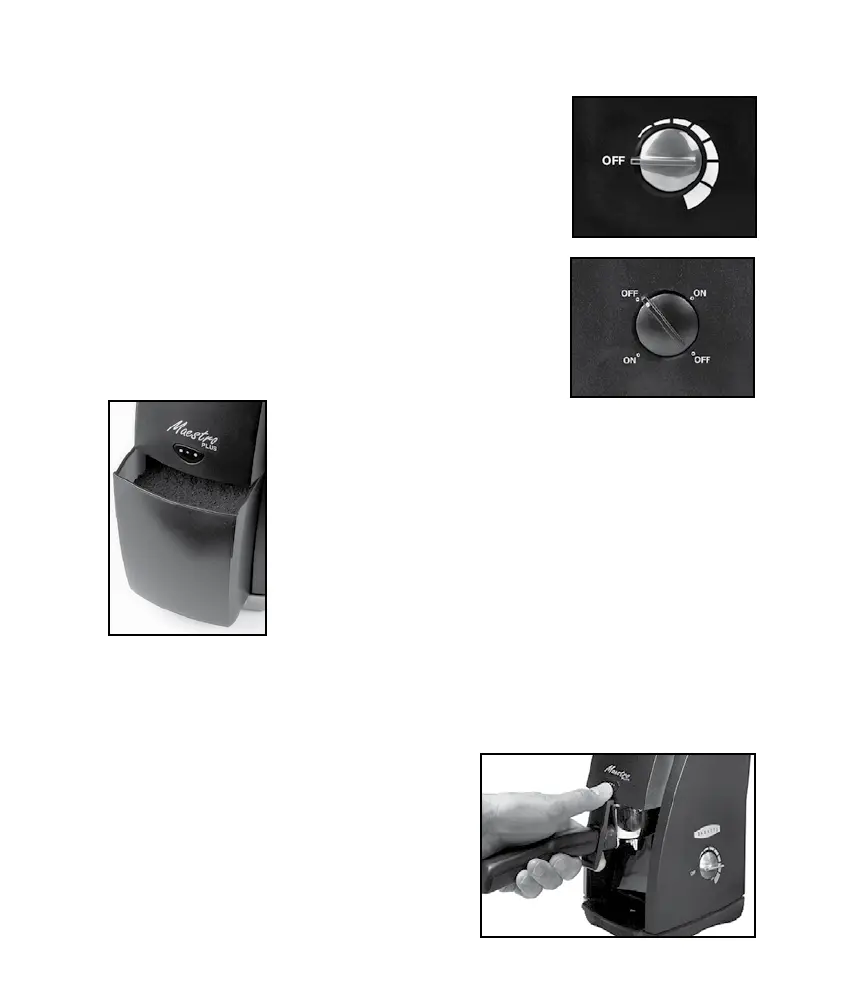
The Maestro Plus is equipped with a 60 second
timer switch. Each segment around the timer
represents about 10 seconds of run time. The
grinder switches off automatically once the time
has elapsed. If you want to interrupt grinding
before the time has elapsed, simply turn the timer
switch counterclockwise until the grinder switches
off.
Manual Switch Operation
You may rotate the switch clockwise or counter
clockwise from any position without damaging it.
The quantity of ground coffee
you need depends on the type of bean, coarseness
of the grind, brewing method and personal taste.
With use, you will nd the most suitable settings for
your personal taste.
Front Mounted Pulse Button
For short duration grinding, the Maestro Plus is
equipped with a front mounted pulse button. It can
be used for grinding directly into an espresso-brew-
ing basket. Remove the grounds bin and position the espresso-basket
inside the grinder directly below the pulse button (see photo). Push
and hold the pulse button to grind. Grinding will stop when the button is
released.
Note: It is important that the espresso
basket is held below the discharge
chute so the coffee powder can fall
freely into the basket. Holding the bas-
ket up tight to the discharge chute will
cause coffee to back up and jam your
grinder.


 To Next Page