Functions
This type of controller has single ramp and dwell pro-
gramming capabilities. The Ramp and Dwell can be con-
figured to five different modes.
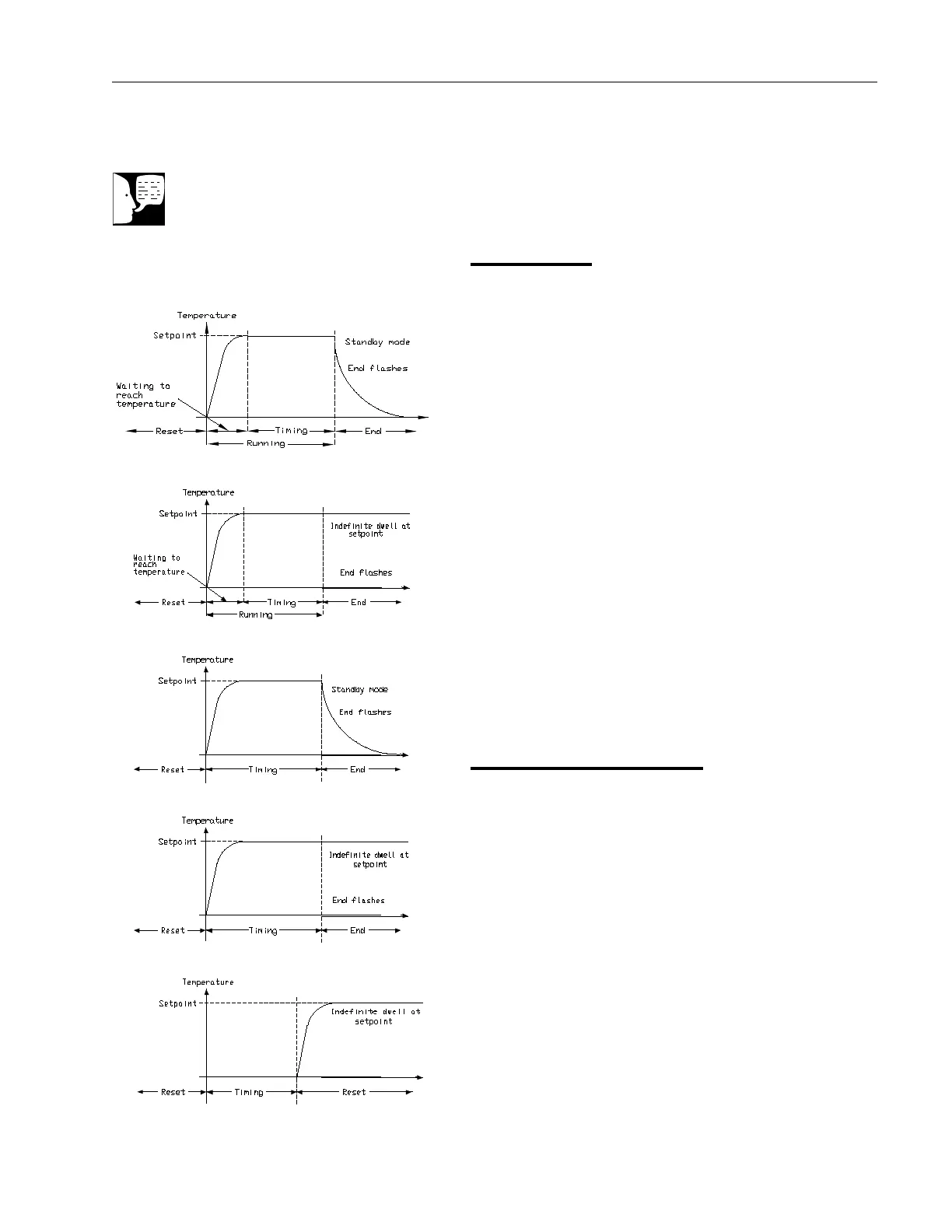
1. Mode 1 (Opt. 1) is a Ramp (if needed) to the
Setpoint temperature, a Dwell, and then a cool
down.
2. Mode 2 (Opt. 2) is the same as mode 1, except
the controller continues to heat at the Setpoint
after the Dwell has completed. (This mode does
not cool down.)
3. Mode 3 (Opt. 3) is the same as mode 1, except
the Dwell time includes the Ramp (if needed).
4. Mode 4 (Opt. 4) is the same as mode 2, except
the Dwell time includes the Ramp (if needed).
5. Mode 5 (Opt. 5) is a Dwell (delay time) before
the controller Ramps (if needed) to the Setpoint
temperature.
Program Overview
•Aprogram mode can be set by changing the
“tm.OP” variable to “Opt. 1, Opt. 2, Opt. 3, Opt.
4, or Opt. 5.
•ARamp rate may be set by changing the “SPrr”
variable to a value. The Ramp rate units are in
degrees per minute.
• The Dwell time can be set by changing the
“dwEll” variable to the desired value. Dwell time
units are in minutes.
• The program Status can be set by changing the
“StAt” variable to “run” or “oFF.” This variable
will start or stop the program.
Single Ramp & Dwell
Note
These instructions are used with the Single Setpoint models with OTP only
(See models listed on front page).
Mode 1 (Opt. 1)
Mode 2 (Opt. 2)
Mode 3 (Opt. 3)
Mode 4 (Opt. 4)
Mode 5 (Opt. 5)
17



 To Next Page