EN EN
49
50
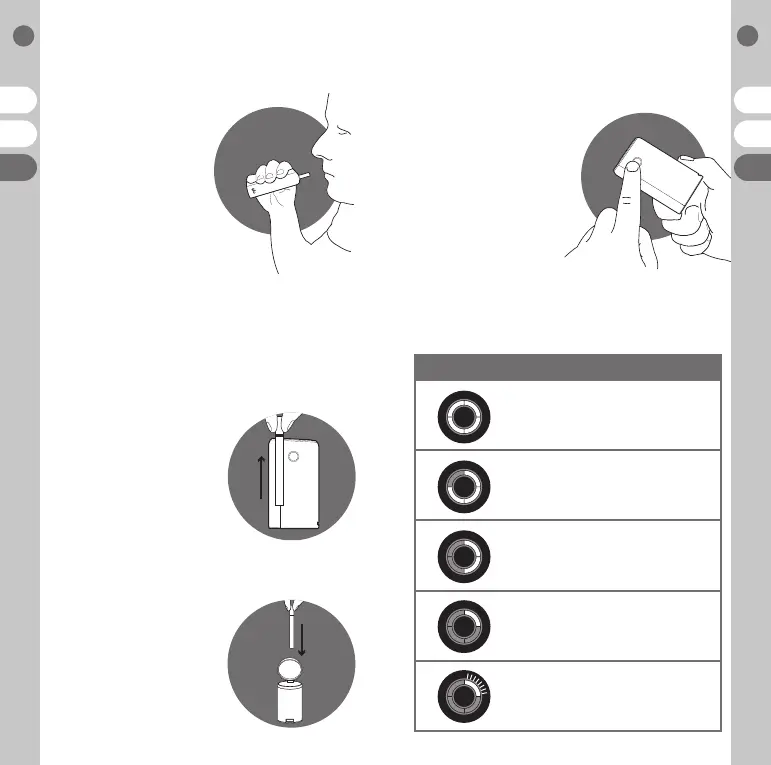
04 Enjoy
Place the neo™ stick to your
lips and inhale gently, just like
a regular cigarette. Three of
the four lights will turn o
20 seconds from the session
end to indicate the session
end is approaching with a
gentle vibrate. The glo™
tobacco heater will then
turn o automatically.
You may stop your session at any point
by holding down the control button for
3 seconds on the glo™ tobacco heater.
The glo™ tobacco heater will gently vibrate
to let you know it’s turning o.
A session cannot be paused. The existing neo™ stick must be
removed and replaced before the next session can begin.
05 Remove a neo™ stick
Simply remove a neo™ stick by the
filter. Take care when removing
the neo™ stick from the glo™
tobacco heater as the tobacco
portion could be hot.
06 Dispose of
a neo™ stick
Discard a neo™ stick responsibly
in a waste bin. Always ensure the shutter
is closed after every session.
CHARGE STATUS:
100% power
75% power remaining
50% power remaining
25% power remaining
Low charge, charging required
07 Check charge status
To check the charge status,
press and release the control
button on the glo™ tobacco
heater. The status of the
charge level cannot be
checked during a session.
See instruction 1 for further
information on charging.


 To Next Page