EasyManua.ls Logo

Batribike Dash - Battery Meter and Display Backlight

Batribike Dash
28 pages
Print Icon
To Next Page IconTo Next Page
To Previous Page IconTo Previous Page
Loading...
10
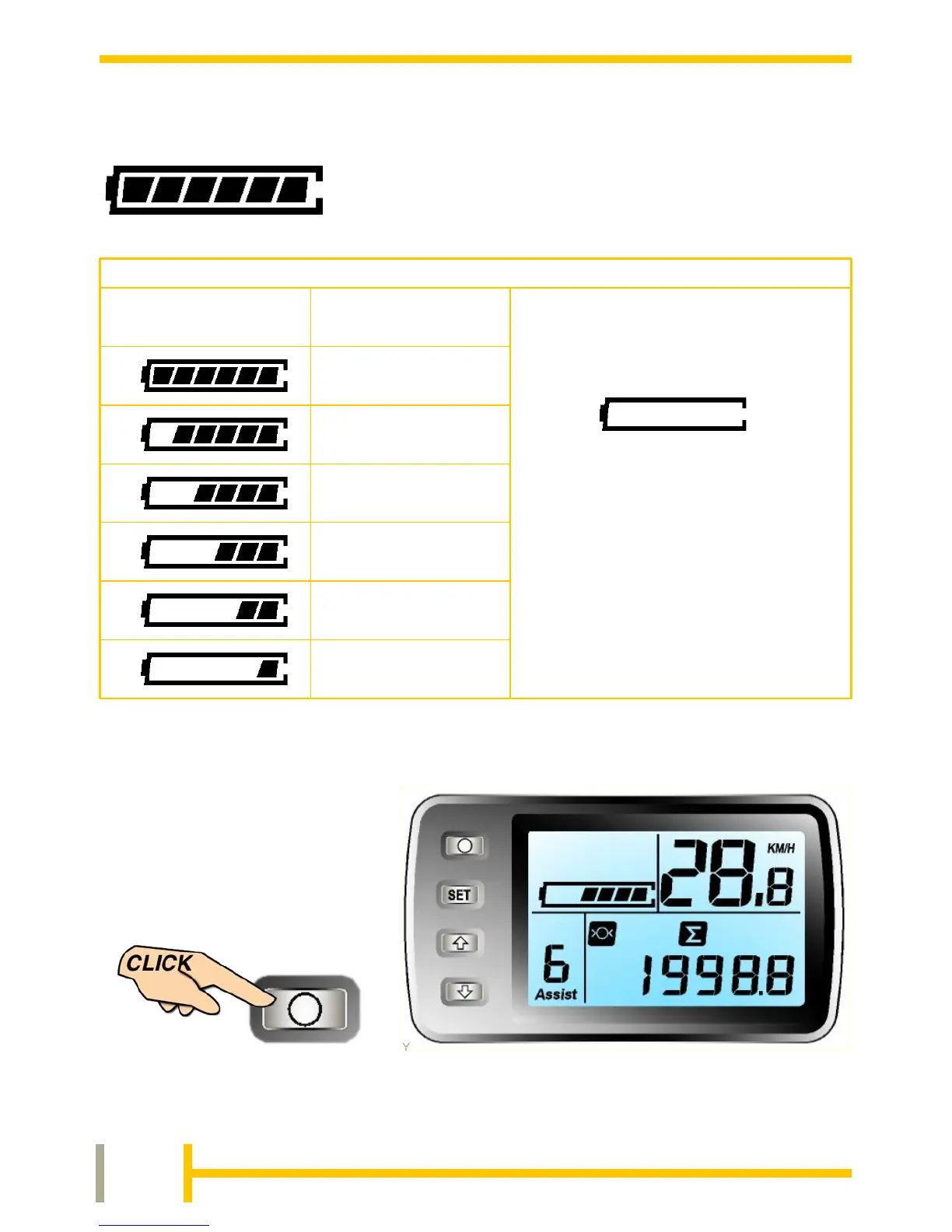
The LCD has a backlight
for night time use. This is
switched on by
momentarily pressing the
POWER button.
To turn the backlight off, again press the POWER button.
The LCD shows the charge remaining in the
battery in the upper left of the display. The
indicators will gradually go out as the battery
power is used up. Refer to the table below
for details.
Battery Meter
Display Backlighting - Night Mode
80 - 100%
SYMBOL
DISPLAYED
CHARGE
REMAINING
BATTERY METER DISPLAYS THE CHARGE REMAINING IN THE BATTERY
BATTERY IS
EXHAUSTED AND
SHOULD BE
RECHARGED AS
SOON AS POSSIBLE
60 - 80%
40 - 60%
20 - 40%
10 - 20%
EMPTY
0 - 10%

Related product manuals