11.7 Place the new drive into the fold plate electrical box and plug the three connectors “1” onto the new
board in the same location and orientation as on the old board.
11.8 Replace the cover and power up the Autoset. Once the computer has restarted press cancel on the
HOME ALL pop up.
11.9 To finish the board replacement, go thru the initiation procedure on the next page.
11.10 Table 1 - Address list:
PARALLEL UNIT 8-PAGE 16-PAGE STACKER
Pan #1 1 Pan #1 5 Pan #1 9 D
Pan #2 2 Pan #2 6 Pan #2 A
Pan #3 3 Pan #3 7 Pan #3 B
Pan #4 4 Pan #4 8 Pan #4 C
XII. INITIALIZING NEW DRIVE BOARD
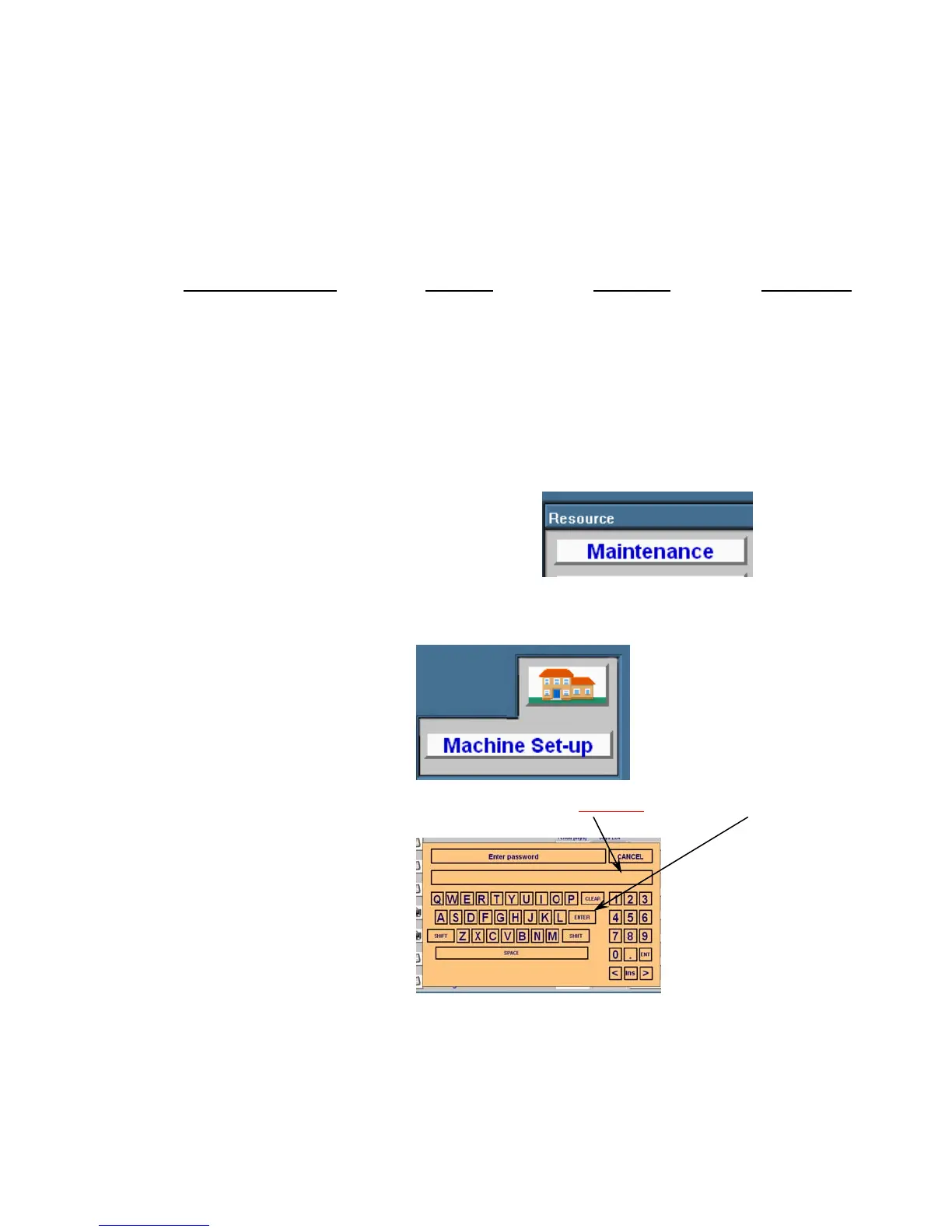
12.1 Go to main page and press “Maintenance” button.
12.2 This will bring up the Maintenance screen. From the Maintenance page press the “Machine Setup”
button.
12.3 This will bring up a keypad to enter the password. Enter
4921281
then press “Enter”.
12.4 This will bring up the Machine Setup page. From this page press the “Initialization Page” button.
12.5 Press the “Initiate” button corresponding to the motor you need to initiate.


 To Next Page