6 Settings
6.1 List of parameters
6.1.1 Reading out operating parameters
Pressing the button enables you to view information about how the boil
er is working.
1. Press this button for one second to view the operating mode (e.g. "t.
17" = purging in progress).
2. Press this button for one second again to view the operating sub-
status or the corresponding function that is active (e.g. "u.00" = boil
er in standby mode).
3. Press this button for one second again to view the operating temper
ature in the heating system: The symbol followed by the temper
ature in °C will flash.
4. Press this button for one second again to view the operating temper
ature in the domestic water system: The symbol followed by the
temperature in °C will flash.
5. Press this button for one second again to view the power level from
0 to 100: The symbol and the number relating to the level of op
erating power will flash.
Press and hold the button for more than three seconds to exit this
menu.
6.2 Setting the parameters
6.2.1 Setting the central heating water temperature
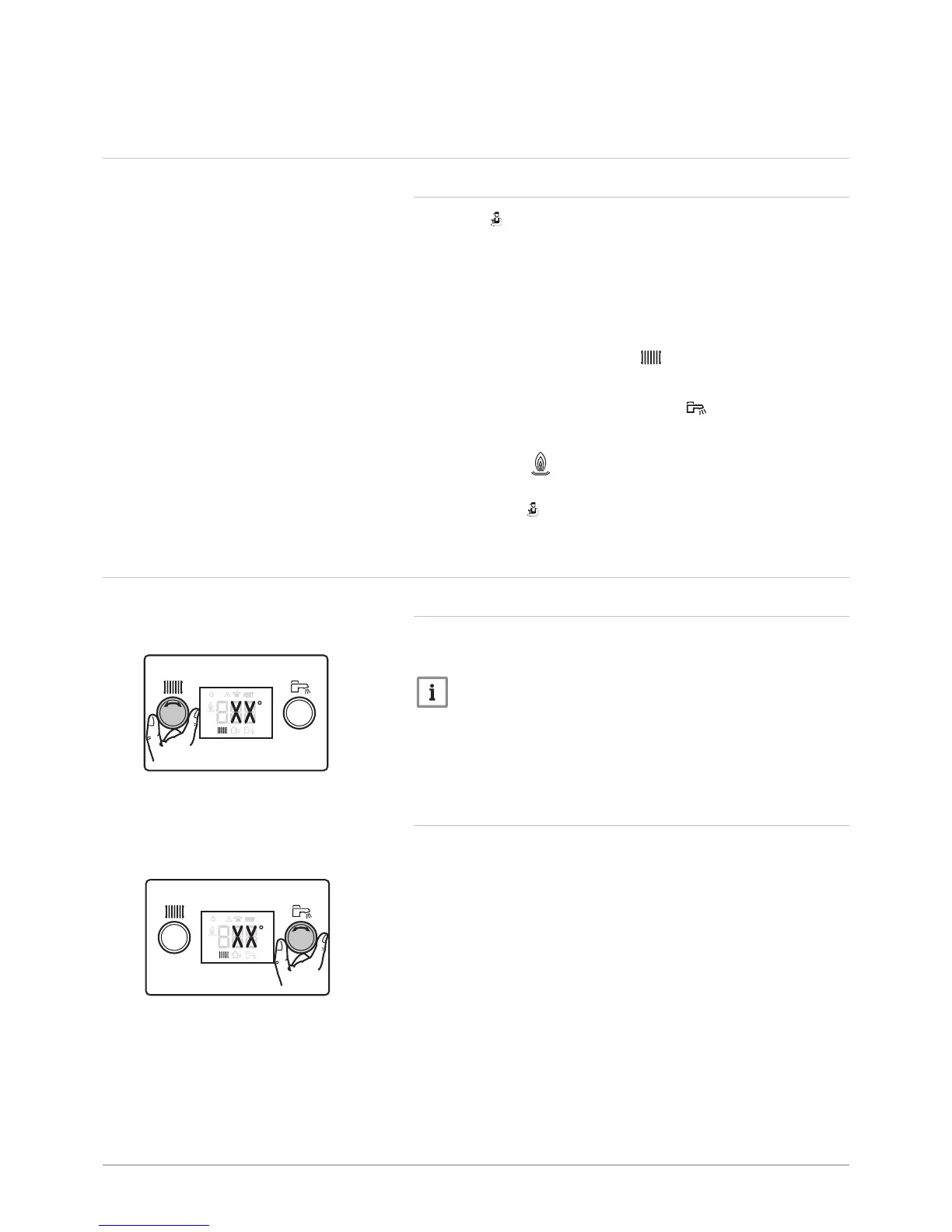
Turn the central heating temperature setting button to adjust the central
heating water temperature. See Fig. 10.
Important
If the central heating water temperature set point is lower than
16°C without an outside temperature sensor, the heating is switch
ed off automatically. The heating starts up again only to ensure
frost protection if the outside temperature sensor shows a value of
less than 3°C.
6.2.2 Setting the domestic hot water temperature
Turn the domestic hot water temperature setting button to adjust the tem
perature. Fig 11.
Fig.10
Setting the central heating



 To Next Page