The Baxi Luna 3 Comfort thermostat is a sophisticated control unit designed to manage the heating and domestic hot water functions of Baxi Luna 3 boilers. This device offers a range of operational modes, programming capabilities, and temperature settings to optimize comfort and energy efficiency.
Function Description:
The thermostat provides comprehensive control over the boiler's operations, allowing users to select between different modes for heating and domestic hot water. These modes include:
- Domestic Hot Water Only (Summer Function): This mode enables the use of domestic hot water without activating the central heating. It is specifically applicable to Luna 3-310 combination boilers. The display shows a dedicated symbol to indicate this mode.
- Domestic Hot Water & Central Heating (Winter Function): This mode activates both domestic hot water and central heating, suitable for colder periods. It is also applicable to Luna 3-310 combination boilers, with distinct symbols appearing on the display for both functions.
- Central Heating Only: This mode focuses solely on central heating, disabling domestic hot water production. It applies to all Luna 3 boilers, with a specific symbol indicating heating-only operation.
- Off Function: This mode turns off the boiler, with the exception of frost protection. All heating and domestic hot water symbols disappear from the display.
- Standby Mode: In this mode, neither domestic hot water nor central heating is active. A specific standby symbol appears on the display, and all other function symbols are absent.
The device supports two primary function modes for operation:
- Automatic Operation: In this mode, the boiler is controlled by a pre-programmed heating schedule. A dedicated symbol indicates automatic operation, allowing the system to follow user-defined time settings for heating.
- Manual Mode: This mode allows for manual adjustment of heating and domestic hot water temperatures. The automatic operation symbol disappears, and a manual mode symbol appears. Users can increase or decrease temperatures using dedicated +/- buttons for domestic hot water (left side) and central heating (right side).
Important Technical Specifications:
While specific technical specifications like voltage or current ratings are not explicitly detailed in the provided manual, the device's functionality implies it operates as a low-voltage control unit, likely powered by the boiler or internal batteries.
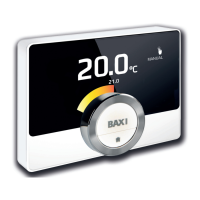
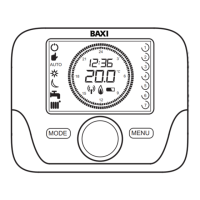
- Display: The thermostat features an LCD display that shows various information, including current time, day of the week, selected mode, temperature settings, time switch program histogram, modulating flame level, fault indicators, burner status, PCB parameters, and battery level.
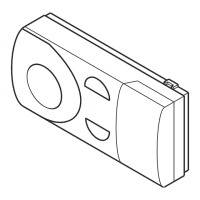
- Control Buttons: The device is equipped with several buttons for navigation and setting adjustments:
- Power/Mode Button: Used to cycle through the main operational modes (DHW only, DHW & CH, CH only, Off, Standby, Automatic, Manual).
- OK Button: Confirms selections and settings.
- iP Button: Initiates programming functions, displays messages like "PROGR," and allows exiting programming modes.
- +/- Buttons (Left): Used for adjusting domestic hot water temperature and navigating through programming options.
- +/- Buttons (Right): Used for adjusting central heating temperature and navigating through programming options.
- VOK Button: Likely related to specific boiler parameters or advanced settings, though its exact function is not fully detailed in the basic operation instructions.
Usage Features:
The Baxi Luna 3 Comfort thermostat offers a user-friendly interface for setting up and managing heating and hot water.
- Setting Date & Time: The iP button initiates the time setting process, allowing users to set the hour, minutes, and day of the week using the +/- buttons and confirming with the OK button.
- Programming Heating Mode Operation Times:
- This feature allows users to define up to four separate heating periods per day.
- Users can program times for single days (Monday to Sunday) or for groups of days (e.g., Monday-Friday, Saturday-Sunday, Monday-Saturday, Every Day).
- The iP button, followed by the mode button, initiates this programming. The +/- buttons are used to select the day or group of days, and the OK button confirms.
- Start and stop times for each heating period are set using the +/- buttons and confirmed with OK. Skipping a time slot is possible by setting the start time equal to the stop time.
- Setting Temperatures for ON and OFF Periods:
- The iP button allows access to temperature settings for different operational states.
- COMFR (Comfort Temperature): The desired temperature when the heating system is on. Set using the +/- buttons.
- ECONM (Economy Temperature): The desired temperature when the heating system is off. This temperature should be lower than the comfort setting. Set using the +/- buttons.
- NOFRS (Frost Protection Temperature): Factory set at 5°C to prevent freezing.
- SHOWR (Shower Function Temperature): The desired domestic hot water temperature for the temporary shower function. Set using the +/- buttons.
- Temporary Shower Function (Luna 3-310 combination boilers only):
- This feature allows for drawing domestic hot water at a lower, more comfortable temperature for 60 minutes, indicated by a flashing symbol.
- To activate, press one of the +/- buttons and then the mode button, followed by the OK button.
- To disable, repeat the activation steps. The display will show "HW S^" to confirm the function is off, and hot water will return to the regular temperature.
- The temperature for this function is set under the "SHOWR" setting in the temperature programming menu.
Maintenance Features:
The manual primarily focuses on operational aspects rather than explicit maintenance features. However, the display includes indicators that can assist in maintenance:
- Fault in progress: A dedicated symbol indicates if there is a fault in the system, alerting the user to potential issues that may require professional attention.
- Battery level: An icon on the display shows the current battery level, prompting users to replace batteries when necessary to ensure continuous operation of the thermostat.
- Burner lighted: An indicator shows when the boiler's burner is active, which can be useful for troubleshooting or confirming boiler operation.
The thermostat's design emphasizes ease of use and clear visual feedback through its LCD display and intuitive button layout, making it an effective tool for managing home comfort with Baxi Luna 3 boilers.

 Need help?
 General



 To Next Page
