10
EN
Orä
NOTE:
(1) After each measurement, clean the probe with a soft cloth, and put the thermometer in a dry and well-
ventilated place. If the person has a fever, clean probe to disinfect the probe. Follow disinfecting instructions in this
manual (p.12). Be careful to not rub the sensor.
(2) Make sure that the ear canal is clean and dry before starting a measurement. It is recommended to clean
the ear canal with a cotton swab if any dirt exists. Otherwise, the temperature probe may be polluted, and
temperature readings may be inaccurate.
(3) Do not use the ear mode temperature if the ear is infected with otitis or suppuration.
(4) The ear mode is suggested for babies from 3 months through adulthood.
MEASURING FOREHEAD TEMPERATURE
1. Make sure the probe cover
D
of thermometer is on the device.
2. Press the Power button
B
to power on the thermometer.
3. When measuring the temperature of an adult, set device on Forehead
mode by clicking on the Mode button
F
. The head icon
will appear on
the screen. When measuring the temperature of a child, set device on
Child mode. The baby icon will appear on the screen next to the head
icon
.
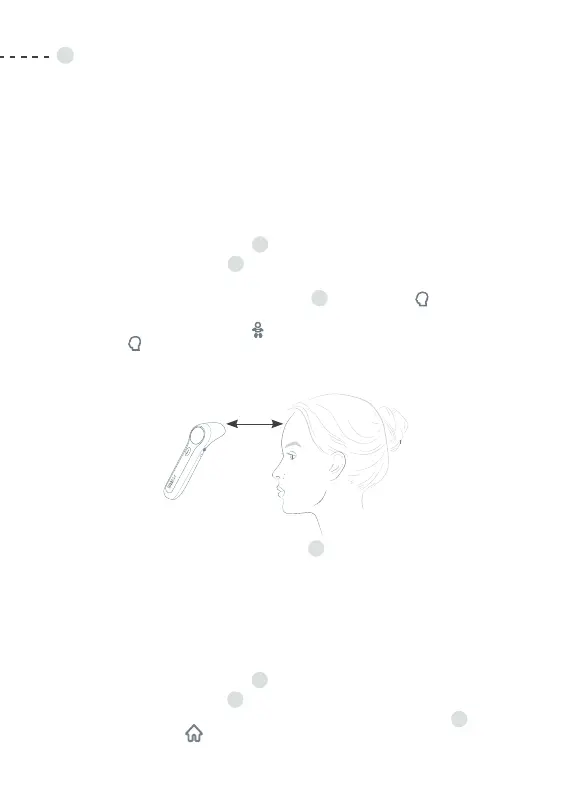
4. Point the thermometer probe to the center of the forehead, about
1 to 3 cm (0.4 to 1.2 in) away from the skin surface.
5. Press and release the Measure button
B
. The temperature reading
will be displayed on the screen instantly.
6. If no activity is detected, the thermometer will power off automatically
in 10 seconds.
NOTE: The forehead mode is suggested to use on children as of the age of two up to adulthood.
MEASURING OBJECT TEMPERATURE
1. Make sure the probe cover
D
of thermometer is on the device.
2. Press the Power button
B
to power on the thermometer.
3. Set the device on Object mode by clicking on the Mode button
F
.
The house icon will appear on the screen.
0.4 - 1.2 in.


 To Next Page