DOWN ARROW
UP ARROW
SLEEP
H
M
L
HR
˚C
˚F
WATER FULL SLEEP
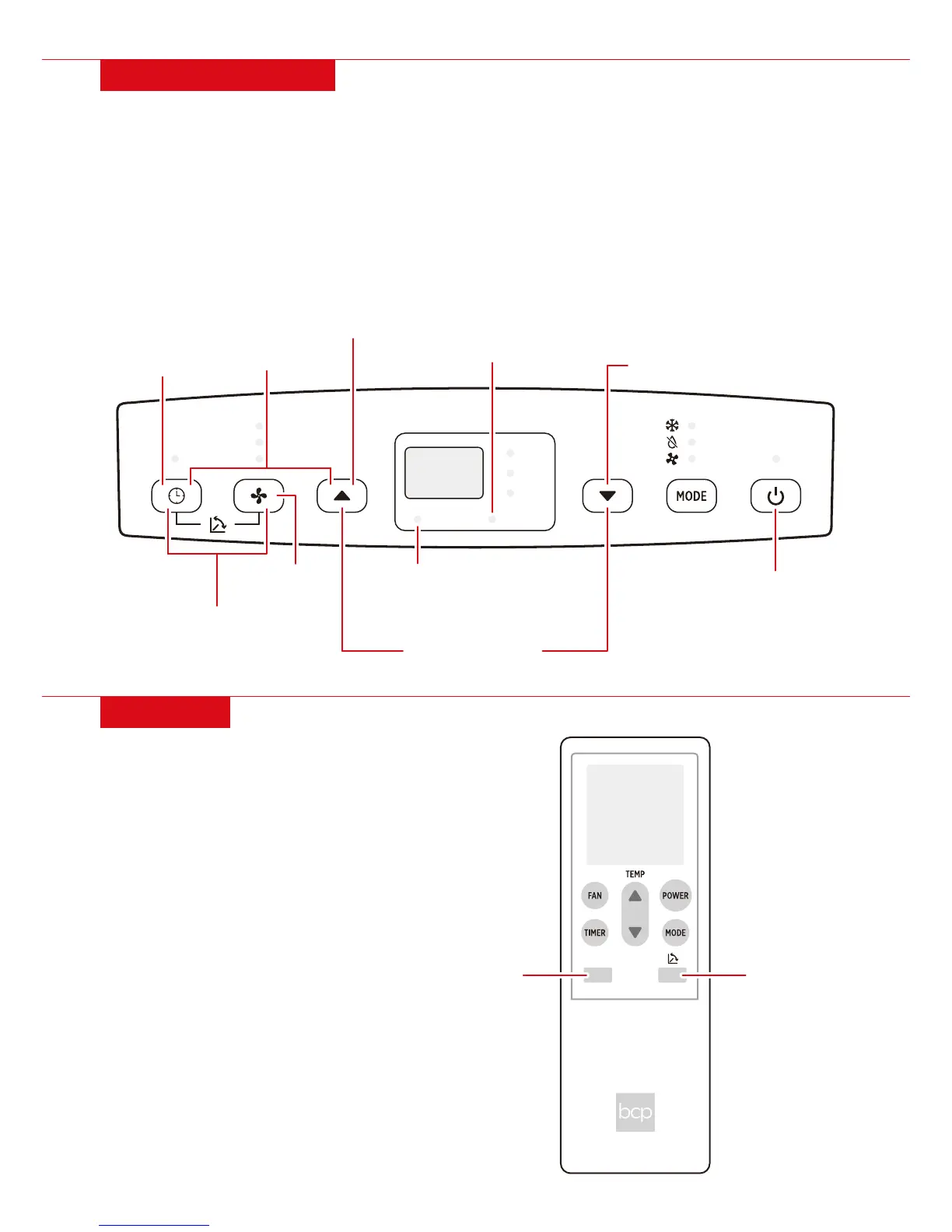
• MODE: Cycle between cool, dehumidify, and fan mode
• UP ARROW: Increase temperature/time
• DOWN ARROW: Decrease temperature/time
• SPEED: Toggle fan speed between low, medium, and high
• TIMER: Set timer from 1 to 24 hours
• OSCILLATE: Press Speed and Timer at same time to toggle vent oscillation
• SLEEP: Press Timer and Up Arrow at same time to enter Sleep mode (see Remote section)
• WATER FULL INDICATOR: Indicates water tank is full and needs to be drained
• SLEEP INDICATOR: Indicates unit is in Sleep mode
• TOGGLE °F/°C: Press Up Arrow and Down Arrow at same time
CONTROL PANEL
• Install 2 AAA batteries in the remote control.
• SLEEP: Unit enters Sleep mode
1. Fan turns to low
2. After 2 hours, temperature increases 1°F
3. After 2 hours, temperature increases 1°F again
4. Temperature remains unchanged afterwards
REMOTE
4 |
POWER
SPEED
TOGGLE °F/°C
OSCILLATE
WATER FULL
INDICATOR
SLEEP OSCILLATE
SLEEP INDICATOR
TIMER
SLEEP


 To Next Page