DRAINING WATER
MANUAL: Recommended if using cooling mode because water is recycled in unit for more eective cooling.
When the water full indicator turns on, the internal water tank must be drained.
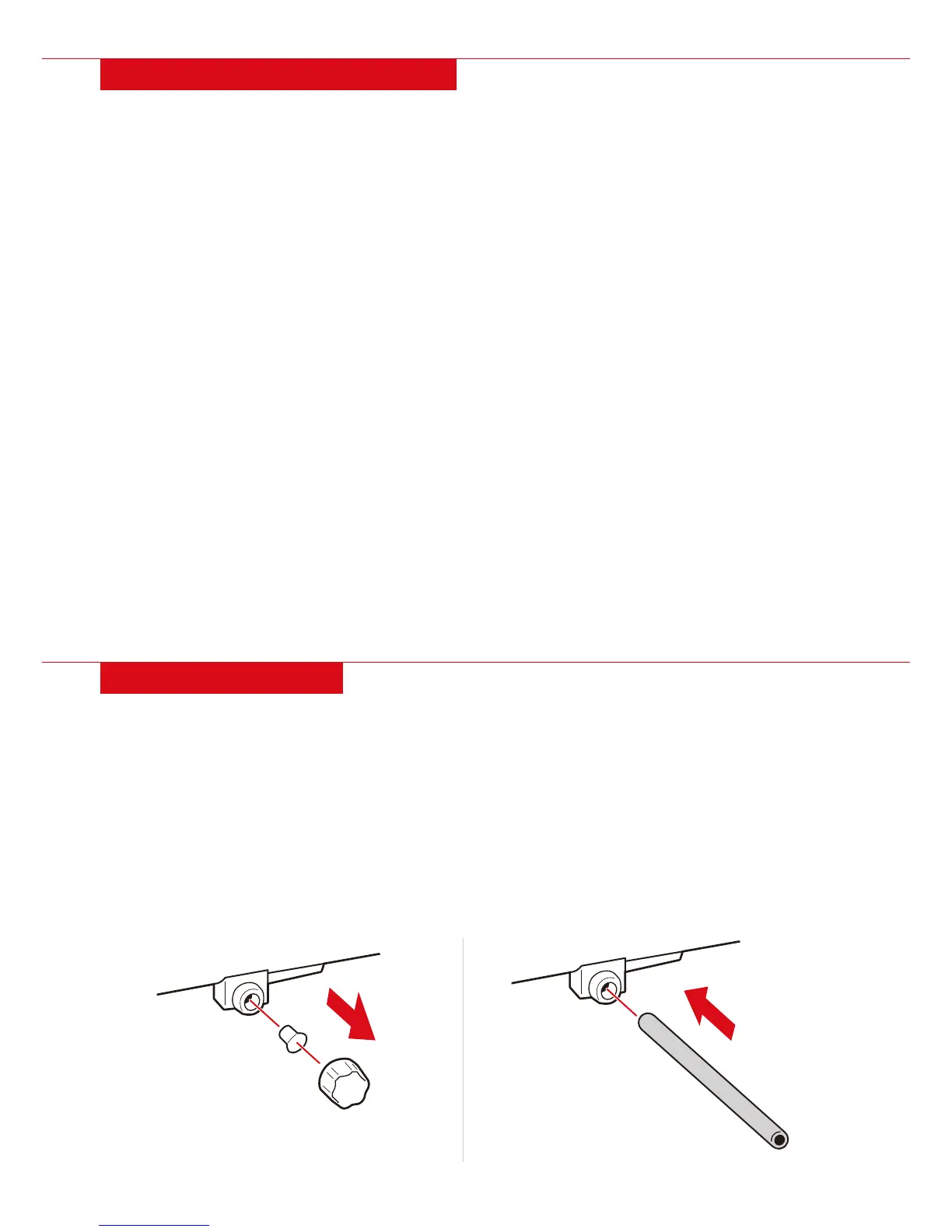
1. Remove the cap and stopper from the lower drain outlet.
2. Tilt unit slightly backwards to drain water into an appropriate vessel or outside.
CONTINUOUS: Recommended if using dehumidifying mode.
Continuous draining requires a 13mm drain hose (not included).
1. Remove the cap and stopper from the lower or upper drain outlet.
- Upper drain outlet is recommended for dehumidifying.
2. Attach drain hose to drain outlet.
- Make sure drain hose is straight and in good condition.
3. Place other end of hose in appropriate draining location or outside.
OPERATING INSTRUCTIONS
NOTE: It is recommended that you leave appliance o for at least 3 minutes before turning back on.
COOLING
• Do not use cooling mode if ambient temperature is higher than 95°F.
1. Press Mode button until cool indicator turns on.
2. Adjust to desired room temperature (62°F-86°F).
3. Press Speed button to select desired fan speed.
DEHUMIDIFYING
• Fan speed or temperature cannot be adjusted in dehumidifying mode.
1. Press Mode button until dehumidify indicator turns on.
2. When the water full indicator turns on, drain water through the drain outlet.
FAN
• Temperature cannot be adjusted in fan mode.
• Exhaust hose not required in fan mode.
1. Press Mode button until fan indicator turns on.
2. Press Speed button to select desired fan speed.
TIMER
SET TIMER AUTO-START
1. With the air conditioner turned o, press the Timer button.
2. Set the desired timer start time within 1 to 24 hours from now. Unit will turn on when timer ends.
CANCEL TIMER
Press the Timer button to display remaining time, then press again to cancel.
SET TIMER AUTO-STOP
1. With the air conditioner turned on, press the Timer button.
2. Set the desired timer end time within 1 to 24 hours from now. Unit will turn o when timer ends.
| 9
REMOVE CAP AND STOPPER ATTACH DRAIN PIPE


 To Next Page