EasyManua.ls Logo

BCN3D Sigma - Initial Setup and Calibration

BCN3D Sigma
23 pages
Print Icon
To Next Page IconTo Next Page
To Previous Page IconTo Previous Page
Loading...
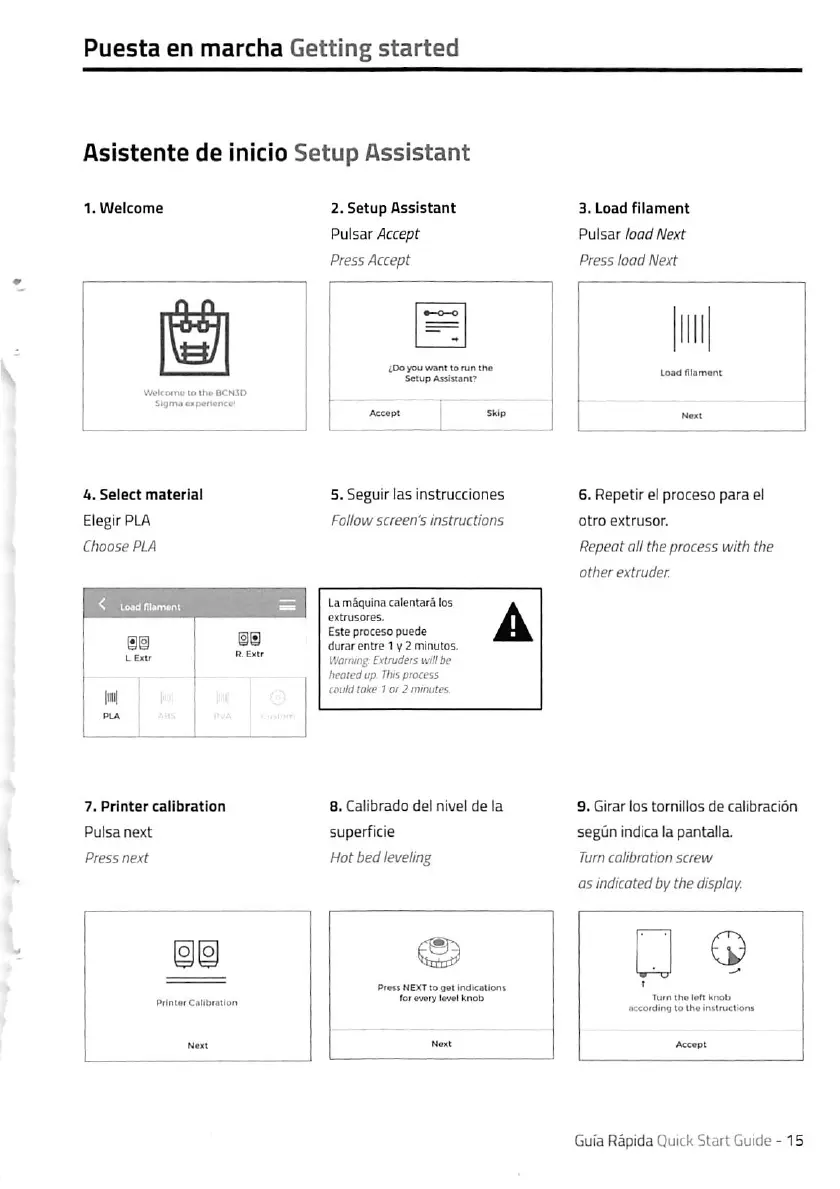
Puesta
en
marcha
Getting
started
Asistente
de
inicio
Setup
Assistant
1.
Welcome
Wckoinu
it.
ilu«
b<
4.
Select
material
ElegirPLA
Choose
PLA
7.
Printer
callbratlon
Pulsa
next
Press
next
2.
Setup
Assistant
Pulsar
Accept
Press
Accept
^Do
you
wont
to
mn
the
S«tup
Afslscant?
5.
Seguir
las
instrucciones
Follow
screen's
instructions
La
mäquina
calentarä
los
extrusores.
Esteproceso
puede
durar
enCre
1
y
2
minutos.
IVW'iin^'
Extruders
willbe
hcolfdup
Thispiocess
cpulil
loke
t
ot
2
mmutes
8.
Caiibrado
de!
nivel
de
la
superficie
Hot
bedleveling
Pr«ss
NEXTto
get
indkcallon»
for«v«ry
Iev«l
knob
S.Load
fllament
Pulsar
load
Next
Press
lood
Next
6.
Repetir
el
proceso
para
el
otro
extrusor.
Repeat
all
the
process
with
the
other
extruder.
9.
Girar
los
tornillos
de
calibraciön
segün
indica
la
pantalla.
Turn
callbratlon
screw
OS
indicated
by
the
display.
I

Other manuals for BCN3D Sigma

Related product manuals