EasyManua.ls Logo

BCN3D Sigma - Page 16

BCN3D Sigma
23 pages
Print Icon
To Next Page IconTo Next Page
To Previous Page IconTo Previous Page
Loading...
Puesta
en
marcha
Gelting
started
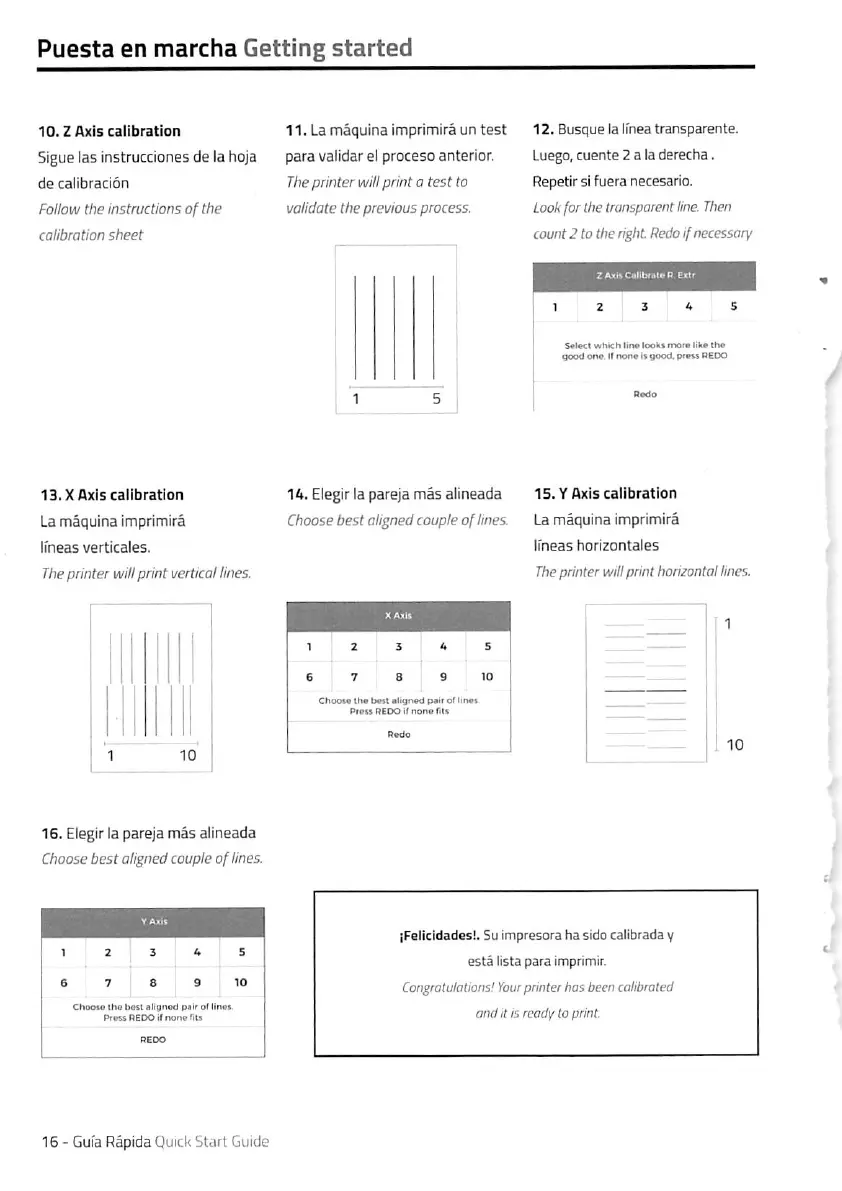
10.
Z
Axis
calibration
11.
La
mäquina
imprimirä
un
test
12.
Busque
la
Ifnea
transparente.
Sigue
las
instrucciones
de
la
hoja
para
validar
ei
proceso
anterior.
de
calibraciön
The
printer
will
print
a
test
to
Follow
the
instructions
of
the
validate
the
previous
process.
calibration
sheet
Luego,
cuente
2
a
la
derecha.
Repetir
si
fuera
necesario.
Look
für
the
transparent
line.
Then
count
2
to
the
right
Redo
ifnecessary
S«lecl
whkh
lin«
looks
mof*
lik«
ih«
good
oo«.
If
rtot>4
b
good,
pr»«s
PEOO
13.x
Axis
calibration
La
mäquina
imprimirä
Ifneas
verticaies.
The
Printer
will
print
uertical
llnes.
16.
Eiegiria
parejamäs
alineada
15.
Y
Axis
calibration
Choose
best
alignedcouple
oflines.
La
mäquina
imprimirä
ifneas
horizontales
The
printer
will
print
horizontal
lines.
ChooM
Ih«
b*st
thgned
p«ir
gf
lin*«
Pm»
REDO
If
non»
fi
ts
16.
Eiegir
ia
pareja
mäs
aiineada
Choose
best
aligned
couple
oflines.
Ch«oiB
tns
best
allgnsd
psir
ofllnei.
Press
REOOit
nonefits
iFeilcIdades!.
Su
impresora
ha
sido
caiibrada
y
estä
iista
para
imprimir.
Congrotulations!
Yotir
prMer
has
been
calibrated
andit
IS
ready
to
print.

Other manuals for BCN3D Sigma

Related product manuals