EasyManua.ls Logo

BCN3D Sigma - Page 19

BCN3D Sigma
23 pages
Print Icon
To Next Page IconTo Next Page
To Previous Page IconTo Previous Page
Loading...
Haz
tu
primera
impresiön
dual
Your
first
dual
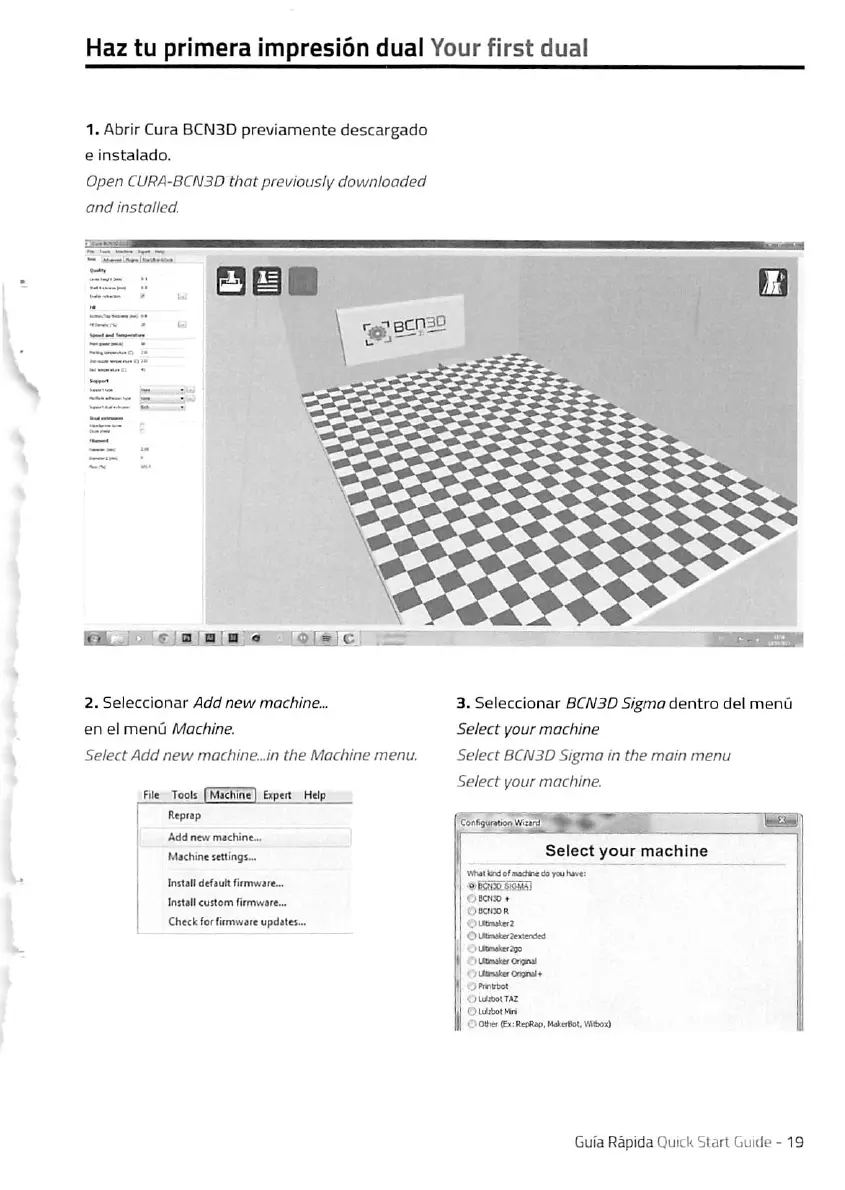
1.
Abrir
Cura
BCN3D
previamente
descargado
e
instalado.
Open
CURA-BCN3D
thatpreviously
downloaded
and
installed.
•>;
6"
j
B.
2.
Seleccionar
Add
new
machine...
en
el
menü
Machine.
SelectAdd
new
machine...in
the
Machine
menu.
Fite
Tools
I
Muhine
|
Expeit
Help
3.
Seleccionar
BCN3D
Sigma
öentro
de!
menü
Select
your
machine
Select
BCN3D
Sigma
in
the
mein
menu
Select
your
machine.
Add
new
mechine-.
U
Mechine
settings-.
1
Select
your
machlne
^
WhitttndefwdFTede
yeuhev«;
Instelf
defeult
f
irmwere...
tnstell
«ustem
rtrmwere...
O
KNX>
*
OKNDIl
Che<l:
(or
firmware
updeles...
OinxweerinenM
1
1.
j
II
1
.jlMnateOngntl
|
<
;uOnteonginil*
j
1
;j
9
'
'OLulibetTez
1
1
OUiibet^M
1
II
OO««<ExtR«A«s>WaBreot,VAb»]0
\
Gufa
Räpida
Quick
Start
Guide
-19

Other manuals for BCN3D Sigma

Related product manuals