EasyManua.ls Logo

BCN3D Sigma - Page 20

BCN3D Sigma
23 pages
Print Icon
To Next Page IconTo Next Page
To Previous Page IconTo Previous Page
Loading...
Haz
tu
primera
impresiön
dual
Your
first
dual
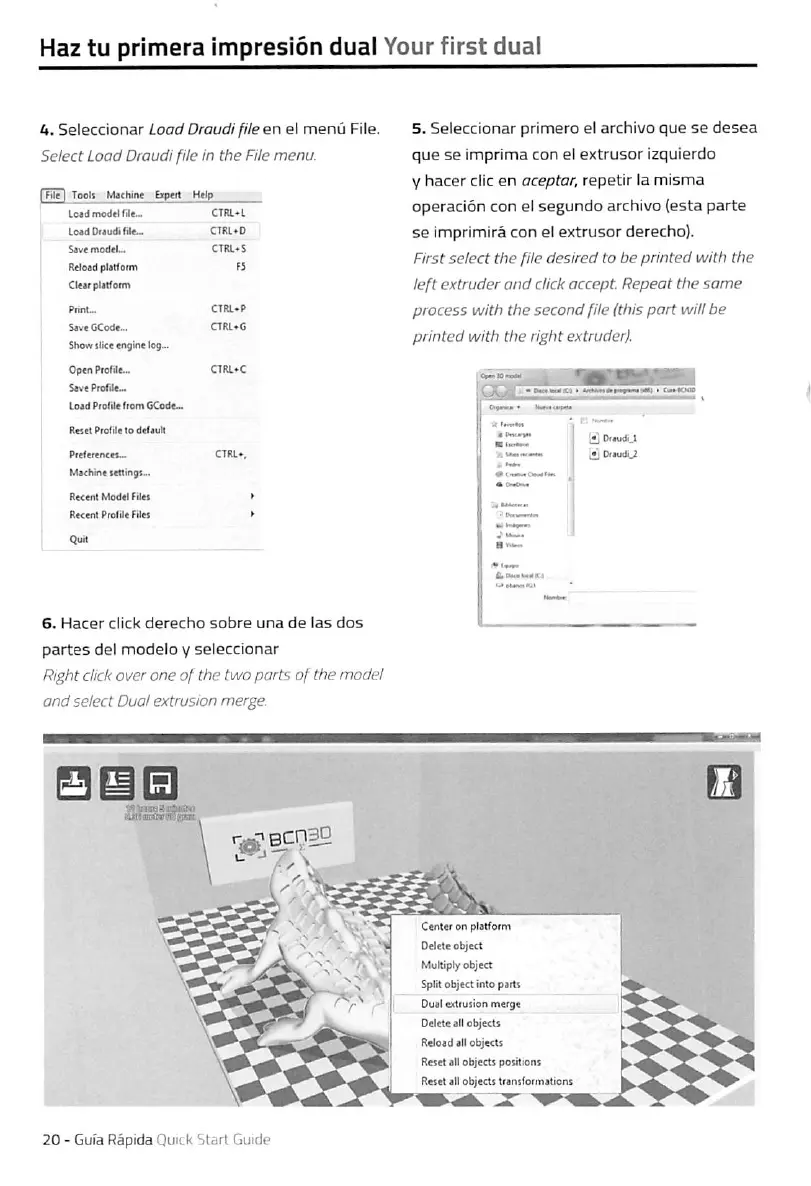
4.
Seleccionar
Laad
Draudi
fUe
en
el
menü
File.
Select
Load
Draudi
file
in
the
FUe
menu.
I
Be
I
Toalt
M«hin«
bptrt
Hrip
Loid
model
rde-.
CTRL*L
Lo»d
Drjudi
file-
CTItl^O
S4vemod«L,
CTRL*S
ftcleadptatfoim
F5
Cleir
plilfonn
Show
ilicc
«nglne
log...
Optn
Prolile-
Sovo
PcoTilc...
Load
Profil*
ftom
CCodc-
R«set
Profil«
lo
deCauil
Machnt
Kttinga..
Reccrrt
Modti
Filu
RKcrrtProlile
Filet
6.
Hacer
dick
derecho
sobre
una
de
las
dos
partes
del
modelo
y
seleccionar
Right
dick
Over
one
of
the
two
parts
of
the
rnodel
and
select
Duo!
extrusion
merge.
5.
Seleccionar
primero
el
archivo
que
se
desea
que
se
imprima
con
el
extrusor
Izquierdo
V
hacer
die
en
aceptar,
repetir
la
misma
operaciön
con
el
segundo
archivo
{esta
parte
se
imprimirä
con
el
extrusor
derecho).
First
select
the
file
desired
to
be
printed
with
the
left
extruder
and
dick
accept.
Repeat
the
same
process
with
the
second
file
(this
part
will
be
printed
with
the
right
extruder).
Draudi
2
Center
on
platiorm
Delele
object
MuKiply
object
Split
object
intopartt
Dual
edtusion
merge
Oeleteall
objectt
Reload
all
objects
Reset
all
objectt
potitiont
Reset
all
objectt
potitiont
I
Reset
all
objectt
transformations
20
-
Gufa
Rapide
Quick
Start
Guide

Other manuals for BCN3D Sigma

Related product manuals