bdiusa.com
customerservice@bdiusa.com
ELEMENTS 8777/8779__ME__
MEDIA CABINET
3
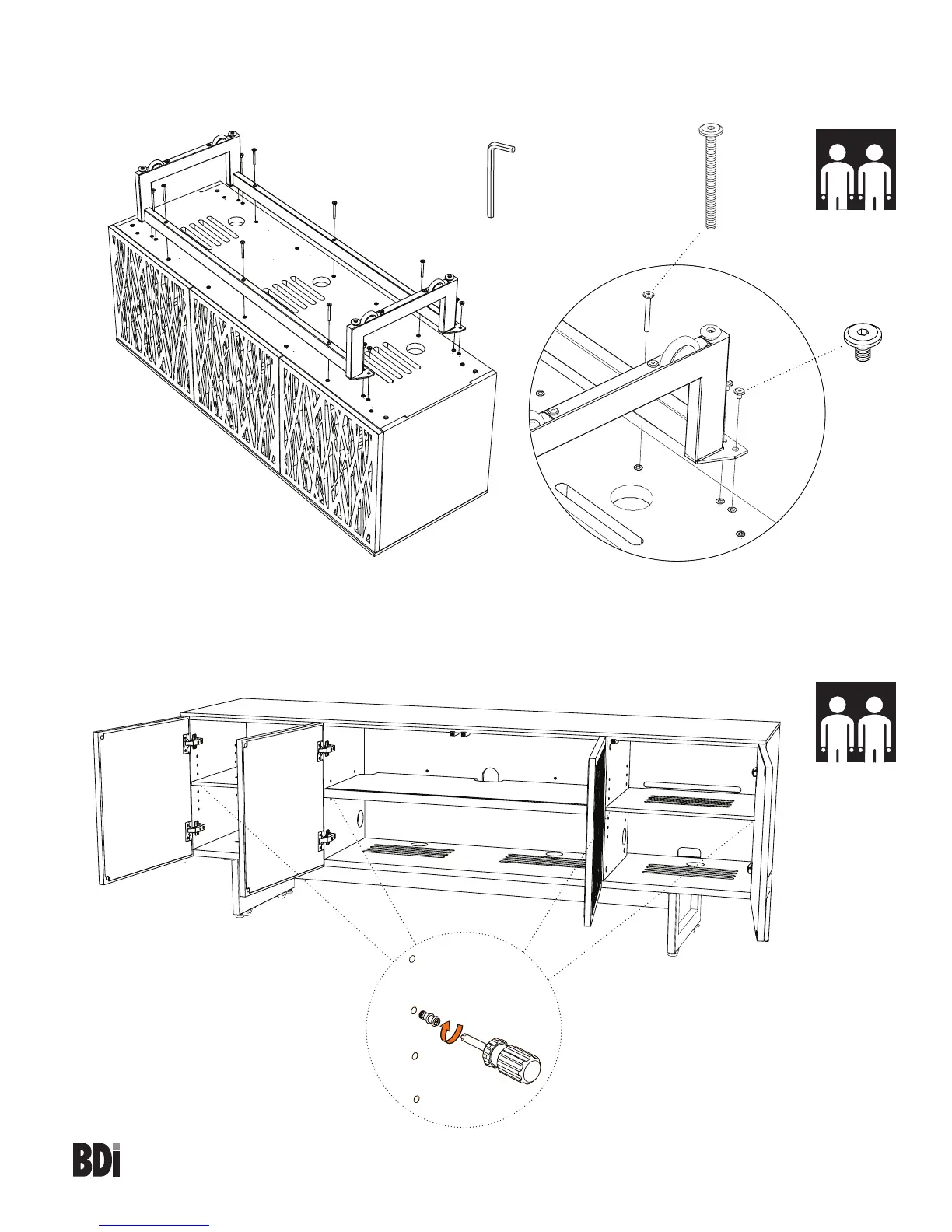
Step 3 Triple - With help from another person, carefully position the cabinet A1 upside-down (as shown) or on
its back. Attach the base to the cabinet with 8 Screws H1 and 6 Screws H2 using Hex Wrench T2. Do NOT
fully tighten until all screws are started.
2 Person Task
T2
H2 x 6
H1x 8
Step 4 Quad Only - Adjustable Shelves
With help from another person, carefully rotate your Elements Media Cabinet onto its feet. The shelf pins located
inside all three cabinet spaces may be repositioned using Screwdriver T1, allowing you to raise or lower
Middle and Side Shelves C3 and C4 to the desired level.
2 Person Task
C3
C4
C4
T1


 To Next Page