Need help?
Do you have a question about the BDI Corridor 6531 and is the answer not in the manual?
Contact BDI at customerservice@bdiusa.com for further assistance with your product.
Lists and identifies all parts and tools required for assembly, including screws and wrenches.
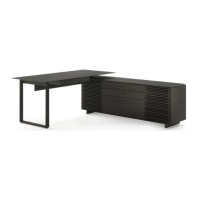
Lists and identifies major cabinet parts like the cabinet, desktop, drawer, shelves, and legs.
Identifies structural parts such as base rails, connection sockets, desk legs, and modesty panels.
Attaching leg plates to cabinet legs using screws and a hex wrench.
Securing the base rail and cabinet legs to the main cabinet body.
Applying glass bumpers to the top of the cabinet for protection.
Mounting connection sockets to the cabinet for stability or accessory attachment.
Installing drawer pulls onto the cabinet drawers using screws.
Fastening a 'T' bracket to the connection socket for structural support.
Connecting the desk leg assembly to the main desktop.
Securing desk rails to the desktop and desk leg for stability.
Mounting the keyboard drawer onto the desktop using screws.
Attaching kleets to the underside of the desktop.
Connecting the assembled desktop to the main cabinet structure.
Placing and aligning the glass top onto the assembled cabinet.
Assembling modesty panel brackets and attaching them to the panel.
Installing the modesty panel onto the desktop using screws.
Instructions for repositioning the pullout printer tray within the cabinet.
Adjusting cabinet levelers to ensure a stable and balanced stance.
Adjusting desk levelers by hand to attain a level stance.
Guidance on adjusting European hinges for proper door alignment and swing.
Guidance on installing file bar clips and bars for forward or sideways facing files.
Instructions for cleaning glass surfaces using household cleaners.
Guidelines for cleaning and maintaining wood surfaces, noting natural variations.
Instructions for cleaning metal and painted surfaces.
Information on BDI's warranty policy for furniture, including duration and coverage.
Details on registering your BDI product for updates and potential rewards.
Crucial safety advice regarding furniture tip-over hazards and prevention methods.
Information on patents, trademarks, and copyright laws protecting the product design.
 General
| Product Type | TV Stand |
|---|---|
| Model Number | 6531 |
| Material | Wood, Metal |
| Depth | 20 inches |
| Color | Black |
| Adjustable Shelves | Yes |
| Cable Management | Yes |
| Number of Shelves | 3 |
| Assembly Required | Yes |
| Weight Capacity | 150 lbs |

 To Next Page